📋 Quick Summary
In this article:
Quick Answer: What AI Video Editing Software Is Worth Using?
What Is AI Video Editing Software?
Why AI Video Editing Is Becoming Important
Key AI Features That Actually Matter
1. Automatic Transcription
2. Text-Based Editing
3. Filler Word and Silence Removal
4. Automatic Captions
5. Audio Enhancement
6. Automatic Reframing
7. AI Search and Media Organization
8. Generative Video Assistance
Video editing used to require a great deal of manual work. Editors had to search through footage, cut pauses, create captions, clean audio, resize videos, and prepare different versions for different platforms.
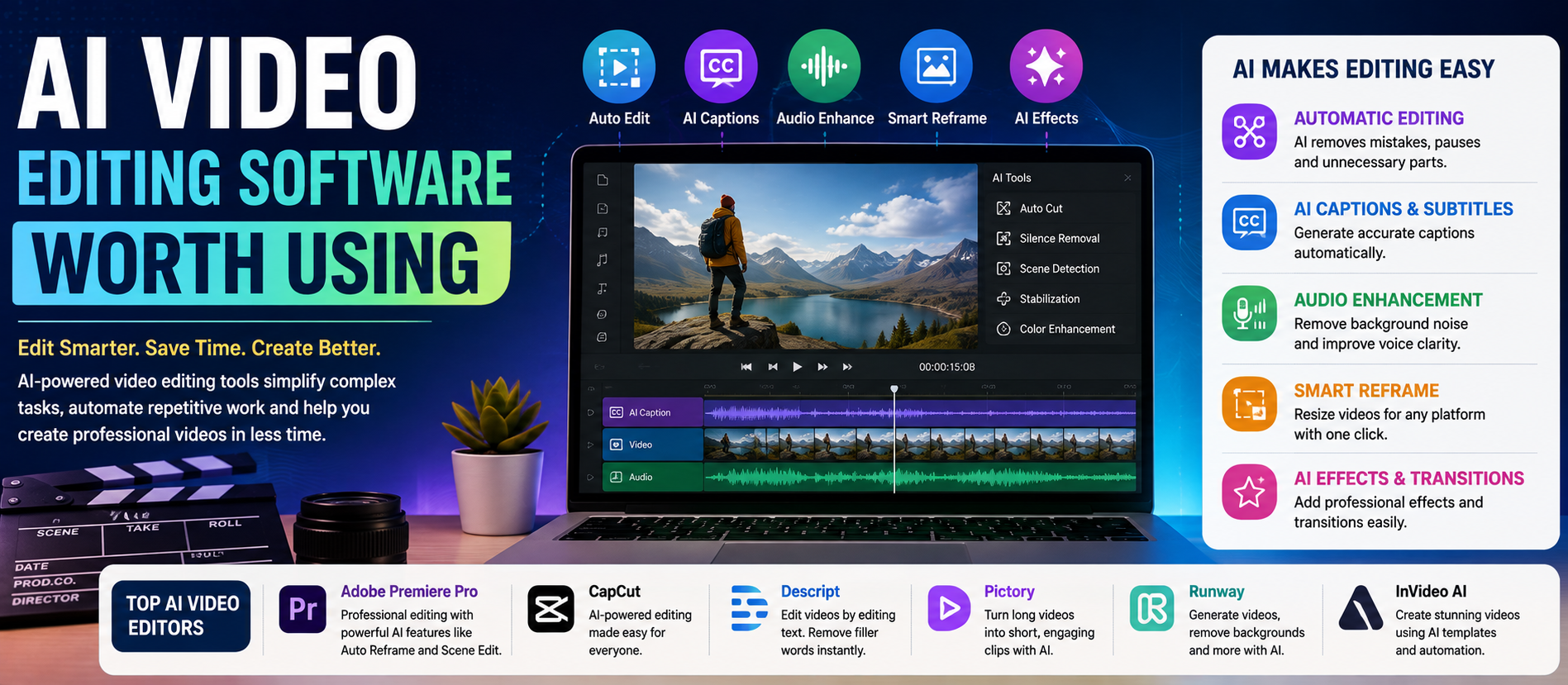
Today, AI video editing software can reduce much of this repetitive work. AI can transcribe speech, remove filler words, find useful clips, generate captions, improve audio, track subjects, reframe video, and assist with selected generative tasks.
That does not mean AI replaces the editor.
The best results still require human judgment. AI can save time, but a person must decide what story to tell, which moments matter, what should be removed, and whether the final result is accurate and appropriate.
This guide explains what AI video editing software can do, which types of tools are worth considering, how to choose the right platform, and how creators and businesses can build a practical AI-assisted workflow.
Digiifrog creates clear, structured, and search-friendly content for technology, business, education, and digital growth using SEO, AEO, GEO, and AI Search Optimization.
Quick Answer: What AI Video Editing Software Is Worth Using?
The best AI video editing software depends on your workflow. Professional editors may prefer Adobe Premiere for AI-assisted timeline editing. Creators working with interviews, podcasts, tutorials, and talking-head videos may find text-based editing tools useful. Social media creators may prefer fast captioning, reframing, and clip-generation tools.
The right choice should be based on your content type, editing experience, budget, device, collaboration needs, and the amount of control you need over the final video.
What Is AI Video Editing Software?
AI video editing software uses machine learning or generative AI to automate or assist parts of the video production process.
Common AI features include:
- Automatic transcription.
- Text-based video editing.
- Automatic caption generation.
- Filler word and silence removal.
- Audio cleanup.
- Subject tracking and masking.
- Automatic reframing.
- Translation and subtitle assistance.
- Highlight and short-clip detection.
- Generative video or B-roll tools.
- AI-assisted search inside large media libraries.
The important word is assist. AI can speed up repetitive tasks, but automated edits should always be reviewed before publishing.
Why AI Video Editing Is Becoming Important
Video is now used for marketing, education, customer support, internal communication, product demonstrations, entertainment, and social media.
At the same time, audiences often expect content in several formats. One long interview may need to become a YouTube video, short vertical clips, captioned versions, translated versions, and promotional snippets.
AI can help reduce the time required for this process.
For example, a creator can upload an interview, create a transcript, remove obvious filler words, edit the conversation by changing text, create captions, and then prepare shorter versions for different platforms.
This workflow is often faster than starting every task manually.
Key AI Features That Actually Matter
1. Automatic Transcription
Transcription converts spoken words into editable text. This is useful for interviews, podcasts, webinars, tutorials, meetings, and educational videos.
A transcript also makes it easier to search for a specific section without manually reviewing every minute of footage.
2. Text-Based Editing
Text-based editing allows you to edit video by editing the transcript.
Delete a sentence, and the related video section can be removed from the timeline. Rearrange text, and the related sections can be reorganized.
This approach is especially useful for dialogue-heavy content.
3. Filler Word and Silence Removal
AI can detect repeated words such as “um,” “uh,” or other unnecessary verbal fillers. Some tools can also identify long pauses.
However, automatic removal can make speech sound unnatural if used too aggressively. Always review the result.
4. Automatic Captions
Captions can improve accessibility and help viewers follow content when sound is unavailable.
AI can create captions quickly, but names, technical terms, numbers, and unusual words should be checked manually.
5. Audio Enhancement
AI audio tools can reduce background noise and improve speech clarity. This can be useful for creators who do not have a professional recording environment.
Strong processing can sometimes make audio sound artificial, so moderation is important.
6. Automatic Reframing
Different platforms use different aspect ratios. AI-assisted reframing can help adapt horizontal footage into vertical or square formats while keeping the important subject visible.
7. AI Search and Media Organization
Large video projects can contain hundreds or thousands of clips. AI search tools can help editors locate footage by describing what they are looking for.
This can be valuable for professional teams working with large media libraries.
8. Generative Video Assistance
Some modern tools can generate selected video elements, create B-roll, extend clips, or generate media from a prompt.
Generative results should be reviewed carefully for visual errors, continuity problems, factual accuracy, and disclosure requirements where applicable.
AI Video Editing Software Worth Considering
Adobe Premiere
Adobe Premiere is a strong option for professional editors who want AI assistance inside a full timeline-based workflow.
Its AI capabilities can help with tasks such as searching footage, masking and tracking, transcription-related workflows, caption work, and generative editing features. Adobe has also developed tools such as Generative Extend, which can create additional frames or extend selected media to help solve timing and transition problems.
This type of workflow is most useful when an editor needs detailed manual control and professional post-production features rather than a simple one-click editor.
Best for: Professional editors, agencies, production teams, and creators who need detailed timeline control.
Consider carefully: The learning curve can be higher than simple browser-based tools, and AI features may have specific requirements or limitations.
Descript
Descript is particularly useful for creators who work with spoken content. Its text-based workflow allows users to edit video by editing a transcript.
It also offers AI-assisted tools for transcription, filler word removal, audio enhancement, captions, background changes, eye contact adjustment, translation, and other creator-focused tasks.
This can make Descript useful for podcasts, interviews, tutorials, webinars, screen recordings, product demonstrations, and talking-head content.
Best for: Podcasters, educators, marketers, YouTubers, and teams that edit speech-heavy videos.
Consider carefully: Complex cinematic editing may still require a traditional professional editor.
Runway and Generative Video Workflows
Generative video platforms can be useful when creators need to experiment with AI-generated visuals, image-to-video workflows, effects, or creative transformations.
These tools are most useful when AI generation is part of the production process rather than only a method for trimming existing footage.
Best for: Creative experimentation, concept videos, visual effects, generated footage, and AI-assisted production.
Consider carefully: Generated footage can contain inconsistencies. Review every important frame before using it in a commercial or high-stakes project.
Social-First AI Video Editors
Tools designed for social media often focus on speed. Their AI features may include automatic captions, templates, background removal, resizing, beat-based editing, and fast export options.
These tools can be useful when the goal is to publish short-form content quickly.
Best for: Reels, Shorts, TikTok-style content, promotional clips, and fast social campaigns.
Consider carefully: Templates and automation can make content look similar to other videos unless you add your own creative direction.
AI Clip and Repurposing Tools
Another category focuses on turning long videos into short clips. These tools can analyze a long recording and suggest moments that may work as shorter content.
This can be useful for podcasts, webinars, interviews, and educational videos.
Best for: Repurposing long-form content into multiple short videos.
Consider carefully: AI does not always understand context, humor, nuance, or the most important moment in a conversation.
How to Choose the Right AI Video Editor
Do not choose a tool only because it has the largest number of AI features. Choose the tool that solves your actual workflow problem.
Ask Question 1: What Type of Video Do You Create?
Talking-head videos, podcasts, cinematic projects, product demos, online courses, and social clips all require different workflows.
A text-based editor may be excellent for an interview but less suitable for advanced color grading and complex motion graphics.
Ask Question 2: How Much Manual Control Do You Need?
Beginners may prefer simple automation. Professional editors may need precise control over every frame, audio track, transition, and effect.
Ask Question 3: Do You Need Collaboration?
Businesses and agencies may need shared projects, comments, approvals, version control, and organized asset management.
Ask Question 4: What Is Your Main Bottleneck?
Identify the task that consumes the most time.
- Too much manual cutting?
- Caption creation?
- Audio cleanup?
- Finding clips?
- Creating short versions?
- Generating B-roll?
The best AI tool is often the one that removes your biggest bottleneck.
A Practical AI Video Editing Workflow
Step 1: Organize Your Source Files
Use clear file names and project folders. AI works best when the editor can still understand the project structure.
Step 2: Create a Transcript
For spoken content, generate a transcript and review important names, technical terms, and numbers.
Step 3: Make the First Edit
Remove obvious mistakes, repeated sections, and unnecessary material.
Step 4: Use AI for Repetitive Cleanup
Use AI to identify filler words, pauses, background noise, or other repetitive editing tasks.
Step 5: Review Every Important Edit
Automation can remove useful pauses or change the rhythm of a conversation. Watch the result.
Step 6: Add Visual Structure
Use B-roll, graphics, screenshots, demonstrations, or other visual elements when they genuinely improve understanding.
Step 7: Create Captions
Generate captions, then review them manually.
Step 8: Adapt the Video for Different Platforms
Create versions that fit the intended aspect ratio, length, and audience.
Step 9: Complete a Final Quality Check
Check audio, captions, transitions, branding, factual accuracy, permissions, and export settings before publishing.
Benefits of Using AI Video Editing Software
Faster Production
AI can reduce repetitive work and help creators produce first drafts more quickly.
Lower Entry Barrier
Text-based editing and automatic assistance can make video production easier for people with limited editing experience.
Better Content Repurposing
One long video can be adapted into several shorter pieces of content.
Improved Accessibility
Automatic transcription and captioning can make it easier to create accessible content.
More Time for Creative Decisions
When repetitive tasks are reduced, editors can spend more time on storytelling, pacing, visual design, and strategy.
Limitations of AI Video Editing
AI video editing is useful, but it is not perfect.
Context Errors
AI may misunderstand a conversation, identify the wrong highlight, or remove a pause that is important for meaning.
Caption Mistakes
Automated captions can make errors with names, accents, specialist vocabulary, and numbers.
Generic Creative Results
Heavy reliance on templates can make videos look repetitive.
Generative Artifacts
AI-generated footage may contain visual errors, inconsistent objects, unusual movement, or continuity problems.
Privacy and Rights
Before uploading sensitive footage, review the platform's current privacy, data, training, and commercial-use policies.
Best Practices for Better AI-Assisted Video Editing
- Use AI for repetitive work, not every creative decision.
- Review captions before publishing.
- Keep original footage and project backups.
- Check generated media for errors.
- Use clear prompts when working with generative tools.
- Maintain a consistent brand style.
- Do not assume AI-generated facts are correct.
- Get appropriate rights and permissions for footage, music, voices, and images.
- Keep a human editor responsible for the final output.
AI Video Editing for Different Users
For Beginners
Start with a simple editor that offers automatic captions, trimming, templates, and easy export options. Learn basic editing principles instead of relying entirely on automation.
For YouTubers
Look for transcription, text-based editing, audio cleanup, captioning, clip creation, and efficient workflows for long-form content.
For Podcasters
Prioritize transcription accuracy, audio enhancement, filler word removal, speaker management, and short-clip creation.
For Businesses
Look for collaboration, brand consistency, approvals, secure workflows, reusable templates, and efficient production at scale.
For Professional Editors
Prioritize precise timeline control, media organization, advanced audio and color tools, format support, and AI features that fit an existing production workflow.
How AI Changes the Role of the Video Editor
AI is changing the editing process, but it does not remove the need for creative skill.
Editors still make decisions about:
- Story structure.
- Pacing.
- Emotional impact.
- Visual consistency.
- Audience expectations.
- Brand identity.
- Accuracy and ethics.
AI can produce a fast first draft. A skilled editor can turn that draft into a coherent and purposeful final video.
AI Video Editing and Content Strategy
The value of AI video editing increases when it supports a larger content strategy.
For example, one recorded expert interview can become:
- A full YouTube video.
- Several short social clips.
- A captioned version.
- A blog article based on the transcript.
- A newsletter summary.
- Short educational content.
This approach can help businesses get more value from a single content production session.
SEO, AEO, GEO, and AI Search Optimization for Video Content
Video should not be treated as an isolated content format. Search visibility can improve when videos are supported by useful titles, descriptions, transcripts, captions, chapters, and related written content.
SEO helps people discover relevant content through search.
AEO focuses on answering clear user questions directly.
GEO focuses on making information understandable and useful in generative search experiences.
AI Search Optimization supports clear language, logical structure, useful context, and content that can be understood by both people and AI-powered search systems.
For video creators, this can mean answering a clear question, using a descriptive title, providing accurate context, and supporting the video with readable information.
How Digiifrog Supports AI and Digital Content
Digiifrog creates structured, readable content for businesses, technology brands, educational platforms, and digital audiences.
- SEO Content Strategy
- AEO and Answer-Focused Content
- GEO and Generative Search Optimization
- AI Search Optimization
- Technology and AI Content
- Clear, Reader-Friendly Digital Content
Frequently Asked Questions
What is AI video editing software?
AI video editing software uses artificial intelligence to assist with tasks such as transcription, captions, text-based editing, audio cleanup, clip detection, reframing, media search, and selected generative workflows.
Can AI edit an entire video automatically?
Some tools can create a first draft automatically, but human review is still important. AI may make mistakes with context, pacing, captions, and creative decisions.
Is AI video editing good for beginners?
Yes. AI features can reduce the learning curve by automating repetitive tasks. Beginners should still learn basic principles such as storytelling, pacing, audio quality, and visual clarity.
What is text-based video editing?
Text-based editing allows users to edit video through a transcript. Removing or rearranging text can remove or rearrange the related video sections.
Can AI improve video audio?
AI can reduce certain types of background noise and improve speech clarity. Results should be reviewed because excessive processing can make voices sound unnatural.
Should I use AI-generated video in commercial projects?
You should review the current terms, licensing conditions, rights, privacy policies, and output restrictions of the specific platform you use. Requirements can change over time.
Which AI video editor is best?
There is no single best option for every user. A professional editor, a podcaster, and a social media creator may each need a different workflow. Choose the tool that solves your most important production problem.
Conclusion
AI video editing software is worth using when it saves time without taking away the control you need.
For professional workflows, AI can help search footage, automate repetitive tasks, improve efficiency, and support selected generative edits. For creators, text-based editing, captions, audio cleanup, and automatic clip creation can make production much faster.
The best strategy is not to automate everything.
Use AI where repetition is slowing you down. Keep people responsible for story, quality, accuracy, and creative decisions.
AI can speed up the edit. Human judgment makes the video worth watching.
Disclaimer: This article is for general educational and informational purposes. Software features, pricing, plan availability, licensing, privacy practices, and AI capabilities can change. Review the current official information for any tool before making a purchase or using it for commercial work.
Digiifrog
Website: www.digiifrog.com
Ready to Grow?
Talk to us about a strategy tailored to your brand — we will help you stand out in search, AI discovery and social.

Comments (0)
Log in to leave a comment.