📋 Quick Summary
In this article:
What Is an AI Website Builder?
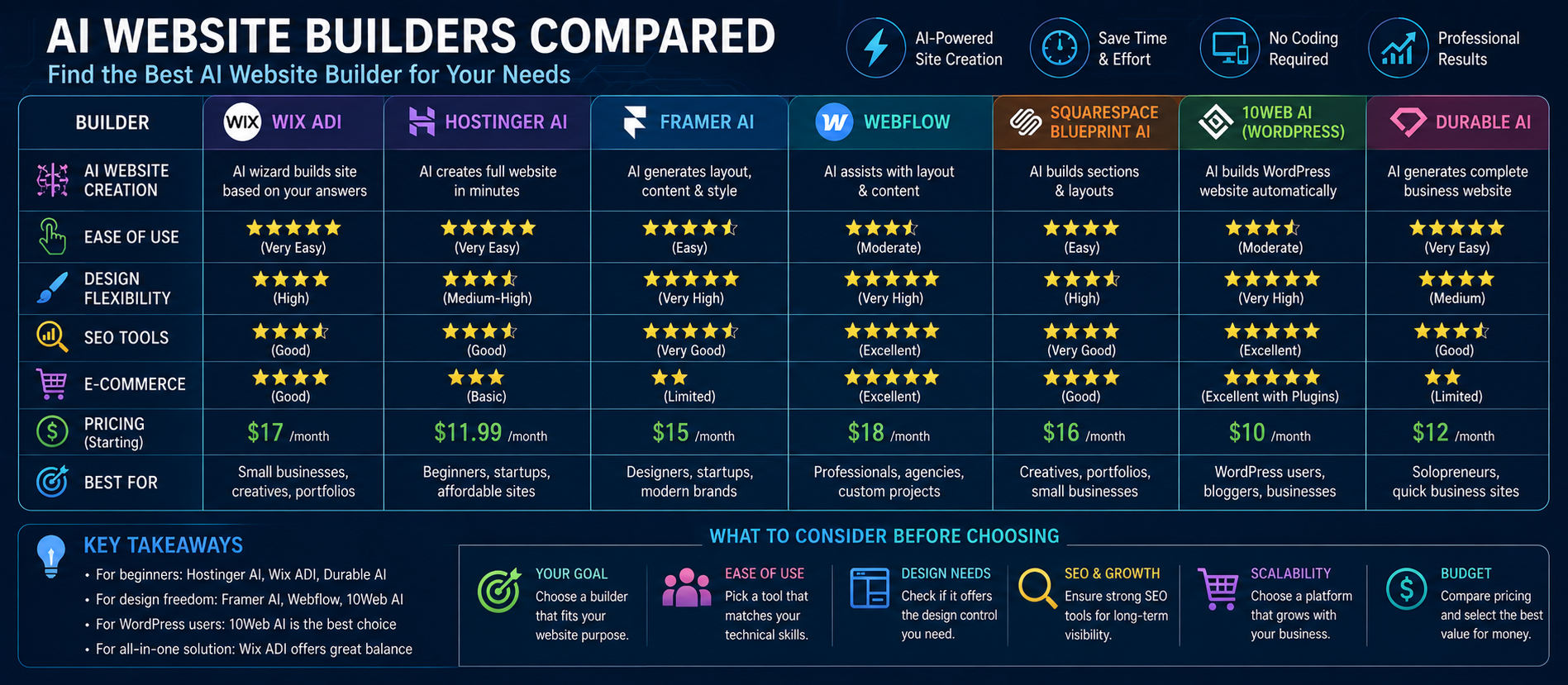
AI Website Builders Compared at a Glance
1. Wix AI Website Builder
2. Hostinger AI Website Builder
3. Framer AI
AI website builders are changing how businesses, creators, startups, and agencies launch websites. Instead of beginning with a blank canvas, users can describe a business, audience, style, or goal and let artificial intelligence generate an initial website structure, draft copy, visual direction, and page sections.
However, the fastest AI website builder is not automatically the best choice. A good website must still be editable, mobile-friendly, searchable, fast, secure, and capable of supporting future business needs. The right platform depends on whether you are building a small-business website, portfolio, landing page, online store, content site, or a more complex digital experience.
What Is an AI Website Builder?
An AI website builder uses artificial intelligence to help create or improve a website. Depending on the platform, AI may generate website structure, page sections, headlines, draft copy, design directions, visual suggestions, SEO metadata, CMS content, and selected business features.
The most useful AI builders combine generation with strong editing controls. AI should create a starting point, while the business or website owner retains the ability to review, edit, test, and improve the final result.
AI Website Builders Compared at a Glance
| PlatformBest ForMajor StrengthPotential Limitation | |||
| Wix | Small businesses and all-purpose websites | AI generation plus a broad business ecosystem | Platform-specific workflow may not suit every advanced custom build |
| Hostinger | Budget-conscious users | AI creation with hosting and website tools in one package | May offer less design flexibility than specialized professional tools |
| Framer | Portfolios and design-led marketing sites | Strong visual control and AI-assisted design workflow | Can require more design knowledge for advanced results |
| Webflow | Professional teams and structured websites | Powerful visual development and CMS workflows | Steeper learning curve for beginners |
| Squarespace | Creative brands and polished business sites | Design-focused templates and AI-assisted creation | Customization may feel constrained for unusual requirements |
| 10Web | WordPress-oriented workflows | AI generation combined with WordPress infrastructure | WordPress management can add complexity |
| Instant AI builders | Simple service-business websites | Very fast first drafts | Advanced customization can be more limited |
1. Wix AI Website Builder
Wix is a strong option for users who want AI assistance together with a broad website and business platform. Its AI workflow can generate an initial site from a description and then allow further refinement through editing tools and AI assistance.
Best for:
- Small and growing businesses.
- Service providers.
- Portfolio and company websites.
- Users who want AI generation and manual editing.
Key advantage:
It combines AI-assisted creation with a mature ecosystem of website and business tools.
Consider before choosing:
Evaluate whether the platform's editing model, pricing, integrations, and long-term workflow match your requirements.
2. Hostinger AI Website Builder
Hostinger focuses on helping users move quickly from an idea to a live website. Its offering combines AI-assisted creation with hosting, domain options, templates, ecommerce capabilities, and related website tools.
Best for:
- Beginners.
- Small businesses.
- Portfolios and simple websites.
- Users focused on value and convenience.
Key advantage:
Hosting and website creation are closely integrated, making the launch process simpler.
Consider before choosing:
Review whether the available design controls and integrations are sufficient for a highly customized website.
3. Framer AI
Framer is especially attractive for design-led teams, portfolios, startup websites, and high-quality landing pages. Its AI workflow can generate editable pages, sections, copy, and visuals from a prompt, while the visual canvas gives users detailed control over layout, typography, responsive behavior, components, and effects.
Best for:
- Designers.
- Creative agencies.
- Startup and SaaS marketing websites.
- Portfolios and landing pages.
Key advantage:
AI-generated work remains editable, allowing teams to use AI for speed without giving up visual refinement.
Consider before choosing:
Users who only need a basic business site may find a simpler builder easier to learn and maintain.
4. Webflow AI
Webflow is aimed at users who want significant visual and structural control without relying entirely on traditional hand coding. Its broader ecosystem is useful for professional websites, content systems, and team workflows.
Best for:
- Professional web teams.
- Agencies.
- Content-rich websites.
- Businesses that need structured CMS workflows.
Key advantage:
Strong control and a professional workflow for projects that need to grow beyond a simple generated homepage.
Consider before choosing:
It generally requires more learning than the most beginner-oriented AI builders.
5. Squarespace and AI-Assisted Website Creation
Squarespace remains a popular choice for users who prioritize visual consistency and polished design. AI-assisted creation can help generate an initial direction, while the broader platform supports content, commerce, and business websites.
Best for:
- Creative professionals.
- Restaurants and service businesses.
- Portfolios.
- Design-conscious brands.
Key advantage:
A polished design ecosystem can help users create professional-looking websites without starting from scratch.
6. 10Web and AI for WordPress
10Web takes a different approach by connecting AI website creation with the WordPress ecosystem. This can be useful for businesses that want AI-assisted generation while continuing to use WordPress-based content workflows.
Best for:
- WordPress users.
- Content-driven websites.
- Agencies managing multiple websites.
- Businesses that prefer a WordPress-oriented ecosystem.
7. Instant AI Website Builders
Some AI-first platforms focus on generating a website in minutes from a short description of a business. These tools can be useful for local services, freelancers, consultants, and users who need a quick online presence.
Main advantage:
Speed. A user can move from an idea to a first draft extremely quickly.
Main limitation:
A fast first draft may not provide the flexibility needed for complex content, advanced SEO, custom integrations, or future scaling.
AI Website Builders vs AI App Builders
Not every AI-powered creation tool is designed for the same purpose. Traditional AI website builders generally focus on websites, pages, content, and business features. AI app builders can generate more complex functionality, databases, authentication, dashboards, and interactive applications.
💡 Key Insight
Before choosing a tool, ask one important question: Do I need a website, or do I actually need a web application?
How to Choose the Best AI Website Builder
1. Define the Website Goal
Do you need leads, ecommerce sales, bookings, portfolio visibility, content publishing, or a product landing page? The goal should determine the platform.
2. Evaluate Editing Control
AI-generated websites rarely need zero editing. Choose a builder that allows you to change content, layout, mobile behavior, branding, and SEO settings.
3. Consider Long-Term Scalability
Think beyond launch day. Will you need more pages, a blog, ecommerce, automation, multilingual content, or advanced integrations later?
4. Review SEO Capabilities
Check whether you can manage page titles, meta descriptions, headings, URLs, redirects, image alt text, structured data, indexing, and performance.
5. Check Ownership and Portability
Understand what happens if you want to move your website. Review export options, migration possibilities, data access, and platform dependence before making a long-term commitment.
6. Test the Mobile Experience
Never judge an AI-generated website only on a desktop preview. Review responsiveness, readability, navigation, forms, and page speed across devices.
7. Compare the Total Cost
Do not compare only introductory prices. Consider renewals, AI credits, ecommerce fees, premium integrations, email, domains, and future upgrades.
SEO, AEO, GEO, and AI Search Optimization
AI can generate a website quickly, but AI-generated does not automatically mean search-optimized. Every website should still be reviewed for technical and content quality.
For SEO, focus on useful original content, clear site architecture, descriptive headings, internal links, metadata, accessibility, and performance.
For AEO, structure important information so common questions can be answered clearly and directly. FAQ sections, concise definitions, comparison tables, and well-organized headings can improve content usability.
⚠ Watch Out
For GEO and AI Search optimization, publish original, accurate, well-structured information that explains products, services, concepts, evidence, and relationships clearly. Avoid publishing large amounts of unreviewed AI-generated content simply because it can be produced quickly.
Common Mistakes When Using AI Website Builders
- Publishing the first AI draft without editing.
- Using generic AI copy that does not reflect the real business.
- Ignoring mobile design.
- Failing to review SEO settings.
- Publishing inaccurate or hallucinated information.
- Ignoring accessibility and website performance.
- Choosing a platform only because it generates a site quickly.
- Not planning for future content and integrations.
- Failing to understand portability and ongoing costs.
Recommended Choice by Use Case
- Best all-purpose small-business option: Wix.
- Best budget-oriented option: Hostinger.
- Best for design-led portfolios and landing pages: Framer.
- Best for advanced professional website workflows: Webflow.
- Best for polished creative brands: Squarespace.
- Best for WordPress-oriented workflows: 10Web.
- Best for a very fast simple first draft: An instant AI-first website builder.
These recommendations should be treated as use-case guidance rather than absolute rankings. Features, pricing, AI capabilities, and plan structures change frequently, so businesses should test current offerings before committing.
Frequently Asked Questions
What is the best AI website builder?
There is no single best option for everyone. Wix is a strong all-purpose choice, Hostinger is attractive for value and simplicity, Framer is well suited to design-led websites, Webflow supports professional workflows, Squarespace suits polished creative brands, and 10Web is useful for WordPress-oriented projects.
Can AI build a complete website?
Yes, AI can generate an initial website with structure, sections, copy, and visual direction. However, human review is still important for branding, accuracy, legal information, accessibility, SEO, security, and business functionality.
Are AI website builders good for SEO?
They can be, provided the platform offers appropriate SEO controls and the website owner reviews technical setup and content quality.
Can I use an AI website builder for ecommerce?
Yes. Several major platforms support online stores, products, payments, inventory, and related ecommerce workflows. Choose a platform based on the complexity and scale of your store.
Will AI website builders replace web developers?
AI can automate repetitive creation tasks and speed up prototyping, but complex websites still benefit from professionals who understand design, development, accessibility, security, integrations, performance, and business strategy.
Conclusion
AI website builders make website creation faster, but the best choice depends on what happens after the first draft. A strong platform should help you edit, optimize, publish, measure, and grow your website over time.
Wix is a strong all-purpose option for businesses that need an integrated ecosystem. Hostinger offers an attractive path for budget-conscious users. Framer is particularly compelling for design-focused websites and portfolios. Webflow provides deeper professional control, while Squarespace supports polished creative sites and 10Web brings AI generation into a WordPress-oriented workflow.
For the best results, use AI to accelerate the process rather than replace strategy. Define your audience, review every generated page, add original expertise, optimize for search, test the mobile experience, and select a platform that fits your long-term goals.
For businesses exploring AI-powered websites, automation, SEO, AEO, GEO, and AI Search optimization, Digiifrog provides technology-focused digital strategy and solutions. Visit www.digiifrog.com.
Quick Answer: Which AI Website Builder Should You Choose?
Choose Wix for an all-purpose business website, Hostinger for budget-friendly simplicity, Framer for design-led websites and portfolios, Webflow for professional and structured workflows, Squarespace for polished creative brands, and 10Web if you prefer a WordPress-oriented ecosystem. The best choice depends on your website goal, editing needs, SEO requirements, integrations, budget, and long-term scalability.
Important Note
AI website builder features, pricing, plan limits, AI credits, and availability can change. Always review the current official product documentation and pricing before selecting a platform for a long-term project.
Ready to Grow?
Talk to us about a strategy tailored to your brand — we will help you stand out in search, AI discovery and social.


Comments (0)
Log in to leave a comment.