📋 Quick Summary
In this article:
Quick Answer: What Are the Best AI Tools for Software Developers?
Why Software Developers Are Using AI Tools
1. AI Coding Assistants
When Coding Assistants Are Most Useful
2. AI Pair Programming
3. AI-Powered Code Editors
4. AI Tools for Code Explanation
5. AI Tools for Debugging
6. AI Tools for Code Review
7. AI for Automated Testing
8. AI Tools for Test Case Generation
Introduction
Artificial intelligence is changing the way software is designed, written, tested, documented, and maintained. Developers now use AI tools to suggest code, explain unfamiliar files, identify possible bugs, generate tests, improve documentation, and automate repetitive tasks.
💡 Key Insight
The best AI tools for software developers are not designed to replace engineering knowledge. Their main purpose is to help developers work faster and spend more time solving important problems.
AI can be useful when a developer needs to understand a large codebase, write repetitive code, debug an error, create unit tests, review a pull request, or learn an unfamiliar programming language.
However, AI-generated code is not automatically correct or secure. Developers still need to review outputs, test applications, understand dependencies, and follow security best practices.
This guide explains the best AI tools for software developers, the main categories of AI development tools, and the best ways to use AI responsibly in a professional software development workflow.
Quick Answer: What Are the Best AI Tools for Software Developers?
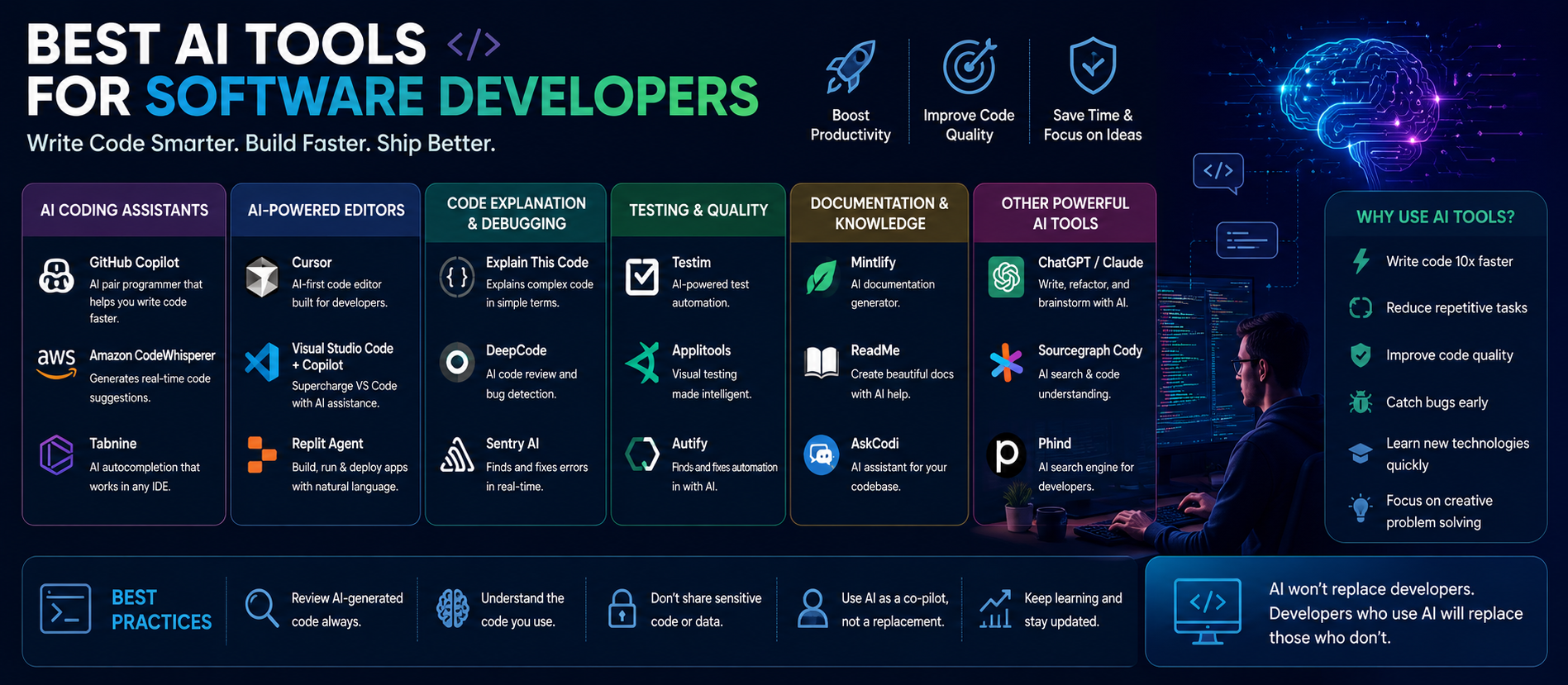
The best AI tools for software developers include AI coding assistants, AI-powered development environments, code explanation tools, debugging assistants, automated testing tools, documentation generators, code review systems, and AI agents that can support multi-step development tasks. The right choice depends on the programming language, codebase, privacy requirements, workflow, and team needs.
Why Software Developers Are Using AI Tools
Software development involves much more than writing code. Developers must understand requirements, design systems, maintain existing applications, debug problems, write tests, review changes, and document their work.
AI can support many of these tasks. For example, an AI assistant can explain what a function does, suggest a regular expression, generate a test case, summarize a long error message, or help a developer understand an unfamiliar API.
The main value of AI is often speed. It can help developers move from a question to a useful starting point more quickly.
1. AI Coding Assistants
AI coding assistants are among the most popular AI tools for software developers. They can work inside or alongside a development environment and provide suggestions while developers write code.
- Code completion
- Function generation
- Code explanation
- Refactoring suggestions
- Comment generation
- Context-aware coding assistance
Examples in this category include GitHub Copilot, Cursor, Codeium, Amazon Q Developer, and other AI-enabled coding platforms. The best choice depends on the editor, programming language, privacy requirements, and type of project.
When Coding Assistants Are Most Useful
- Writing repetitive code
- Creating boilerplate files
- Learning a new programming language
- Explaining unfamiliar syntax
- Generating simple functions
- Refactoring small sections of code
Developers should always review generated code before using it in production.
2. AI Pair Programming
AI pair programming tools provide assistance while a developer works. The developer remains responsible for the design and final code. The AI acts as an assistant that can suggest possible implementations.
AI pair programming can help with autocomplete, code generation, code explanation, test generation, documentation, and development questions.
The biggest benefit is reducing the time spent on repetitive tasks. However, developers should not accept suggestions automatically. A suggestion may compile successfully and still contain incorrect logic, poor performance, or security problems.
3. AI-Powered Code Editors
Traditional code editors are increasingly adding AI features. Some newer development environments are designed around AI from the beginning.
AI-powered editors can provide:
- Chat with the codebase
- Project-wide search and explanation
- Multi-file editing suggestions
- Automated refactoring
- Context-aware development assistance
This can be useful for large applications where understanding existing code takes significant time. Instead of manually searching through many files, a developer may ask an AI assistant to explain how a feature works or identify where a function is used.
4. AI Tools for Code Explanation
Every developer eventually works with unfamiliar code. This may include legacy applications, open-source projects, enterprise systems, or code written by another team.
AI can help explain code in simple language. For example, a developer can ask: "Explain this function line by line and identify possible edge cases."
This can speed up the learning process, but AI explanations should still be verified against the actual code and runtime behavior.
5. AI Tools for Debugging
Debugging can consume a large part of software development time. AI tools can help developers understand error messages, stack traces, dependency conflicts, and unexpected application behavior.
An AI assistant can translate a complex error message into simpler language and suggest possible debugging steps.
- Provide the error message.
- Explain the expected behavior.
- Share the relevant code.
- Ask the AI to identify possible causes.
- Test each proposed solution.
AI should be treated as a debugging assistant, not as a replacement for testing and investigation.
6. AI Tools for Code Review
Code review is essential for maintaining software quality. AI-powered code review tools can help identify possible issues such as potential bugs, repeated code, style inconsistencies, missing error handling, performance concerns, and security risks.
AI can help reviewers focus their attention, especially in large pull requests. However, automated reviews can produce false positives or miss important architectural problems. Human code review remains important.
7. AI for Automated Testing
Testing is one of the best areas for AI assistance. AI can help generate unit tests, integration test ideas, edge cases, mock data, and test documentation.
A developer can provide a function and ask an AI tool to suggest tests for normal inputs, invalid inputs, boundary conditions, and unusual cases.
This can help developers think about scenarios they may have missed. Generated tests should always be reviewed because a test that passes does not necessarily test the correct behavior.
8. AI Tools for Test Case Generation
AI is particularly useful for identifying possible edge cases. For an application that processes user input, AI may suggest testing:
- Empty values
- Very long values
- Invalid formats
- Unexpected characters
- Duplicate records
- Boundary numbers
This can improve test coverage and help developers think more systematically about application behavior.
9. AI Tools for Documentation
Documentation is important, but many teams struggle to keep it updated. AI can help create function descriptions, API documentation, README files, code comments, setup instructions, and technical summaries.
An AI tool can analyze a code module and generate a first draft of documentation. The developer should then review the documentation for accuracy.
Good documentation should explain why important decisions were made, not only what the code does.
10. AI Tools for Learning Programming Languages
Software developers frequently need to learn new languages and frameworks. AI can act as an interactive tutor.
Developers can ask:
- How does this syntax work?
- What is the difference between two frameworks?
- Show me a simple example.
- Explain this error.
- Convert this code to another language.
Interactive learning can be faster than searching through many disconnected resources. Official documentation should still remain an important source of truth, especially for APIs and frameworks that change over time.
11. AI for Refactoring Code
Refactoring improves the structure of existing code without changing its intended behavior. AI can suggest improvements such as breaking large functions into smaller functions, reducing repeated code, improving variable names, simplifying complex conditions, and converting code to modern syntax.
AI refactoring can save time, but large automated changes should be reviewed carefully. A safe approach is to make small changes, run tests, and review the resulting code.
12. AI for Software Architecture Planning
AI can support early-stage planning by helping developers explore system architecture options, database design ideas, API structures, authentication workflows, and scalability questions.
AI can provide alternative approaches and explain possible trade-offs. Architecture decisions should not be based only on an AI recommendation. Developers need to consider actual business requirements, traffic patterns, budget, team skills, compliance requirements, and long-term maintenance.
13. AI Tools for SQL and Databases
Writing database queries can be time-consuming. AI tools can help developers generate SQL queries, explain existing queries, suggest optimization ideas, create sample data, and understand joins.
Developers should be careful when using AI-generated database commands. Never run destructive commands against production data without understanding the query and following appropriate backup and review procedures.
14. AI for API Development
AI can make API development faster by helping generate endpoint structures, request validation, response models, authentication examples, and API documentation.
It can also help developers understand third-party APIs. For current API behavior, developers should always check official documentation because APIs can change.
15. AI Tools for DevOps and Cloud Development
AI is also becoming useful in DevOps and cloud engineering. Potential uses include explaining infrastructure configuration, generating deployment scripts, analyzing logs, summarizing incidents, supporting troubleshooting, and creating infrastructure-as-code templates.
AI can reduce the time needed to understand complex configuration files. However, infrastructure changes can create serious risks. Generated scripts should be tested in safe environments before production deployment.
16. AI Agents for Software Development
AI agents are a growing category of development tools. An AI agent can combine a language model with tools and workflows.
A development agent may be able to:
- Read a task description.
- Inspect relevant files.
- Create a plan.
- Suggest or make code changes.
- Run tests in an approved environment.
- Report the results.
This can support more complex workflows than simple code completion. AI agents should operate with appropriate permissions and human oversight.
17. AI Tools for Security Analysis
AI can help developers identify potential security concerns, including input validation problems, hardcoded secrets, unsafe database queries, authentication mistakes, and weak error handling.
AI should not be considered a complete security solution. Professional security testing, secure coding practices, dependency management, code review, and specialized security tools remain essential.
18. AI Tools for Legacy Code Modernization
Many companies depend on legacy software. Understanding old code can be difficult because documentation may be incomplete and original developers may no longer be available.
AI can help developers summarize old modules, explain complex functions, identify dependencies, suggest modernization approaches, and create documentation for existing code.
This can make the first stage of legacy modernization faster by helping teams understand what the software currently does.
How to Choose the Best AI Tool for Software Development
Which Programming Languages Do You Use?
Check whether the AI tool works well with your primary languages and frameworks.
Does It Integrate With Your Development Environment?
A tool is more useful when it fits naturally into the existing workflow.
How Does It Handle Code and Data?
Businesses should understand privacy policies, data handling rules, and enterprise security controls before sharing proprietary source code.
Does It Understand Large Codebases?
For enterprise projects, codebase context can be more important than simple autocomplete.
What Is the Cost?
Compare free plans, individual subscriptions, and enterprise pricing based on actual developer needs.
Does It Improve Productivity?
The best tool is not necessarily the tool with the most features. It is the tool that saves meaningful time without creating unnecessary risk.
A Practical AI Development Workflow
- Understand the requirement: Define the actual problem.
- Plan the solution: Design the architecture and workflow.
- Use AI for assistance: Generate ideas, code examples, or boilerplate.
- Review the output: Check logic, security, and quality.
- Write and improve tests: Use AI to suggest edge cases.
- Run automated checks: Use linters, tests, and security tools.
- Perform human review: Review important changes before release.
This approach keeps the developer in control.
Best Practices for Using AI Coding Tools
1. Give Clear Instructions
Explain what you need, the programming language, framework, constraints, and expected result.
2. Ask for Small Changes
Small, focused tasks are easier to review than large uncontrolled changes.
3. Review Every Important Output
Never assume AI-generated code is correct simply because it looks professional.
4. Test Generated Code
Run unit tests, integration tests, and other appropriate checks.
5. Protect Sensitive Information
Follow company policies before sharing proprietary code, credentials, customer information, or confidential data with an external AI system.
6. Use AI as an Assistant
AI should improve engineering work, not remove engineering judgment.
Common Risks of AI Coding Tools
Incorrect Code
An AI suggestion may contain logical mistakes.
Security Problems
Generated code may not follow secure coding practices.
Outdated Information
A model may suggest an old API or outdated framework pattern.
Over-Reliance
Developers who accept AI suggestions without understanding them may create maintenance problems.
Privacy Concerns
Organizations must understand how AI tools process and store code and prompts.
AI and the Future of Software Development
AI is likely to become a standard part of the software development lifecycle. Developers may increasingly work with AI systems that can understand project requirements, search codebases, generate implementation plans, write initial code, run tests, analyze errors, and create documentation.
However, software engineering will still require human skills. Developers will continue to make decisions about architecture, security, performance, user needs, business requirements, and technical trade-offs.
The role of developers may change, but strong engineering knowledge will remain valuable.
How AI Is Changing Developer Productivity
AI can reduce time spent on routine tasks. But productivity should not be measured only by the number of lines of code generated.
Good software development also requires correct requirements, maintainable architecture, reliable testing, security, good user experience, and clear documentation.
The best use of AI is to help developers spend more time on these higher-value activities.
AI Search, SEO, AEO, and GEO for Developer Content
AI is also changing how developers search for technical information. Traditional search engines remain important, but more users now ask AI assistants direct questions.
- SEO: Search Engine Optimization
- AEO: Answer Engine Optimization
- GEO: Generative Engine Optimization
- AI Search Optimization: Creating clear and useful content for AI-assisted discovery
Technical content should answer questions directly and explain complex topics clearly. Useful content often includes clear headings, direct answers, accurate explanations, practical examples, and structured FAQ sections.
❓ Frequently Asked Questions
What is the best AI tool for software developers?▾
The best AI tool depends on the developer's workflow. AI coding assistants are useful for code completion and generation, while AI-powered editors can help developers understand large codebases. Testing, debugging, documentation, and code review tools can also improve productivity.
Can AI write production-ready code?▾
AI can generate useful code, but developers should not assume the output is production-ready. Generated code should be reviewed, tested, secured, and checked against project requirements before deployment.
Can AI replace software developers?▾
AI can automate some development tasks, but software development requires problem-solving, architecture decisions, security knowledge, communication, and human judgment. AI is more likely to change developer workflows than completely replace developers.
How can AI help with debugging?▾
AI can explain error messages, analyze stack traces, suggest possible causes, and recommend debugging steps. Developers should test proposed solutions and investigate the underlying problem.
Can AI generate software tests?▾
Yes. AI can help generate unit tests, suggest edge cases, create mock data, and explain missing test scenarios. Developers should review generated tests to ensure they verify the correct behavior.
Is AI-generated code secure?▾
AI-generated code is not automatically secure. Developers should review it for security issues, follow secure coding practices, and use appropriate testing and security tools.
Should developers use AI for learning?▾
AI can be an excellent learning assistant because it can explain code, provide examples, and answer follow-up questions. Official documentation and reliable technical resources should still be used to verify important details.
AI Search and Featured Snippet Summary▾
Question: What are the best AI tools for software developers? Direct Answer: The best AI tools for software developers include AI coding assistants, AI-powered code editors, debugging assistants, automated testing tools, documentation generators, code review platforms, and AI development agents. These tools can help developers write code faster, understand codebases, find possible bugs, generate tests, and automate repetitive development tasks.
Key Takeaways
- AI tools can support many stages of software development.
- AI coding assistants are useful for code completion and repetitive tasks.
- AI-powered editors can help developers understand large codebases.
- AI can support debugging by explaining errors and suggesting possible causes.
- AI-generated tests can help developers identify missing edge cases.
- Documentation tools can reduce repetitive writing work.
- AI can support code review but should not replace human review.
- AI agents can connect language models with development tools and workflows.
- Generated code must be reviewed and tested.
- Security and privacy should be considered before using external AI tools.
- The best AI tool depends on the project, workflow, and business requirements.
Conclusion
The best AI tools for software developers can improve speed, learning, and productivity across the entire development lifecycle.
AI can help developers write code, explain complex files, debug errors, generate tests, create documentation, and explore technical solutions.
But AI should not replace careful engineering practices.
The most successful developers will use AI as a powerful assistant while continuing to apply their own knowledge, testing, creativity, and judgment.
The future of software development will likely involve closer collaboration between developers and AI systems. Developers who understand both software engineering and AI-assisted workflows will be well positioned for this changing environment.
About Digiifrog
Digiifrog creates clear, useful, and search-optimized content for modern SEO, AEO, GEO, and AI Search environments. Visit www.digiifrog.com for more content about artificial intelligence, software, digital technology, and online growth.
Disclaimer
This article is for educational and informational purposes only. AI tools, features, pricing, integrations, and availability can change over time. Always review official documentation, privacy policies, security requirements, and product terms before selecting an AI tool for personal or business software development.
Ready to Grow?
Talk to us about a strategy tailored to your brand — we will help you stand out in search, AI discovery and social.

Comments (0)
Log in to leave a comment.