📋 Quick Summary
In this article:
Quick Answer: What Is the Best Educational Software for Schools?
Why Schools Need Educational Software
Main Types of Educational Software
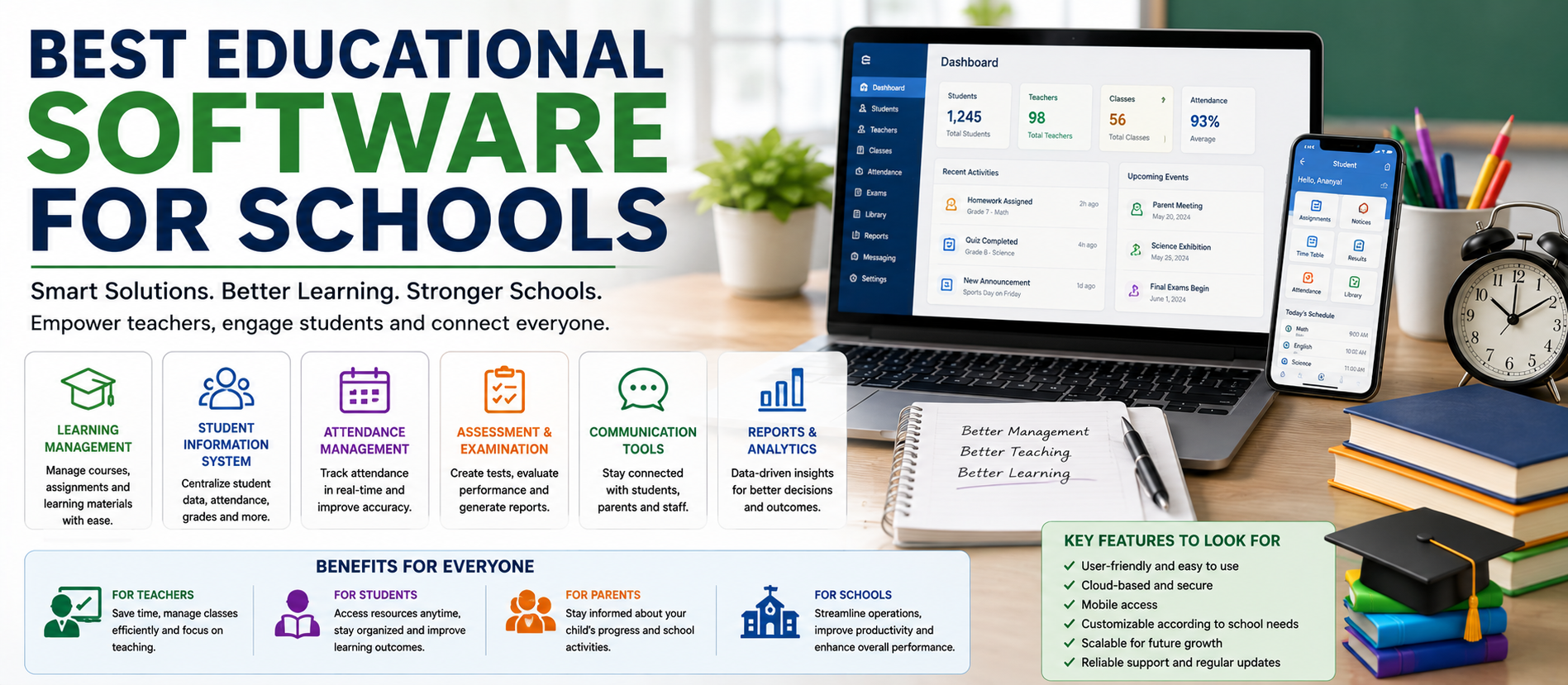
1. Learning Management Systems
2. Classroom Collaboration Software
3. Student Information Systems
4. School Management Software
5. Assessment and Examination Software
6. Parent and School Communication Software
Key Features to Look for in Educational Software
💡 Key Insight
Technology has become an important part of modern education. Schools now use software to manage classrooms, share learning materials, assess students, communicate with parents, organize academic records, and support teachers.
Choosing the best educational software for schools is not simply about finding the platform with the most features. The right software should solve real problems for teachers, students, administrators, and parents.
A small school may need a simple classroom and communication system. A large institution may need a complete education management platform with attendance, assessments, student records, learning management, analytics, and parent communication.
This guide explains the main types of educational software, important features, popular categories, implementation strategies, AI-powered learning, and how schools can choose the right solution.
Digiifrog creates clear, structured, and search-friendly educational content using SEO, AEO, GEO, and AI Search Optimization.
Website: www.digiifrog.com
Quick Answer: What Is the Best Educational Software for Schools?
The best educational software for a school depends on its size, budget, teaching model, technical requirements, and learning goals.
Most schools benefit from a combination of software rather than a single tool. A modern digital education system may include:
- A Learning Management System (LMS).
- A classroom collaboration platform.
- Student information and administration software.
- Assessment and quiz tools.
- Communication software for teachers and parents.
- Digital content and learning resources.
- Analytics and reporting tools.
- AI-powered learning support where appropriate.
The goal is not to use more software. The goal is to use the right software with clear processes.
Why Schools Need Educational Software
Traditional school management often involves many separate processes. Teachers may use paper records. Administrators may maintain spreadsheets. Parents may receive information through multiple communication channels.
Educational software can help connect these activities.
For example, a teacher can share learning materials, assign work, track submissions, and review progress through one digital platform. Administrators can manage records and reports more efficiently. Parents can receive updates through approved communication channels.
When implemented properly, software can help schools improve:
- Organization.
- Communication.
- Access to learning materials.
- Assessment processes.
- Progress tracking.
- Administrative efficiency.
- Data visibility.
- Personalized learning support.
Main Types of Educational Software
Schools should first understand the major categories before selecting a platform.
1. Learning Management Systems
A Learning Management System, often called an LMS, helps teachers create, organize, and deliver learning content.
Common LMS features include:
- Course creation.
- Learning materials.
- Assignments.
- Student submissions.
- Quizzes and assessments.
- Grades and feedback.
- Progress tracking.
- Discussion areas.
An LMS can be especially useful when a school uses blended learning, online learning, or digital homework.
2. Classroom Collaboration Software
Classroom collaboration software helps teachers and students work together digitally.
It may support:
- Class announcements.
- Document sharing.
- Group activities.
- Real-time collaboration.
- Homework distribution.
- Feedback.
- Online discussions.
These tools can reduce the time needed to distribute and collect learning materials.
3. Student Information Systems
A Student Information System, or SIS, focuses on student records and administration.
Depending on the platform, it may manage:
- Student profiles.
- Admissions information.
- Attendance.
- Class schedules.
- Academic records.
- Examination information.
- Fees and payments.
- Parent information.
For larger schools, an SIS can become a central system for administrative data.
4. School Management Software
School management software may combine several administrative functions into one platform.
Features can include:
- Admissions management.
- Student records.
- Attendance.
- Timetable management.
- Examinations.
- Fee management.
- Transport management.
- Staff management.
- Parent communication.
The best option depends on whether the school needs a complete management platform or separate specialized tools.
5. Assessment and Examination Software
Digital assessment software helps teachers create, deliver, and evaluate tests.
Useful features may include:
- Question banks.
- Multiple-choice tests.
- Written responses.
- Automatic scoring for suitable question types.
- Timed assessments.
- Progress reports.
- Performance analysis.
Teachers should still review whether automated scoring is appropriate for the type of assessment being used.
6. Parent and School Communication Software
Clear communication is important for student success.
Communication platforms can help schools send:
- Announcements.
- Attendance updates.
- Homework information.
- Event reminders.
- Academic updates.
- Emergency notices.
A centralized system can reduce confusion caused by using many different messaging channels.
Key Features to Look for in Educational Software
Schools should not select software based only on marketing claims. Create a list of required features before comparing platforms.
Easy to Use
Teachers, students, parents, and administrators may have different levels of technical experience. The interface should be simple enough for regular use.
Mobile Access
Many users access school information from smartphones. Mobile-friendly access can improve communication and participation.
Security and Privacy
Schools handle sensitive student and staff information. Before selecting software, review data protection, account security, permissions, backups, and access controls.
Integration
Software should work effectively with other systems when necessary. For example, a school may need connections between learning platforms, student records, identity systems, and reporting tools.
Reporting and Analytics
Useful reports can help teachers and administrators understand attendance, participation, assessment results, and other trends.
Scalability
A school should consider whether the platform can continue to support its needs as student numbers, classes, or digital services grow.
Accessibility
Educational software should support diverse learners. Consider readability, captions, keyboard navigation, screen-reader compatibility, language support, and other accessibility needs.
Best Educational Software Categories for Different School Needs
Instead of asking for one universal product, schools should match software categories with specific goals.
For Digital Classrooms
Look for a platform that supports assignments, materials, announcements, collaboration, and teacher feedback.
For Online and Blended Learning
An LMS with course organization, progress tracking, assessments, and content delivery can provide a stronger foundation.
For School Administration
Choose a student information or school management system that matches the school's operational needs.
For Student Assessment
Assessment software should support the question types, grading methods, security requirements, and reporting needed by teachers.
For Parent Communication
Choose a secure and simple communication system that provides clear access to important school information.
Popular Educational Software Platforms and Their Use Cases
Several well-known platforms are used across the education sector. Schools should compare the latest features, pricing, privacy terms, regional availability, and integration options directly before making a decision.
Google Classroom
Google Classroom is commonly used for organizing assignments, sharing materials, collecting student work, and supporting classroom communication. It can be useful for schools already using Google's education ecosystem.
Microsoft Teams for Education
Microsoft Teams for Education supports communication, collaboration, meetings, class organization, and integration with other Microsoft education and productivity tools.
Moodle
Moodle is widely known as a learning management platform. It can support course creation, activities, assessments, learning content, and customization.
Canvas
Canvas is a learning management platform used by educational institutions for course delivery, assignments, assessment, feedback, and learning management.
Kahoot!
Kahoot! is known for interactive quiz-based learning activities. Teachers may use similar engagement tools to make review sessions and classroom participation more interactive.
Other Specialized Tools
Schools may also use separate tools for reading, mathematics, coding, language learning, science simulations, video learning, plagiarism checking, student support, scheduling, and administration.
The important point is to avoid unnecessary software overlap. Every platform should have a clear purpose.
How AI Is Changing Educational Software
Artificial intelligence is becoming part of many education tools. AI can support teachers and students in different ways.
Potential uses include:
- Personalized practice activities.
- Learning recommendations.
- Draft lesson materials.
- Question generation.
- Language support.
- Feedback assistance.
- Learning analytics.
- Administrative automation.
However, AI should be used carefully. AI-generated information can contain errors. Teachers and school leaders should create clear policies for responsible use.
AI Should Support Teachers, Not Remove Human Judgment
Teachers understand classroom context, student needs, emotions, learning difficulties, and educational goals. AI can assist with repetitive tasks, but important educational decisions still require human responsibility.
A good approach is to use AI for assistance while keeping teachers in control of important learning and assessment decisions.
Benefits of Educational Software for Teachers
The right software can reduce repetitive work and make information easier to organize.
Possible benefits include:
- Faster assignment distribution.
- Digital feedback.
- Centralized learning materials.
- Progress tracking.
- Reusable lesson resources.
- Improved communication.
- Reduced paperwork in suitable processes.
However, software should not create additional unnecessary administrative work. Schools should evaluate the real workload before introducing a new platform.
Benefits for Students
Students may benefit from easier access to learning resources and feedback.
- Access to materials from different devices.
- Clear assignment instructions.
- Digital collaboration.
- Self-paced practice where appropriate.
- Faster feedback on suitable activities.
- Better visibility of progress.
Technology should support learning goals rather than become a distraction.
Benefits for School Administrators
Educational management software can provide better visibility into school operations.
Administrators may use software to improve:
- Record management.
- Attendance monitoring.
- Academic reporting.
- Communication workflows.
- Resource planning.
- Data organization.
Centralized systems can also reduce the need to search across disconnected spreadsheets and documents.
How to Choose the Best Educational Software for Your School
Step 1: Identify the Problem
Start with the problem, not the software name.
Ask questions such as:
- What takes too much time?
- Where do communication problems occur?
- What information is difficult to track?
- What do teachers need?
- What do students find difficult?
- Which processes should remain simple?
Step 2: Involve Real Users
Teachers, administrators, students, and parents may all interact with the system. Their feedback can help identify practical requirements.
Step 3: Create a Requirements List
Separate features into three groups:
- Must have.
- Useful to have.
- Not necessary.
This prevents a school from paying for features it may never use.
Step 4: Test Before Full Implementation
When possible, run a pilot with a small group. Test usability, training requirements, technical performance, and support quality.
Step 5: Check Security and Data Policies
Understand where data is stored, who can access it, how accounts are protected, and how the provider handles backups and security.
Step 6: Plan Training
Even excellent software can fail if users do not understand how to use it.
Provide:
- Basic onboarding.
- Teacher training.
- Simple user guides.
- Technical support.
- Time for practice.
Step 7: Measure Results
After implementation, ask whether the software is improving learning, communication, efficiency, or administration.
Common Mistakes Schools Make When Choosing Software
Buying Too Many Tools
Too many platforms can confuse users and increase costs. A smaller, well-integrated technology stack is often easier to manage.
Ignoring Teacher Workflows
Teachers should not be forced to use a system that adds unnecessary steps to daily work.
Focusing Only on Features
A long feature list does not guarantee successful adoption. Ease of use, training, reliability, and support are equally important.
Ignoring Data Security
Student information requires careful handling. Security and privacy should be considered before deployment.
Skipping Training
Technology adoption requires time. Schools should not assume that every user will understand a new system immediately.
Creating a Connected School Technology Ecosystem
The best long-term approach may be to create a connected ecosystem.
A simple structure could include:
- Core administration: Student information and school management.
- Learning: LMS and digital classroom tools.
- Assessment: Testing and progress monitoring.
- Communication: Approved teacher, student, and parent channels.
- Analytics: Reports and dashboards.
- AI support: Carefully controlled tools for productivity and learning.
Integration and clear workflows are often more valuable than collecting many separate applications.
The Future of Educational Software
Educational technology is likely to become more connected, personalized, and data-informed.
Future systems may provide stronger support for:
- Personalized learning paths.
- AI-assisted teacher workflows.
- Real-time learning insights.
- Adaptive practice.
- Multilingual learning.
- Accessible content.
- Automation of routine administration.
- Integrated student support.
At the same time, schools will need to balance innovation with privacy, security, equity, and human-centered teaching.
SEO, AEO, GEO, and AI Search Optimization for Education Technology
School leaders and educators often search for direct answers to questions such as:
- What is the best educational software for schools?
- Which software is best for online learning?
- What is the best school management system?
- How can AI help teachers?
- What features should an LMS have?
- How do schools choose educational software?
SEO helps useful educational content appear in traditional search results.
AEO focuses on answering clear questions directly.
GEO helps organize information for generative search experiences.
AI Search Optimization focuses on clear language, useful structure, direct answers, and trustworthy context that can be understood by both people and AI-powered search systems.
How Digiifrog Supports Education and Technology Content
Digiifrog develops clear and structured digital content for education, technology, businesses, and online platforms.
- SEO Content Strategy
- AEO and Answer-Focused Content
- GEO and Generative Search Optimization
- AI Search Optimization
- Education and Technology Content
- Digital Growth and Content Strategy
Frequently Asked Questions
What is educational software?
Educational software is a digital application or platform designed to support teaching, learning, assessment, school administration, communication, or student management.
What is the best educational software for schools?
The best choice depends on the school's needs. A school may use an LMS for learning, a student information system for records, communication tools for parents, and specialized software for assessment or subject-based learning.
Do schools need both an LMS and a student information system?
Often, yes. An LMS mainly focuses on teaching and learning, while a student information system focuses more on records and administration. Some platforms may offer overlapping features.
Can AI improve education?
AI can support personalized practice, content preparation, language assistance, analytics, and administrative tasks. Teachers should continue to review AI output and remain responsible for important educational decisions.
How can schools protect student data?
Schools should review provider security, access controls, privacy policies, data storage, account management, backups, and local legal requirements before adopting a platform.
Should schools use free educational software?
Free software can be useful for some needs, but schools should compare limitations, privacy policies, support, integration, and long-term costs before making a decision.
How can a school successfully introduce new software?
Start with a clear problem, involve users, run a pilot, provide training, create simple workflows, and measure results after implementation.
Conclusion
The best educational software for schools is not necessarily the platform with the largest number of features. It is the software that helps the school solve real problems while remaining simple, secure, accessible, and practical.
Schools should begin by understanding their needs. They should then compare learning, administration, assessment, communication, analytics, and AI capabilities.
A successful digital education strategy combines the right technology with trained teachers, clear processes, responsible data practices, and strong educational goals.
Technology can make information easier to manage and learning resources easier to access. But the most important part of education remains the learning experience itself.
Choose technology with a purpose. Train people properly. Keep learning at the center.
Disclaimer: This article is for general educational and informational purposes. Software features, pricing, availability, privacy policies, integrations, and institutional requirements can change. Schools should review the latest official information and evaluate local data protection and education requirements before selecting a platform.
Digiifrog
Website: www.digiifrog.com
Ready to Grow?
Talk to us about a strategy tailored to your brand — we will help you stand out in search, AI discovery and social.

Comments (0)
Log in to leave a comment.