📋 Quick Summary
In this article:
Why Small Businesses Need Payroll Software
Best Payroll Software Options for Small Businesses
1. Gusto – Best for Simple All-in-One Payroll
2. QuickBooks Workforce – Best for QuickBooks Users
3. ADP – Best for Growing Businesses
4. On Pay – Best for Straightforward Payroll
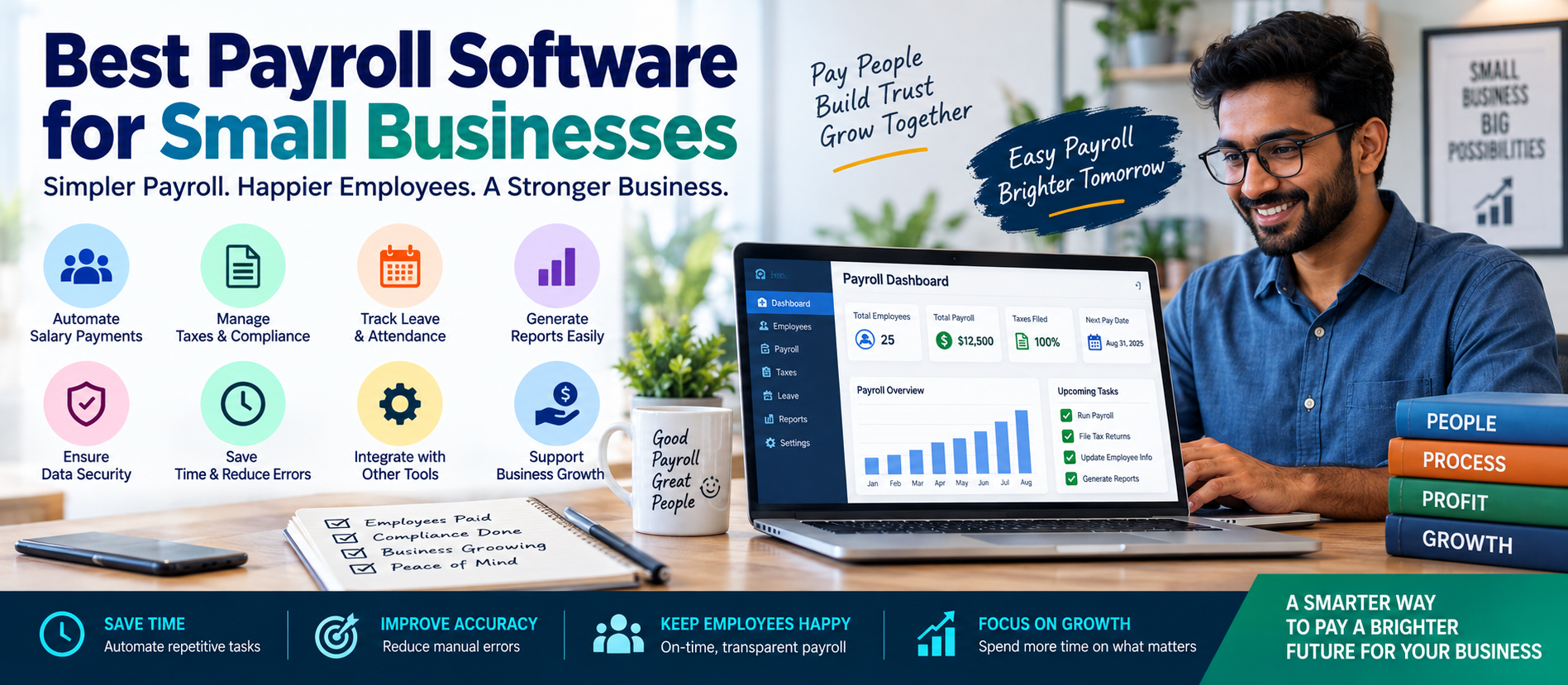
Best payroll software for small businesses can help owners pay employees accurately, reduce manual work, manage tax-related tasks, and keep payroll records organized. Choosing the right payroll system can save time and make day-to-day business operations easier.
Small businesses often have limited staff and resources. A business owner may handle payroll, accounting, employee management, and customer operations at the same time. Manual payroll can become difficult as the business grows. A payroll software solution can automate calculations, organize employee information, generate payslips, and connect payroll with other business tools.
This guide explains what payroll software does, which features matter most, how to compare leading options, and how to choose the right solution for your business.
What Is Payroll Software?
Payroll software is a digital system used to manage employee payments and payroll-related records. Depending on the software and country, it may calculate wages, deductions, taxes, overtime, benefits, and other payroll information.
A modern payroll platform may also include:
- Employee self-service.
- Direct deposit or salary payment support.
- Digital payslips.
- Tax calculations and filing support.
- Time and attendance tracking.
- Leave management.
- HR tools.
- Payroll reports.
- Accounting integrations.
The exact features available depend on the provider, subscription plan, and country where the business operates.
Why Small Businesses Need Payroll Software
Manual payroll may work for a very small team, but it can create problems as the business grows. A simple mistake in hours, deductions, tax calculations, or employee records can create extra work.
Payroll software can help small businesses improve consistency and reduce repetitive calculations.
Save Time
Payroll software can automate calculations and repeat common processes. This gives business owners more time to focus on customers and growth.
Reduce Manual Errors
Manual data entry can lead to mistakes. Payroll systems can reduce duplicate entry and apply configured rules consistently.
Keep Records Organized
Employee information, payroll history, payslips, deductions, and reports can be stored in one system.
Improve Employee Experience
Employees may be able to access payslips, tax documents, leave information, and personal details through a self-service portal.
Support Compliance
Many payroll platforms provide tools for calculations, tax documentation, and compliance workflows. However, businesses remain responsible for understanding the laws and requirements that apply to them.
Best Payroll Software Options for Small Businesses
There is no single payroll platform that is perfect for every business. The best choice depends on your location, employee count, budget, accounting software, payroll complexity, and HR needs.
1. Gusto – Best for Simple All-in-One Payroll
Gusto is widely known for combining payroll, employee management, benefits, and HR features in one platform. It is designed to make payroll easier for small businesses.
Key areas include payroll processing, employee self-service, automated payroll tax workflows, benefits administration, and integrations.
Best for: Small businesses that want an easy-to-use payroll and people-management platform.
Consider before choosing: Available features, pricing, and payroll coverage depend on the plan and location.
2. QuickBooks Workforce – Best for QuickBooks Users
Businesses already using QuickBooks accounting may prefer a payroll solution that works closely with their existing financial workflow. QuickBooks Workforce combines payroll with broader workforce and business management features.
The main advantage is the ability to reduce duplicate work between accounting and payroll systems.
Best for: Businesses already committed to the QuickBooks ecosystem.
Consider before choosing: Advanced features and certain payroll capabilities may depend on the subscription level.
3. ADP – Best for Growing Businesses
ADP offers payroll and workforce solutions for businesses of different sizes. Small businesses may choose ADP when they want a provider that can support more complex payroll and HR needs as the organization grows.
ADP also offers payroll services designed for businesses in India, including support for payroll calculations and requirements related to TDS, PF, ESI, PT, and other applicable payroll processes.
Best for: Businesses that expect to grow or need stronger payroll and compliance support.
Consider before choosing: Pricing and available services may vary based on business requirements and location.
4. OnPay – Best for Straightforward Payroll
OnPay is often considered by small businesses looking for a focused payroll solution with core payroll and HR capabilities.
The platform can be a useful option for businesses that want a straightforward interface and do not need a large enterprise system.
Best for: Small businesses looking for a focused payroll platform.
5. Rippling – Best for Payroll and Workforce Automation
Rippling focuses on connecting payroll with HR, IT, employee management, and automation. This can be useful for companies that manage many employee systems and want to reduce manual processes.
Best for: Growing businesses that want payroll connected with broader workforce operations.
Consider before choosing: A larger platform may provide more features than a very small business actually needs.
6. Square Payroll – Best for Square Ecosystem Businesses
Businesses using Square for payments or point-of-sale operations may find value in connecting payroll with their existing business ecosystem.
This can be useful for retailers, restaurants, and service businesses where employee hours and business transactions are closely connected.
Best for: Businesses already using Square products.
How to Choose the Best Payroll Software
Do not choose payroll software based only on advertising or a low starting price. The right system should match your actual business needs.
1. Check Your Business Location
Payroll rules are different in different countries, states, and regions. Always choose software that supports the payroll requirements where your employees work.
For example, an Indian business may need support for local payroll processes and statutory requirements. A business in the United States may need different tax and filing capabilities.
2. Count Your Employees
Some payroll systems are designed for very small teams. Others are built to support larger organizations.
Choose a platform that fits your current employee count but can also support reasonable growth.
3. Review Payroll Complexity
Ask yourself:
- Do employees have different pay rates?
- Do you manage overtime?
- Do you employ contractors?
- Do employees work in multiple locations?
- Do you have multiple payroll schedules?
- Do you offer benefits or reimbursements?
More complex payroll usually requires more advanced features.
4. Check Integration Options
Payroll should work with the rest of your business systems when possible.
Useful integrations may include:
- Accounting software.
- Time tracking.
- HR software.
- Expense management.
- Employee scheduling.
- Banking systems.
Good integration can reduce duplicate data entry.
5. Understand the Full Cost
Do not only look at the starting monthly price. Check for additional costs related to:
- Extra employees.
- Tax services.
- HR tools.
- Time tracking.
- Benefits administration.
- Year-end documents.
- Multi-location payroll.
Always confirm current pricing directly with the provider before making a decision.
Essential Features to Look for in Payroll Software
Automated Payroll Calculations
The software should help calculate regular wages and configured deductions accurately.
Employee Payment Options
Check whether the system supports the payment method your business needs, such as bank transfer or direct deposit.
Tax and Compliance Support
Look for tools that support relevant payroll taxes, filings, documents, and compliance processes in your business location.
Employee Self-Service
A self-service portal can allow employees to view payslips, update permitted personal information, and access payroll documents.
Reporting
Good payroll reports can help owners understand labor costs, payroll history, deductions, and other important information.
Time Tracking Integration
For hourly employees, time tracking integration can reduce manual entry and improve payroll accuracy.
Mobile Access
Mobile access can make it easier for business owners and employees to review payroll information.
Customer Support
Payroll mistakes can be stressful. Reliable customer support can be an important factor when comparing providers.
Cloud Payroll Software vs Traditional Payroll Systems
Cloud payroll software stores information in secure online systems and can usually be accessed through a browser or mobile application.
Traditional payroll systems may require local software installation or manual record management.
Cloud-based payroll software can offer:
- Remote access.
- Automatic software updates.
- Centralized employee records.
- Easier integration.
- Digital reporting.
- Employee self-service.
However, businesses should always review security, access controls, data storage practices, and provider policies.
Payroll Software for Small Businesses in India
Small businesses in India should select payroll software based on local business requirements. Payroll may involve salary calculations and applicable requirements related to TDS, Provident Fund, ESI, Professional Tax, Labour Welfare Fund, and other state or business-specific obligations.
The exact requirements depend on factors such as location, employee count, salary structure, and applicable regulations.
Before selecting a payroll system, Indian businesses should check:
- Whether Indian payroll is supported.
- Support for applicable statutory calculations.
- Digital payslip generation.
- Attendance and leave integration.
- Employee self-service features.
- Reporting requirements.
- Customer support availability.
Payroll regulations can change, so businesses should verify current requirements with qualified professionals or official sources.
How AI Is Changing Payroll Software
Artificial intelligence is beginning to influence payroll software and workforce management systems.
AI can help payroll teams identify unusual data, detect possible errors, summarize information, and reduce repetitive administrative work.
Potential AI-powered capabilities include:
- Identifying unusual payroll amounts.
- Flagging inconsistent time records.
- Answering employee payroll questions.
- Summarizing payroll reports.
- Helping administrators review payroll data.
- Automating routine workflow steps.
AI should be used carefully. Payroll data is sensitive. Businesses should protect employee information and maintain appropriate human review.
Common Payroll Software Mistakes to Avoid
Choosing Only the Cheapest Plan
A low-cost plan may not include the features your business needs. Compare value instead of only looking at the first monthly price.
Ignoring Local Requirements
Payroll software must support the rules and requirements that apply to your business location.
Not Checking Integrations
If payroll does not connect with accounting or time tracking, employees may need to enter the same data multiple times.
Skipping Employee Training
Even easy software requires a basic understanding of the system. Train administrators and employees when necessary.
Giving Too Much Access
Payroll information is sensitive. Use role-based permissions and limit access to employees who need it.
Not Reviewing Payroll Before Submission
Automation can reduce errors, but it does not remove the need for review. Important payroll information should be checked before final processing.
Best Practices for Using Payroll Software
To get better results from payroll software, follow these practices:
- Keep employee information updated.
- Review payroll reports regularly.
- Use secure passwords and access controls.
- Integrate approved time-tracking systems.
- Check payroll before final approval.
- Keep accurate employee and payment records.
- Review software updates and compliance changes.
- Train staff who manage payroll.
Payroll Software and Business Growth
Payroll software is not only an administrative tool. It can also support business growth.
As a company adds employees, payroll becomes more complicated. A scalable platform can help the business manage additional workers, new locations, changing pay structures, and more HR requirements.
Payroll data can also help business owners understand:
- Total labor costs.
- Overtime spending.
- Department expenses.
- Employee payment trends.
- Workforce growth.
Better reporting can support better business planning.
SEO, AEO, GEO, and AI Search Optimization for Payroll Software Content
Businesses that create content about payroll software should use clear and accurate information.
For SEO, use relevant keywords naturally and organize content with clear headings.
💡 Key Insight
For AEO, answer important questions directly. Readers and AI-powered answer systems benefit from concise explanations.
For GEO and AI Search optimization, provide useful context. Explain who a payroll solution is for, what it does, where it is available, and what factors users should consider.
Clear content is easier for people and AI systems to understand.
Frequently Asked Questions
What is the best payroll software for a small business?
The best payroll software depends on the business. Gusto may suit businesses looking for an easy all-in-one platform. QuickBooks Workforce can be useful for existing QuickBooks users. ADP may suit businesses that need broader payroll and workforce support. The best option depends on location, employee count, budget, and required features.
Can payroll software help with taxes?
Many payroll platforms offer tax calculation, filing, reporting, or compliance support. The exact capabilities depend on the provider and location. Businesses should confirm what services are included and remain responsible for applicable obligations.
Is cloud payroll software safe?
Cloud payroll software can provide strong security features, but businesses should review the provider's security practices, permissions, access controls, and data protection policies.
How much does payroll software cost?
Pricing varies widely. Some providers charge a base monthly fee plus a fee per employee, while others use custom pricing. Additional features may increase the total cost.
Can small businesses use AI in payroll?
AI can support payroll by identifying unusual information, assisting with reports, and automating some administrative workflows. Human review and data security remain important.
Conclusion
The best payroll software for small businesses is the solution that matches the company's location, payroll requirements, budget, and growth plans.
A good payroll platform can reduce repetitive work, organize employee information, improve reporting, and help businesses manage payroll more efficiently.
Gusto can be a strong option for businesses seeking an easy all-in-one experience. QuickBooks Workforce can make sense for businesses already using QuickBooks. ADP can be useful for organizations that need broader payroll and workforce support. Other platforms may be a better fit depending on business needs.
Before choosing any payroll software, compare the features that matter most. Check local payroll support, integrations, employee limits, security, customer support, and the full cost.
Payroll is an important business function. The right technology can make it easier, but businesses should still maintain accurate records and appropriate review processes.
For businesses interested in AI-powered software, business automation, digital transformation, SEO, AEO, GEO, and AI Search optimization, Digiifrog provides modern digital insights and strategies for business growth.
Visit www.digiifrog.com to learn more.
Quick Answer: What Is the Best Payroll Software for Small Businesses?
The best payroll software for a small business depends on its location, employee count, budget, and required features. Gusto is often suitable for easy all-in-one payroll, QuickBooks Workforce can work well for QuickBooks users, and ADP may suit businesses that need stronger payroll, compliance, and workforce support. Always compare current features, pricing, and local availability before choosing a provider.
Important Note
Payroll software features, pricing, tax support, compliance requirements, and regional availability can change. Always confirm current information directly with the software provider and consult a qualified payroll, tax, HR, or legal professional when necessary.
Ready to Grow?
Talk to us about a strategy tailored to your brand — we will help you stand out in search, AI discovery and social.
Comments (0)
Log in to leave a comment.