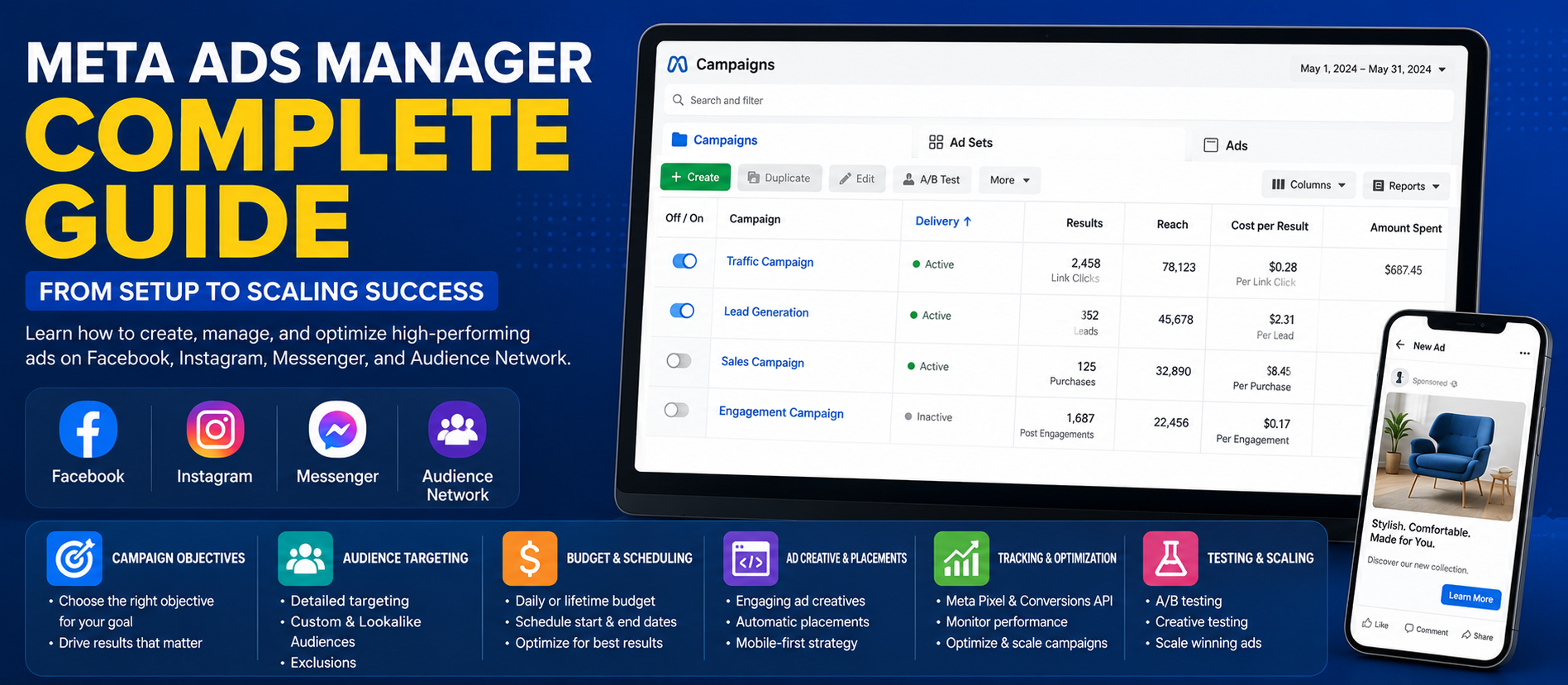
📋 Quick Summary
In this article:
Why Businesses Use Meta Advertising
Step 1: Prepare Your Meta Advertising Account
Step 2: Understand Campaign Objectives
Step 3: Set Up Meta Pixel and Events
Step 4: Consider the Conversions API
Step 5: Build a Clear Campaign Structure
Step 6: Define Your Target Audience
Focus Keyword: Meta Ads Manager Complete Guide
A Meta Ads Manager Complete Guide is useful for businesses, marketers, startups and advertisers who want to create measurable advertising campaigns across Meta technologies. Meta Ads Manager is the central tool used to build, manage and analyze ads that can run across platforms such as Facebook, Instagram, Messenger, WhatsApp and Meta Audience Network, depending on campaign settings and eligibility.
💡 Key Insight
Successful Meta advertising is not simply about boosting a post. A strong campaign requires a clear business objective, accurate measurement, useful audience signals, compelling creative, an appropriate budget and ongoing optimization. In 2026, automation and AI are increasingly important, but good strategy and high-quality data remain essential.
Designfo helps businesses build connected digital growth strategies through paid advertising, website optimization, SEO, content marketing, marketing automation, AEO, GEO and AI Search Optimization.
What Is Meta Ads Manager?
Meta Ads Manager is Meta's advertising management platform. It allows advertisers to create campaigns, define audiences, manage budgets and schedules, build ads, monitor delivery and analyze performance.
The platform is organized around three main levels:
- Campaign: The overall advertising objective and campaign-level settings.
- Ad Set: Audience, placements, budget, schedule and delivery settings.
- Ad: The creative itself, including media, text, links and other ad elements.
Understanding this structure is essential because changes at one level can affect how the campaign is managed and measured.
Why Businesses Use Meta Advertising
Meta advertising can support different stages of the customer journey. A business may want to introduce its brand to new audiences, encourage website visits, generate leads, promote an app or drive sales.
- Build brand awareness
- Increase engagement
- Drive website traffic
- Generate leads
- Promote mobile apps
- Increase product or service sales
- Reconnect with previous website visitors or customers
The most important principle is to select an objective that matches the actual business outcome. Meta explains that its ad auction uses the selected objective to seek people who are more likely to take the action related to that objective.
Step 1: Prepare Your Meta Advertising Account
Before launching a campaign, make sure the basic business assets are ready. Depending on the campaign, this may include a Meta ad account, business Page, Instagram account, website, payment method and tracking setup.
Basic Preparation Checklist
- Confirm business and ad account access.
- Connect the appropriate Facebook Page and Instagram account.
- Add a valid payment method.
- Prepare a high-quality landing page or destination.
- Set up website or app measurement where required.
- Define the primary business result you want to achieve.
Step 2: Understand Campaign Objectives
Your campaign objective tells the advertising system what result you are trying to achieve. Meta currently organizes campaign goals around outcomes such as Awareness, Traffic, Engagement, Leads, App Promotion and Sales.
When to Use Each Objective
- Awareness: When the main goal is reach, recognition or attention.
- Traffic: When the goal is to send people to a website or another destination.
- Engagement: When the goal centers on interactions with content or messages.
- Leads: When you want inquiries, instant-form submissions, calls or other lead actions.
- App Promotion: When promoting app installs or in-app activity.
- Sales: When the objective is measurable purchases or conversion activity.
For example, if the real goal is online sales, optimizing only for cheap clicks may not produce the best business outcome. The objective and optimization event should reflect the result that matters most.
Step 3: Set Up Meta Pixel and Events
If you send visitors to your website, accurate measurement is a major part of campaign management. The Meta Pixel can be installed on a website to help measure actions such as purchases, registrations and other events.
Meta's setup guidance describes two main tasks: creating the pixel and base code, then configuring events to measure meaningful actions. Depending on the website platform, setup may be completed through a partner integration or manual implementation.
Examples of Useful Events
- Page view
- Lead
- Complete registration
- Add to cart
- Initiate checkout
- Purchase
- Contact or inquiry actions
Always test tracking before making major budget decisions. If the wrong event is measured, campaign optimization may also focus on the wrong outcome.
Step 4: Consider the Conversions API
The Meta Conversions API creates a direct connection between marketing data and Meta's ad optimization and measurement systems. Meta explains that website events sent through the Conversions API can be less affected by browser loading problems, connectivity issues and ad blockers.
Meta recommends considering the Conversions API alongside the Pixel for website events because the two can work together to improve event connectivity and measurement.
Businesses should implement data collection responsibly and ensure their tracking practices align with applicable privacy and consent requirements.
Step 5: Build a Clear Campaign Structure
A complicated account is not automatically a better account. Meta's current performance guidance emphasizes simplifying account structure and reducing unnecessary fragmentation.
When similar ad sets compete simultaneously, each may receive fewer opportunities to learn. Combining genuinely similar ad sets can help delivery systems gather signals more efficiently.
A Simple Campaign Structure
- Campaign: One clear business objective.
- Ad Set: A meaningful audience and delivery strategy.
- Ads: Multiple creative approaches for the same offer.
Do not create dozens of nearly identical ad sets without a clear testing reason.
Step 6: Define Your Target Audience
Audience strategy can include location, demographics, interests, custom audiences and other signals available within the platform. The right approach depends on your business, customer data, campaign objective and market.
Common Audience Types
- Broad audiences: Fewer manual restrictions, allowing the delivery system to use available signals.
- Interest-based audiences: Built around relevant interests and characteristics.
- Custom audiences: Based on permitted first-party data, website activity or engagement sources.
- Lookalike audiences: Designed to find people with similarities to a qualifying source audience.
Meta's lead-generation guidance highlights the value of first-party data and allows advertisers to use custom audiences and lookalike audiences in appropriate campaigns.
Step 7: Choose Budget and Schedule Settings
Budget management is one of the most important parts of Meta Ads Manager. Depending on the campaign setup, advertisers may use campaign-level or ad-set-level budget controls.
Practical Budget Tips
- Start with a budget that can generate enough meaningful data.
- Avoid spreading a small budget across too many audiences and ads.
- Give campaigns time to collect data before making unnecessary changes.
- Increase spending gradually when performance is consistently profitable.
- Measure cost against the value of leads or sales, not only against clicks.
Campaigns and ad sets may enter a learning phase while the delivery system explores which audiences and placements are more likely to generate the desired result. Meta recommends minimizing unnecessary edits during this period.
Step 8: Create High-Quality Ad Creative
Creative quality can strongly influence how effectively an ad communicates with the audience. Instead of relying on one image or one message, test multiple creative concepts.
Useful Creative Formats
- Single images
- Short-form video
- Product demonstrations
- Customer testimonials
- Carousel-style storytelling
- Before-and-after examples
- Educational or problem-solving content
Meta's performance guidance encourages creative diversification so the delivery system has more opportunities to match relevant messages with relevant people.
A Strong Ad Usually Answers
- What is being offered?
- Why should the audience care?
- What problem or opportunity does it address?
- What evidence supports the message?
- What should the person do next?
Step 9: Optimize the Landing Page
An effective ad can still fail if the destination page is slow, confusing or inconsistent with the ad. The landing page should continue the same message and make the next step clear.
- Match the landing-page headline to the ad's promise.
- Explain the main benefit clearly.
- Use relevant proof, testimonials or case studies.
- Keep forms simple and appropriate for the offer.
- Optimize for mobile users.
- Improve page speed and usability.
- Use one clear primary call to action.
Step 10: Understand Placements
Meta campaigns may deliver across eligible placements and technologies depending on campaign settings. Placement decisions should be tested based on actual results rather than assumptions.
Creative assets should also be prepared for the formats where they may appear. Vertical video, square images and other variations can improve the presentation across different surfaces.
Step 11: Monitor the Right Metrics
Different objectives require different success metrics. A campaign should not be judged only by impressions or clicks if the real goal is qualified leads or sales.
Important Metrics May Include
- Reach and impressions
- Cost per result
- Click-through rate
- Landing-page views
- Leads
- Cost per lead
- Purchases
- Cost per purchase
- Conversion value
- Return on ad spend
- Lead quality and downstream revenue
For Traffic campaigns, Meta specifically identifies cost per result as a key performance metric, while conversion-focused campaigns should be evaluated against meaningful actions such as purchases or registrations.
Step 12: Use Lead Quality Data
Generating a large number of inexpensive leads does not always create business value. If possible, connect advertising measurement with CRM or sales outcomes so you can understand which leads become qualified opportunities or customers.
Meta's lead guidance recommends connecting CRM data through the Conversions API for advertisers using conversion-lead optimization, helping the system learn from higher-quality outcomes.
Step 13: Test and Optimize Systematically
Optimization should be based on a clear hypothesis. Avoid changing targeting, budget, creative, landing pages and objectives all at the same time.
Variables You Can Test
- Creative concept
- Headline or primary message
- Call to action
- Audience approach
- Offer
- Landing page
- Budget allocation
- Conversion event
Meta also provides A/B testing options in Ads Manager. Use testing to learn which approach creates better business outcomes rather than selecting a winner based only on vanity metrics.
Step 14: Check Delivery Status and Problems
If a campaign is not spending or an ad is not delivering, check the Delivery column in Ads Manager. Meta notes that campaign, ad set and ad can have different statuses, so review all three levels when troubleshooting.
Common Issues to Review
- Ad approval or review status
- Budget limitations
- Audience restrictions
- Payment issues
- Tracking problems
- Landing-page errors
- Recent edits that affected delivery
Common Meta Ads Manager Mistakes to Avoid
- Choosing an objective that does not match the real business goal.
- Launching campaigns without proper conversion tracking.
- Creating too many overlapping ad sets.
- Making major edits too frequently.
- Optimizing only for cheap clicks or impressions.
- Using only one creative concept.
- Ignoring landing-page experience.
- Measuring lead quantity but not lead quality.
- Scaling spend before results are stable.
- Using customer data without appropriate consent and governance.
A Practical Meta Ads Optimization Workflow
- Define the primary business outcome.
- Choose the closest campaign objective.
- Set up and test measurement.
- Create a focused campaign and audience structure.
- Launch several meaningful creative variations.
- Allow enough data to accumulate.
- Review cost, conversion quality and business value.
- Pause or revise weak combinations.
- Scale proven campaigns gradually.
- Continue testing creative, offers and measurement quality.
Meta Ads and SEO, AEO, GEO and AI Search
Meta advertising and SEO serve different purposes, but they can support a connected marketing strategy. Paid campaigns can test offers, creative messages and customer language, while SEO and content can build longer-term organic visibility.
For AEO, use recurring customer questions from ads, comments and lead conversations to create clear website answers. For GEO and AI Search Optimization, focus on accurate company information, original expertise, useful content and strong technical foundations rather than creating low-value pages for every possible AI query.
Advertising data should inform your content strategy, while high-quality website content can strengthen the customer journey after an ad click.
How Designfo Helps With Meta Advertising
Designfo supports businesses that want to build connected advertising and digital growth systems.
- Meta Ads Strategy
- Campaign Setup and Management
- Audience and Funnel Strategy
- Ad Creative and Graphic Design
- Landing Page Development
- Conversion Tracking Strategy
- Conversion Rate Optimization
- SEO and Content Marketing
- Marketing Automation
- AEO, GEO and AI Search Optimization
Frequently Asked Questions
What is Meta Ads Manager?
Meta Ads Manager is Meta's advertising management tool for creating, publishing, managing and analyzing campaigns across eligible Meta technologies.
What are the three levels of Meta Ads Manager?
The three main levels are Campaign, Ad Set and Ad. Campaign controls the overall objective, Ad Set controls audience and delivery settings, and Ad contains the creative and messaging.
Which Meta campaign objective should I choose?
Choose the objective that is closest to your actual business goal. For example, use a sales-focused objective for measurable sales outcomes and a lead-focused objective when generating qualified contacts is the main goal.
Do I need the Meta Pixel?
For website conversion measurement and optimization, Meta provides the Pixel and recommends considering it together with the Conversions API for website events.
Why is the Conversions API important?
It provides a more direct connection between marketing data and Meta's systems and can improve event connectivity and measurement when used appropriately with the Pixel.
How can I improve Meta ad performance?
Improve measurement quality, simplify unnecessary account fragmentation, test diverse creative, use relevant audiences, optimize the landing page and evaluate results against real business outcomes.
Conclusion
This Meta Ads Manager Complete Guide shows that successful advertising depends on more than selecting an audience and publishing an image. Strong results require a clear objective, accurate tracking, useful creative, a focused account structure, quality conversion data and disciplined testing.
In 2026, Meta's automation and AI capabilities can help advertisers optimize delivery, but they depend on meaningful business goals and reliable signals. The best approach is to combine automation with strong creative strategy, high-quality data and human oversight.
By connecting Meta Ads with SEO, AEO, GEO and AI Search Optimization, businesses can create a broader digital growth strategy that supports both immediate campaign results and long-term brand visibility.
Designfo
Website: www.designfo.in
Ready to Grow?
Talk to us about a strategy tailored to your brand — we will help you stand out in search, AI discovery and social.


Comments (0)
Log in to leave a comment.