📋 Quick Summary
In this article:
Quick Answer: How Do You Create a Web Design Video Series?
Why Create a Video Series About Web Design Basics?
Step 1: Define Your Target Audience
Step 2: Create Clear Learning Goals
Step 3: Plan the Video Series Topics
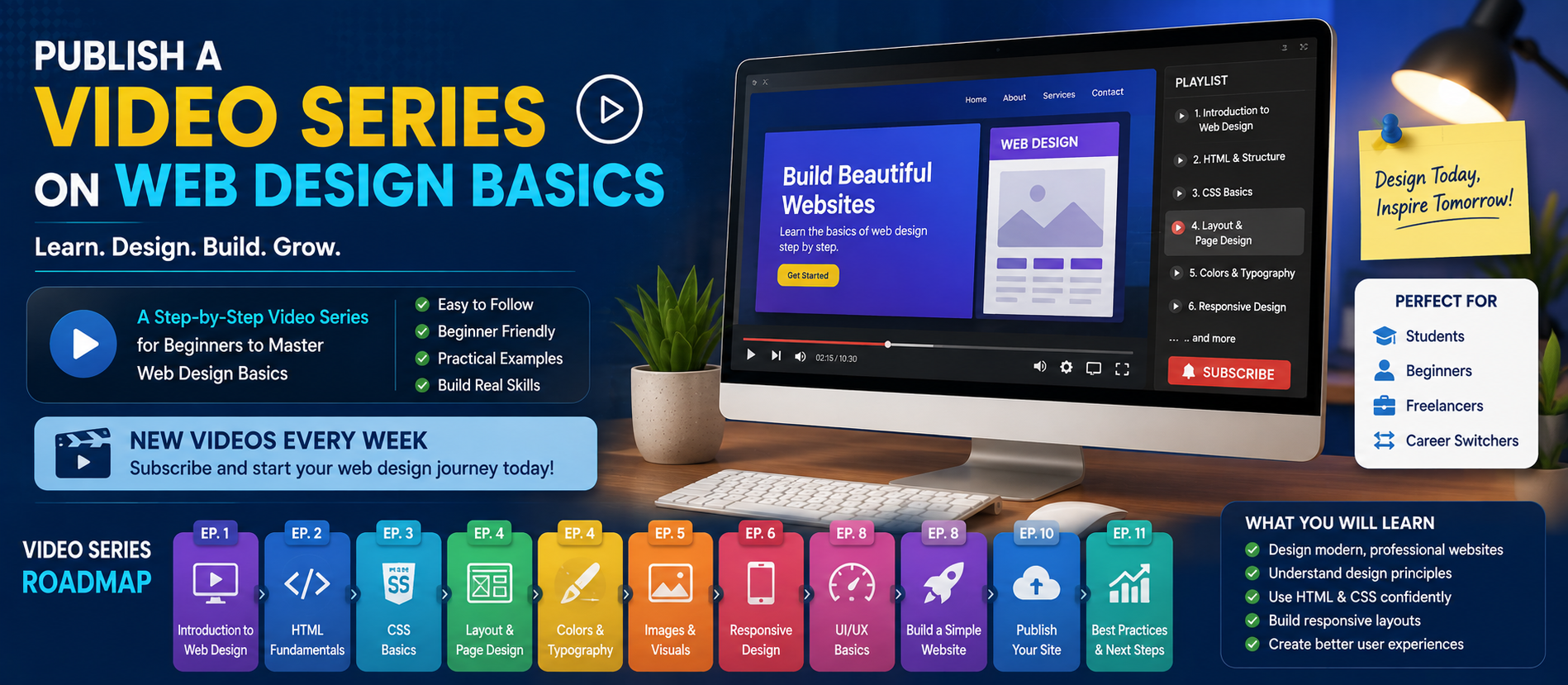
Suggested Web Design Basics Video Series
Step 4: Keep Each Video Focused
Step 5: Write a Simple Script
Step 6: Use Visual Demonstrations
Step 7: Focus on Clear Audio and Readability
Step 8: Create a Consistent Publishing Schedule
Introduction
Video is one of the easiest ways to teach web design. Beginners often understand a design concept faster when they can see it in action. A well-planned video series can explain the complete web design process one step at a time.
Publishing a video series on web design basics can help beginners learn practical skills while helping a business build authority and attract a relevant audience.
The best series does not need expensive equipment or complicated production. It needs useful lessons, clear explanations, good structure, and consistent publishing.
This guide explains how to plan, create, publish, optimize, and promote a beginner-friendly web design video series.
Quick Answer: How Do You Create a Web Design Video Series?
Start by defining your audience and learning goals. Break web design into short lessons, create a simple publishing schedule, record clear demonstrations, and publish each video with an optimized title, description, transcript, and supporting web page. Promote the series across search, social media, email, and relevant online communities.
Why Create a Video Series About Web Design Basics?
Many people want to learn web design but do not know where to start. A structured series removes that confusion.
Instead of searching for random tutorials, viewers can follow a logical learning path.
A web design video series can help you:
- Teach beginners valuable skills
- Build trust and authority
- Create reusable educational content
- Increase website visibility
- Attract potential clients or students
- Create content for YouTube and social media
- Support SEO and AI search visibility
One well-planned lesson can also be repurposed into a blog post, short video, social media post, infographic, newsletter, or downloadable guide.
Step 1: Define Your Target Audience
Do not create a course for everyone.
Choose the main audience before recording your first video.
Your audience may include:
- Complete beginners
- Small business owners
- Students
- Freelancers
- Graphic designers learning web design
- People planning a career change
A complete beginner needs simple explanations. An experienced graphic designer may need more practical information about responsive layouts, usability, and website development workflows.
Define what the viewer should know before starting and what they should be able to do after completing the series.
Step 2: Create Clear Learning Goals
Every video should have a clear purpose.
For example, after watching a lesson, the viewer should be able to understand or complete one specific task.
Good learning goals include:
- Understand the basic principles of web design
- Explain the difference between web design and web development
- Choose a suitable layout structure
- Create a simple color palette
- Understand typography for websites
- Design pages for mobile devices
- Create a basic website prototype
Clear learning goals help prevent videos from becoming too broad or confusing.
Step 3: Plan the Video Series Topics
A logical sequence is important.
Start with basic concepts and gradually move toward practical projects.
Suggested Web Design Basics Video Series
Episode 1: What Is Web Design?
Explain what web design includes and how it differs from web development.
Episode 2: Understanding Website Structure
Introduce pages, navigation, headers, footers, sections, and content hierarchy.
Episode 3: Basic Web Design Principles
Cover balance, contrast, alignment, spacing, hierarchy, and consistency.
Episode 4: Color Theory for Web Design
Explain color selection, contrast, branding, and readability.
Episode 5: Typography Basics
Show how fonts, font sizes, line spacing, and hierarchy affect usability.
Episode 6: Layout and Visual Hierarchy
Explain grids, whitespace, sections, and how users scan a web page.
Episode 7: Responsive Web Design
Teach why websites must work across desktops, tablets, and mobile devices.
Episode 8: User Experience Basics
Introduce navigation, clarity, accessibility, and simple user journeys.
Episode 9: Designing a Homepage
Create a simple homepage step by step.
Episode 10: Web Design Tools and Common Mistakes
⚠ Watch Out
Introduce useful tool categories and explain mistakes beginners should avoid.
Episode 11: Your First Web Design Project
Bring the main lessons together in one practical beginner project.
Step 4: Keep Each Video Focused
A beginner does not need to learn everything in one video.
Each episode should answer one main question or teach one clear skill.
Short, focused lessons are easier to understand and easier to revisit.
For longer topics, divide the lesson into chapters.
Step 5: Write a Simple Script
You do not need to read every sentence from a script. However, a simple outline can make the video clearer.
A useful video structure is:
- Introduce the topic
- Explain why it matters
- Teach the main concept
- Show a practical example
- Summarize the lesson
- Explain the next step
Avoid long introductions. Tell viewers quickly what they will learn.
Step 6: Use Visual Demonstrations
Show the concept whenever possible.
You can demonstrate:
- A good and poor layout comparison
- Before-and-after design changes
- How spacing affects readability
- How typography changes visual hierarchy
- How a desktop design adapts to mobile
- A simple website design workflow
Screen recordings can be especially useful when explaining design tools and practical workflows.
Step 7: Focus on Clear Audio and Readability
Viewers should be able to hear and understand you clearly. Use simple language, define technical terms, and add captions when possible.
Step 8: Create a Consistent Publishing Schedule
A simple schedule may be:
- One new episode every week
- One short supporting video between major episodes
- A final project video after the main lessons
Publishing one useful video every week is usually better than publishing many videos quickly and then stopping.
Step 9: Create Strong Video Titles
A video title should clearly describe the lesson.
Good titles help both users and search systems understand the content.
Examples include:
- Web Design Basics for Beginners: Start Here
- How Website Layout Works: A Beginner's Guide
- Color Theory for Web Design Explained Simply
- Responsive Web Design Basics for Beginners
- How to Design Your First Homepage
Avoid misleading titles. The title should accurately represent the video.
Step 10: Write Useful Video Descriptions
A video description should do more than repeat the title.
Explain:
- What the viewer will learn
- Who the video is for
- Important topics covered
- Related lessons in the series
- Relevant website resources
Use keywords naturally. Do not overload the description with repeated search terms.
Step 11: Create a Supporting Page for Every Video
Publishing videos only on a video platform can limit your content strategy.
💡 Key Insight
Create a supporting page on your website for important lessons.
The page can include:
- The embedded video
- A written summary
- Key learning points
- Important definitions
- A transcript or useful sections of the transcript
- Links to related lessons
- A FAQ section
This creates a useful content hub for your audience.
SEO Optimization for a Web Design Video Series
Choose topics based on real beginner questions. Use clear titles, logical headings, useful descriptions, supporting pages, and internal links between related lessons. Review older content when important tools or practices change.
AEO: Optimize for Answer-Based Search
Answer Engine Optimization, or AEO, focuses on making answers clear and easy to understand.
For each lesson, include direct answers to common questions.
For example:
What is responsive web design?
Responsive web design is an approach that helps a website adapt its layout and content to different screen sizes, including desktops, tablets, and smartphones.
Short, direct definitions can improve readability and help users find important information quickly.
GEO and AI Search Optimization
Generative Engine Optimization, or GEO, focuses on creating useful, clear, accurate, and structured content for modern generative AI search experiences.
To make your video series more AI-search ready:
- Use clear titles and headings
- Define important terms
- Provide accurate explanations
- Include original examples
- Connect related lessons
- Keep information current
- Clearly identify your brand and authorship
Do not create content simply to chase AI citations. Create useful lessons first.
Promote Your Web Design Video Series
Promote each lesson through relevant channels.
Social Media
Share short clips, useful design tips, and key lessons from each episode.
Email Marketing
Send subscribers a short introduction and explain what they will learn in the new episode.
Your Website
Create a central page containing every episode in the correct order.
Online Communities
Share useful lessons where appropriate, but avoid spam. Focus on helping people and participating in relevant discussions.
Encourage Viewers to Practice
Give viewers small tasks.
For example:
- Choose three colors for a sample website
- Create a simple typography hierarchy
- Sketch a homepage layout
- Review an existing website and identify design issues
Small exercises turn passive viewing into active learning.
Measure the Performance of Your Video Series
Track performance to understand what your audience finds useful.
Useful measurements include:
- Views
- Watch time
- Audience retention
- Website visits
- Search impressions
- Newsletter sign-ups
- Inquiries or leads
Do not judge success only by total views.
A smaller audience that watches the complete series and takes meaningful action may be more valuable than a large audience with low engagement.
Common Mistakes to Avoid
Trying to Teach Everything at Once
Using Too Much Technical Language
Ignoring Mobile Design
Modern web design must consider multiple screen sizes.
Publishing Without a Learning Structure
Create a clear order for the series.
Making Videos Without Supporting Content
Supporting pages, transcripts, summaries, and internal links can improve the learning experience.
Ignoring Accessibility
Use captions, readable visuals, and clear explanations whenever possible.
AEO FAQ: Web Design Basics Video Series
What should a beginner learn first in web design?
A beginner should start with website structure, visual hierarchy, layout, color, typography, responsive design, usability, and basic accessibility principles.
How many videos should a web design beginner series have?
A beginner series can have around 8 to 15 focused lessons. The right number depends on the depth of each topic and the learning goals.
How long should web design tutorial videos be?
The ideal length depends on the topic. A focused video should be long enough to explain the concept clearly without adding unnecessary information.
Can video content help SEO?
Yes. Video can support SEO when it answers user questions, is published with clear titles and descriptions, and is supported by useful website content.
Should every video have a transcript?
A transcript can improve accessibility and provide an additional text resource for viewers. It can also support a more complete learning page.
Key Takeaways
- Define your audience before planning the series.
- Create a logical sequence of beginner lessons.
- Keep each video focused on one main topic.
- Use practical visual demonstrations.
- Create supporting pages and transcripts.
- Optimize content for SEO, AEO, GEO, and AI search.
- Encourage viewers to practice.
- Measure watch time, engagement, traffic, and meaningful business results.
Conclusion
Publishing a video series on web design basics can create long-term value for both viewers and your business.
The key is to make learning simple.
Start with the fundamentals. Teach one concept at a time. Use visual examples. Give viewers practical exercises. Create a clear path from beginner knowledge to a completed project.
Do not focus only on views. Focus on whether the content helps people understand and use what they learn.
With clear planning, consistent publishing, and useful supporting content, a web design video series can become a valuable educational resource and a strong part of your long-term digital marketing strategy.
About Digiifrog
Digiifrog creates useful, readable, and future-ready digital content for modern audiences. Our approach combines SEO, AEO, GEO, and AI Search optimization with a strong focus on clarity and real user value.
Visit www.digiifrog.com for more resources about web design, digital marketing, SEO, Artificial Intelligence, automation, and online business growth.
Disclaimer
This article is for educational and informational purposes. Web design tools, platform features, search technologies, and best practices can change over time. Choose tools and learning methods based on your audience, project requirements, skills, and goals.
Ready to Grow?
Talk to us about a strategy tailored to your brand — we will help you stand out in search, AI discovery and social.


Comments (0)
Log in to leave a comment.