📋 Quick Summary
In this article:
Quick Answer: Which Cloud Computing Platform Is Best?
Understanding IaaS, PaaS, and SaaS
Infrastructure as a Service (IaaS)
Platform as a Service (PaaS)
Software as a Service (SaaS)
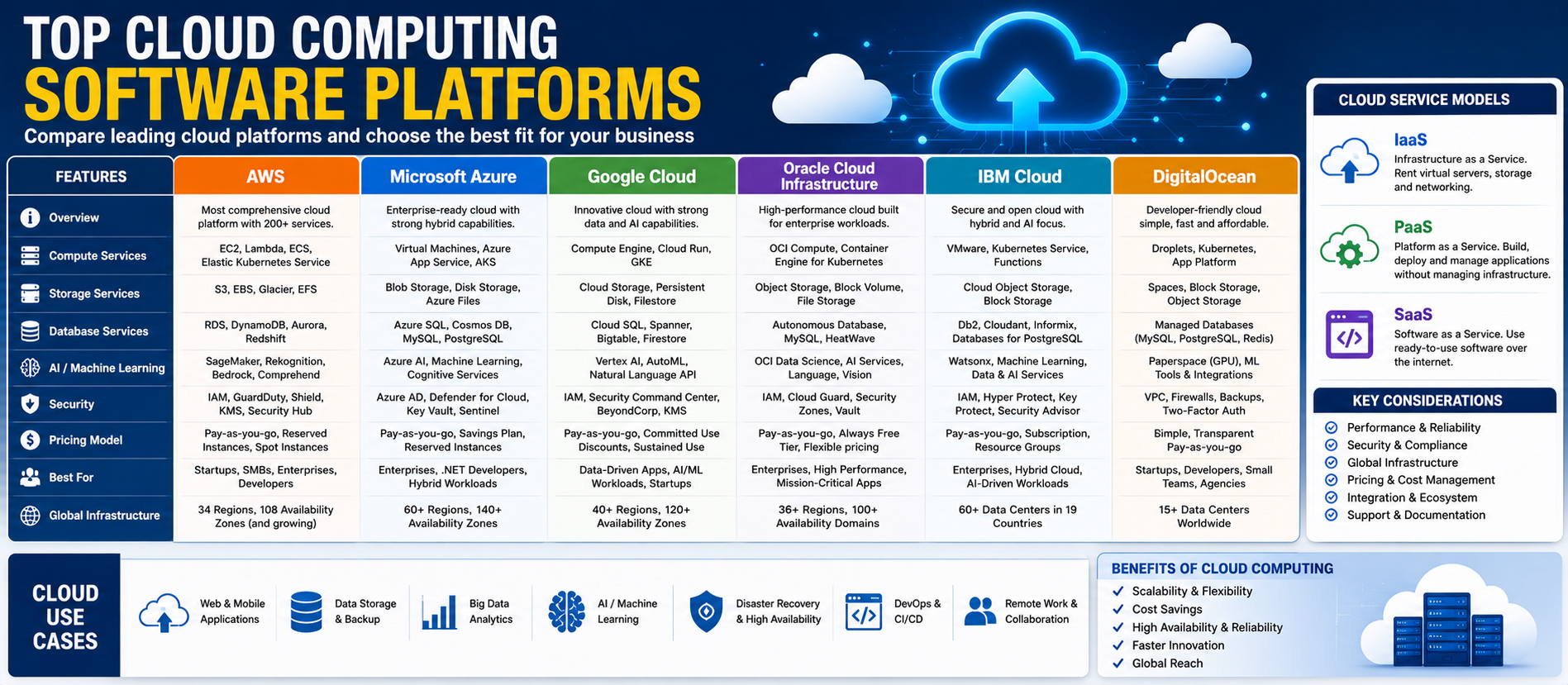
Top Cloud Computing Platforms at a Glance
1. Amazon Web Services: Best for Breadth and Scale
2. Microsoft Azure: Best for Microsoft Ecosystem Integration
3. Google Cloud: Best for Data, AI, and Cloud-Native Development
4. Oracle Cloud Infrastructure: Best for Oracle and Enterprise Data Workloads
5. IBM Cloud: Best for Hybrid and Regulated Environments
Cloud computing has changed the way businesses build, run, and scale technology. Instead of purchasing and maintaining every server in a private data center, organizations can access computing power, storage, databases, analytics, AI tools, security services, and development platforms on demand.
Today, cloud platforms support almost every type of organization. Startups use cloud services to launch products quickly. Small businesses use cloud applications without building large IT environments. Enterprises use cloud platforms for global applications, data analytics, AI, cybersecurity, disaster recovery, and hybrid infrastructure.
This guide compares the top cloud computing software platforms and explains how to choose the right environment for your business.
Digiifrog creates clear, structured, and search-friendly content about technology, business, education, and digital growth. Our content approach considers SEO, AEO, GEO, and AI Search Optimization.
Quick Answer: Which Cloud Computing Platform Is Best?
There is no single best cloud platform for every business. Amazon Web Services is often chosen for its broad range of infrastructure and platform services. Microsoft Azure is a natural fit for organizations deeply connected to Microsoft technologies. Google Cloud is especially strong in data, analytics, containers, and AI services. Oracle Cloud Infrastructure can be attractive for Oracle workloads, databases, enterprise applications, and distributed cloud strategies. IBM Cloud focuses strongly on hybrid, multi cloud, regulated industries, and mission-critical workloads. Digital Ocean can be attractive to developers and smaller businesses that want a simpler cloud experience.
The best choice depends on workload requirements, existing technology, technical skills, data location, security needs, performance, AI strategy, and total cost.
What Is Cloud Computing?
Cloud computing provides access to technology resources through remote data centers and networks. Instead of buying physical hardware for every workload, customers can provision computing resources when needed.
Common cloud services include:
- Virtual machines and compute resources.
- Object, block, and file storage.
- Managed databases.
- Networking and content delivery.
- Containers and Kubernetes.
- Server less computing.
- Data warehouses and analytics.
- Artificial intelligence and machine learning.
- Security and identity management.
- Backup and disaster recovery.
- Developer and DevOps tools.
The cloud can help organizations scale faster, experiment with new technology, and reduce the need to operate every layer of physical infrastructure themselves.
Understanding IaaS, PaaS, and SaaS
Infrastructure as a Service (IaaS)
IaaS provides core computing resources such as virtual machines, storage, and networking. The customer usually has more control over operating systems and applications.
Platform as a Service (PaaS)
PaaS provides managed environments for building and deploying applications. Developers can focus more on application development while the provider manages more of the underlying platform.
Software as a Service (SaaS)
SaaS delivers complete applications over the internet. Examples include business productivity, CRM, accounting, and collaboration software.
Many cloud providers offer services across all three models, although their strengths differ.
Top Cloud Computing Platforms at a Glance
| Platform Best For Main Strength | ||
| Amazon Web Services | Broad infrastructure and enterprise workloads | Large service portfolio and global cloud ecosystem |
| Microsoft Azure | Microsoft-based organizations | Integration with Microsoft tools and enterprise cloud services |
| Google Cloud | Data, AI, analytics, and cloud-native development | Big Query, Kubernetes, AI, and managed cloud services |
| Oracle Cloud Infrastructure | Oracle workloads and enterprise databases | Distributed cloud, database services, and multi cloud options |
| IBM Cloud | Hybrid and regulated enterprise workloads | Hybrid cloud, governance, security, and enterprise operations |
| Digital Ocean | Developers, startups, and smaller teams | Simplified developer-focused cloud infrastructure |
1. Amazon Web Services: Best for Breadth and Scale
Amazon Web Services, commonly called AWS, provides a broad collection of cloud services. Its portfolio covers compute, storage, databases, analytics, networking, security, containers, application integration, developer tools, IoT, AI, and machine learning.
AWS can support small projects as well as large enterprise environments. Businesses can start with basic virtual servers or managed storage and later add more advanced services as their requirements grow.
Best for: Startups, SaaS companies, enterprises, developers, AI workloads, and organizations that need a wide range of cloud services.
Main advantages:
- Broad service portfolio.
- Global infrastructure.
- Compute, storage, database, analytics, and networking services.
- Managed containers and server less options.
- Large developer and partner ecosystem.
- Strong AI and machine learning capabilities.
- Tools for hybrid and multi cloud environments.
Popular examples: Amazon EC2 for compute, Amazon S3 for object storage, Amazon RDS for managed databases, AWS Lambda for server less workloads, Amazon EKS for Kubernetes, and Amazon Bedrock for generative AI applications.
Consider carefully: AWS offers many services, and that flexibility can create complexity. Cost management, architecture planning, permissions, and service selection require discipline.
2. Microsoft Azure: Best for Microsoft Ecosystem Integration
Microsoft Azure is a major cloud platform with infrastructure, platform, data, AI, security, and application services. It is especially attractive for organizations already using Microsoft 365, Windows Server, SQL Server, Active Directory, Power Platform, and other Microsoft technologies.
Azure can support virtual machines, databases, analytics, application hosting, containers, AI, identity management, and hybrid infrastructure.
Best for: Enterprises and businesses that already have significant investments in Microsoft technology.
Main advantages:
- Strong Microsoft ecosystem integration.
- Enterprise identity and security tools.
- Hybrid cloud capabilities.
- Virtual machines, databases, and application services.
- Azure AI and data services.
- Integration with Microsoft development and productivity tools.
Consider carefully: Azure has a large service catalog. Organizations should avoid simply moving every existing workload without reviewing architecture, licensing, and cloud operating costs.
3. Google Cloud: Best for Data, AI, and Cloud-Native Development
Google Cloud provides infrastructure, data, analytics, AI, security, developer tools, and managed application services. It is well known for products such as Compute Engine, Google Kubernetes Engine, Big Query, Cloud Storage, Cloud SQL, and Cloud Run.
Google Cloud is also deeply connected to Google's AI strategy. Businesses can access services for machine learning, generative AI, agent development, data analysis, and AI-assisted development.
Best for: Data-driven organizations, AI projects, analytics workloads, container-based applications, and cloud-native development teams.
Main advantages:
- Strong data and analytics capabilities.
- Big Query for large-scale analytics.
- Google Kubernetes Engine for managed containers.
- Cloud Run for managed containerized applications.
- Broad AI and machine learning services.
- Developer tools and AI-assisted coding.
Consider carefully: Google Cloud is highly capable, but teams should match services to their existing skills and avoid unnecessary architectural complexity.
4. Oracle Cloud Infrastructure: Best for Oracle and Enterprise Data Workloads
Oracle Cloud Infrastructure, or OCI, provides public cloud, hybrid cloud, dedicated cloud, and multi cloud capabilities. It offers compute, networking, storage, containers, databases, developer services, AI services, and enterprise infrastructure.
OCI can be especially relevant for organizations using Oracle Database and Oracle enterprise applications. Oracle also supports multi cloud connections and services designed to work across cloud environments.
Best for: Oracle customers, database-intensive workloads, enterprise applications, and organizations evaluating distributed or multi cloud strategies.
Main advantages:
- Strong Oracle Database integration.
- Public, hybrid, dedicated, and multi cloud options.
- Enterprise infrastructure services.
- AI and cloud services.
- Support for distributed cloud approaches.
- Free tier options for experimentation.
Consider carefully: OCI is particularly compelling when the business has existing Oracle workloads or specific enterprise performance and deployment requirements.
5. IBM Cloud: Best for Hybrid and Regulated Environments
IBM Cloud focuses on enterprise cloud computing, especially hybrid and multi cloud environments. It combines infrastructure and platform services with security, governance, automation, and enterprise management capabilities.
This can make IBM Cloud relevant for organizations running mission-critical workloads or operating in industries with demanding compliance and governance requirements.
Best for: Regulated industries, large enterprises, hybrid cloud environments, and organizations modernizing existing infrastructure.
Main advantages:
- Hybrid and multi cloud focus.
- Infrastructure and platform services.
- Enterprise governance and compliance capabilities.
- Security-focused architecture.
- Support for mission-critical workloads.
- Integration with IBM automation and AI technologies.
Consider carefully: The best fit depends on the workload and enterprise architecture. Smaller teams may find a simpler developer-focused provider easier for basic hosting needs.
6. Digital Ocean: Best for Simplicity and Developer-Friendly Cloud Services
Digital Ocean is known for providing a simpler cloud experience for developers, startups, and small businesses. It offers cloud compute, managed databases, Kubernetes, storage, application hosting, and other infrastructure services.
The platform can be attractive when a team wants to deploy applications without navigating the full complexity of a hyperscale cloud environment.
Best for: Developers, startups, agencies, SaaS prototypes, and small-to-medium technical teams.
Main advantages:
- Developer-friendly experience.
- Simplified infrastructure setup.
- Virtual servers and managed services.
- Managed Kubernetes and databases.
- Useful for startups and smaller teams.
Consider carefully: Large enterprises with highly specialized requirements may need the broader service catalogs and global capabilities offered by hyperscale providers.
Cloud Platform Comparison by Use Case
Best for Startups
Startups often evaluate AWS, Google Cloud, Microsoft Azure, and Digital Ocean. The best choice depends on available credits, developer experience, managed services, AI needs, and expected growth.
Best for Enterprise Infrastructure
AWS, Microsoft Azure, Google Cloud, Oracle Cloud Infrastructure, and IBM Cloud all offer enterprise capabilities. The decision should focus on existing systems, compliance, data requirements, technical expertise, and workload architecture.
Best for AI and Machine Learning
AWS, Google Cloud, Microsoft Azure, and Oracle Cloud all provide AI infrastructure and services. Google Cloud is particularly strong in data, AI, and managed cloud-native services, while AWS and Azure offer broad AI ecosystems integrated with extensive cloud platforms.
Best for Microsoft-Based Businesses
Microsoft Azure is often the natural starting point for organizations deeply invested in Microsoft technologies.
Best for Oracle Database Workloads
OCI should be included in the evaluation when Oracle Database or Oracle enterprise applications are central to the business architecture.
Best for Hybrid Cloud
Azure, IBM Cloud, AWS, Google Cloud, and Oracle all support hybrid or multi cloud approaches in different ways. The best option depends on where workloads currently run and how much integration is required.
Cloud Computing and Artificial Intelligence
AI is now one of the most important reasons businesses evaluate cloud platforms. Training and running modern AI workloads can require specialized compute, large-scale storage, data pipelines, model management, security, and monitoring.
Major cloud platforms now provide services for:
- Generative AI applications.
- Foundation model access.
- AI agents.
- Machine learning development.
- GPU and AI infrastructure.
- Data pipelines and analytics.
- AI security and governance.
- AI-assisted software development.
Businesses should not choose an AI cloud platform based only on model names. Evaluate data governance, model choice, pricing, performance, integration, monitoring, and portability.
Public Cloud, Private Cloud, Hybrid Cloud, and Multi cloud
Public Cloud
Resources are provided through the cloud provider's shared infrastructure environment. Public cloud services can offer flexibility, rapid provisioning, and global scale.
Private Cloud
Infrastructure is dedicated to a single organization. It may be managed internally or provided by a third party.
Hybrid Cloud
A hybrid cloud combines different environments, such as on-premises infrastructure and public cloud services.
Multi cloud
A multi cloud strategy uses services from more than one cloud provider. This can support interoperability, workload-specific choices, or business requirements, but it also increases operational complexity.
How to Choose a Cloud Computing Platform
1. Start with the Workload
Do not choose a cloud provider only because it is popular. Start with what you need to run.
Examples include:
- Website or ecommerce application.
- Mobile application backend.
- Enterprise database.
- AI application.
- Data warehouse.
- Disaster recovery system.
- Internal business software.
- Global SaaS platform.
2. Review Existing Technology
Existing Microsoft, Oracle, IBM, Google, or other technology investments may affect the best platform choice.
3. Evaluate Data Requirements
Consider data residency, regional availability, backup, encryption, access control, and regulatory obligations.
4. Review Security
Cloud security follows a shared responsibility model in many services. The provider secures parts of the infrastructure, while the customer remains responsible for areas such as identity, configuration, data access, and application security.
5. Compare Pricing Beyond the Headline Price
Cloud costs can include compute, storage, databases, networking, data transfer, managed services, support, and third-party software.
Always model expected usage instead of comparing only the lowest advertised price.
6. Consider Skills and Operations
A highly advanced cloud platform is not useful if the team cannot operate it safely. Consider training, managed services, automation, and support.
7. Plan for Growth and Portability
Consider how the architecture will scale and how difficult it would be to move workloads in the future.
Common Cloud Computing Mistakes
Moving to the Cloud Without Redesigning the Workload
Simply copying an old server environment into the cloud can reproduce old inefficiencies. Review whether managed databases, containers, serverless services, or modern architecture could reduce operational work.
Ignoring Cost Governance
Cloud resources can be created quickly. Without budgets, tagging, monitoring, and ownership rules, unused resources may continue generating costs.
Giving Users Excessive Permissions
Identity and access management should follow the principle of least privilege.
Assuming the Cloud Provider Handles Everything
The provider does not automatically secure every customer configuration or application. Customers still need strong identity controls, secure configurations, monitoring, and data protection.
Creating Multi cloud Complexity Without a Business Reason
Using several providers can be valuable, but it can also increase skills, networking, monitoring, and governance requirements.
A Practical Cloud Adoption Process
Step 1: Assess Applications and Data
Identify which workloads are suitable for migration, modernization, replacement, or retirement.
Step 2: Define Business Goals
Clarify whether the goal is cost optimization, faster development, AI adoption, global scale, resilience, or data modernization.
Step 3: Select an Architecture
Choose the appropriate model: virtual machines, containers, server less, managed databases, or a combination.
Step 4: Build a Security Foundation
Define identity, permissions, network boundaries, encryption, logging, backups, and incident response procedures.
Step 5: Establish Cost Controls
Create budgets, resource ownership rules, monitoring, alerts, and regular optimization reviews.
Step 6: Test Before Large-Scale Migration
Use pilot projects to validate performance, security, cost, and operational processes.
Step 7: Train Teams
Cloud adoption requires changes in development, operations, security, and finance practices.
Cloud Computing and SEO, AEO, GEO, and AI Search
People researching cloud software often ask direct questions:
- What is the best cloud computing platform?
- Which is better: AWS, Azure, or Google Cloud?
- What is the best cloud for AI?
- Which cloud platform is best for a startup?
- What is the difference between hybrid cloud and multi cloud?
SEO helps useful cloud content become discoverable through search engines.
AEO focuses on answering direct questions with clear, useful responses.
GEO helps structure information for generative search experiences.
AI Search Optimization emphasizes direct language, logical headings, structured comparisons, useful context, and information that is easy for people and AI systems to understand.
How Digiifrog Supports Technology Content
Digiifrog develops structured and readable digital content for technology companies, businesses, educational organizations, and online audiences.
- SEO Content Strategy
- AEO and Answer-Focused Content
- GEO and Generative Search Optimization
- AI Search Optimization
- Software and Technology Content
- Business and Digital Growth Content
Frequently Asked Questions
What is the best cloud computing platform?
There is no single best platform for every business. AWS, Microsoft Azure, and Google Cloud are major choices for broad cloud workloads. OCI can be especially relevant for Oracle environments, IBM Cloud for hybrid and regulated enterprise use cases, and Digital Ocean for simpler developer-focused infrastructure.
Which is better: AWS, Azure, or Google Cloud?
The answer depends on the workload. AWS offers a very broad service portfolio, Azure integrates strongly with Microsoft environments, and Google Cloud is particularly strong in data, analytics, containers, and AI.
What is the cheapest cloud platform?
The cheapest option depends on the workload, region, resource type, data transfer, managed services, discounts, and usage patterns. Always calculate the expected total cost rather than relying on one advertised price.
Which cloud platform is best for AI?
AWS, Microsoft Azure, Google Cloud, and Oracle Cloud all offer AI infrastructure and services. The best choice depends on model requirements, data systems, existing architecture, governance, and budget.
What is hybrid cloud?
Hybrid cloud combines different computing environments, commonly on-premises infrastructure with public cloud services.
Is multi cloud always better?
No. Multi cloud can improve flexibility and support specific business needs, but it also increases operational complexity. Use it when there is a clear technical, regulatory, or business reason.
Conclusion
The top cloud computing software platforms offer different strengths rather than one universal solution.
AWS provides a broad cloud ecosystem and large service portfolio. Microsoft Azure is a strong choice for Microsoft-based organizations. Google Cloud stands out for data, analytics, AI, and cloud-native development. Oracle Cloud Infrastructure is highly relevant for Oracle workloads and distributed cloud strategies. IBM Cloud focuses on hybrid, multi cloud, regulated, and mission-critical environments. Digital Ocean provides a simpler path for developers, startups, and smaller teams.
The best decision starts with the workload. Define what you need to build or run, review security and compliance requirements, estimate total cost, evaluate your team's skills, and test the architecture before making a large commitment.
The right cloud platform should help your business move faster without creating unnecessary cost, risk, or operational complexity.
Disclaimer: This article is for general educational and informational purposes. Cloud products, pricing, regions, AI capabilities, features, and availability can change. Review current official vendor documentation and obtain appropriate technical, security, legal, or financial advice before making a cloud architecture or purchasing decision.
Digiifrog
Website: www.digiifrog.com
Ready to Grow?
Talk to us about a strategy tailored to your brand — we will help you stand out in search, AI discovery and social.
Comments (0)
Log in to leave a comment.