📋 Quick Summary
In this article:
Quick Answer: Which IDE Is Best?
1. Visual Studio Code: Best for Flexibility and Multi-Language Development
2. IntelliJ IDEA: Best for Java and Kotlin Development
3. Visual Studio: Best for .NET, Windows, and Enterprise Development
4. PyCharm: Best IDE for Python Development
5. Android Studio: Best for Android App Development
6. Xcode: Best for Apple Platform Development
7. Eclipse IDE: Best for Established Java and Plugin-Based Workflows
8. Jet Brains Rider: Best Cross-Platform IDE for .NET
IDE vs Code Editor: What Is the Difference?
💡 Key Insight
Software development is faster when developers have the right tools. An Integrated Development Environment, commonly called an IDE, brings important development tools into one workspace. Depending on the product, an IDE can provide code editing, intelligent completion, debugging, testing, refactoring, version control, terminal access, database tools, and AI-assisted development.
Today, developers also expect more from their development environment. AI coding assistants and agents can suggest code, explain errors, plan changes, edit multiple files, run commands, and help test implementations. At the same time, traditional features such as debugging, code navigation, performance analysis, and reliable language support remain essential.
This guide compares the top IDE software for developers. It covers popular options for web development, Java, Kotlin, Python, .NET, C++, mobile development, data science, game development, and cross-platform projects.
Digiifrog creates clear, structured, and search-friendly content about technology, software, business, education, and digital growth. Our content strategy considers SEO, AEO, GEO, and AI Search Optimization.
Quick Answer: Which IDE Is Best?
There is no single best IDE for every developer. Visual Studio Code is one of the most flexible choices for developers who work across multiple languages and frameworks. IntelliJ IDEA is a leading option for Java and Kotlin development. Visual Studio is a strong environment for Windows, .NET, C++, and enterprise development. PyCharm is designed specifically for Python and also supports web, data, and AI workflows. Android Studio is the standard official environment for Android development, while Xcode is the main development environment for Apple platforms. Jet Brains Rider is a strong cross-platform option for .NET and game development.
The best choice depends on the programming language, framework, project size, operating system, debugging requirements, team workflow, and preferred level of AI assistance.
What Is an IDE?
An IDE is software that combines multiple development tools into a single working environment. Instead of switching constantly between separate editors, debuggers, terminals, build tools, and project browsers, developers can manage much of the workflow from one application.
Common IDE features include:
- Source code editor.
- Syntax highlighting.
- Code completion and intelligent suggestions.
- Error detection and inspections.
- Debugging tools.
- Testing support.
- Refactoring tools.
- Build and run tools.
- Integrated terminal.
- Git and version control integration.
- Project navigation.
- Extensions or plugins.
- AI coding assistance and agents.
Some products are technically code editors rather than full traditional IDEs. Visual Studio Code is a well-known example. However, with language tooling and extensions, it can support complete development workflows and is commonly included in comparisons of IDE software.
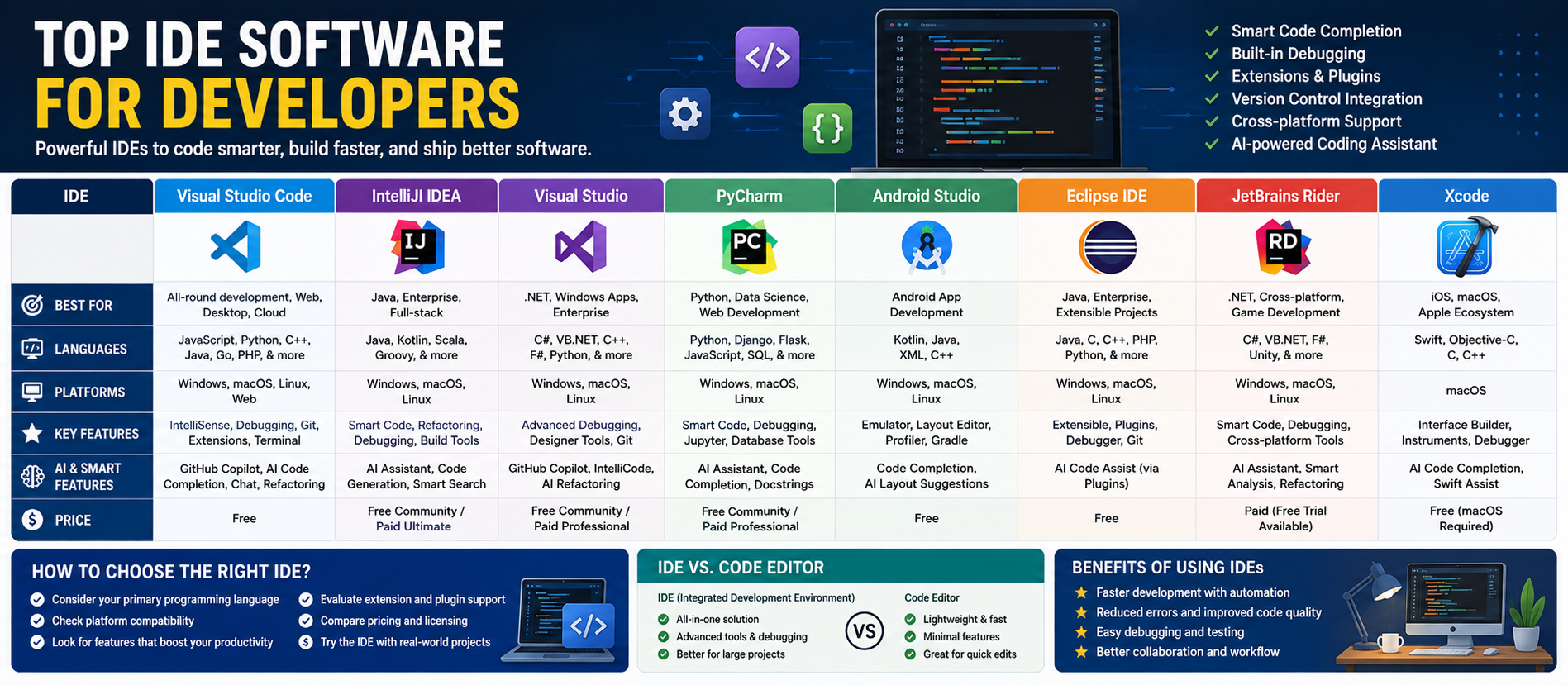
Top IDE Software at a Glance
| Software Best For Main Strength | ||
| Visual Studio Code | Multi-language and web development | Extensions, customization, AI, and broad language support |
| IntelliJ IDEA | Java and Kotlin | Deep code intelligence and productive development tools |
| Visual Studio | .NET, C++, Windows, enterprise | Comprehensive Microsoft development environment |
| PyCharm | Python, web, data, AI/ML | Dedicated Python tooling and integrated workflows |
| Android Studio | Android development | Official Android development environment |
| Xcode | Apple platforms | Development for iOS, macOS, watchOS, and related platforms |
| Eclipse IDE | Java and extensible enterprise projects | Long-established plugin ecosystem |
| JetBrains Rider | .NET and game development | Cross-platform .NET tooling and deep code analysis |
1. Visual Studio Code: Best for Flexibility and Multi-Language Development
Visual Studio Code, often called VS Code, is a free and open-source code editor that can become a powerful development environment through extensions. It supports major languages such as JavaScript, TypeScript, Python, C#, C++, Java, HTML, and CSS, with additional language and framework support available through its extension ecosystem.
VS Code includes editing, debugging, source control, an integrated terminal, testing support, profiles, remote development options, and extensive customization. Developers can also work with AI-powered suggestions and agents. Current VS Code workflows can combine traditional hands-on coding with AI agents that plan changes, edit project files, run commands, and help validate work.
Best for: Web developers, full-stack developers, students, freelancers, startups, DevOps teams, and developers who work across several programming languages.
Main advantages:
- Free and open-source core editor.
- Available for Windows, macOS, and Linux.
- Large extension ecosystem.
- Support for many programming languages.
- Integrated Git and source control.
- Integrated terminal and debugging.
- Remote development and browser-based options.
- AI assistance and agent workflows.
- Highly customizable profiles, themes, and settings.
Potential limitation: A new installation may require several extensions and configuration steps before it feels like a complete environment for a specialized technology stack.
2. IntelliJ IDEA: Best for Java and Kotlin Development
IntelliJ IDEA is a JetBrains IDE focused strongly on Java and Kotlin development. It is designed to help developers work efficiently through intelligent code completion, navigation, inspections, refactoring, debugging, and integrated development tools.
For large Java projects, deep project awareness can make a significant difference. IntelliJ IDEA is especially useful when developers need to understand complex codebases, navigate dependencies, safely refactor code, and work with modern backend frameworks.
JetBrains positions IntelliJ IDEA as a professional environment for Java and Kotlin, with productivity, code quality, and integrated development capabilities as central parts of the product.
Best for: Java developers, Kotlin developers, backend engineers, enterprise application teams, and developers working with JVM technologies.
Main advantages:
- Deep Java and Kotlin support.
- Intelligent code completion.
- Advanced navigation and search.
- Refactoring tools.
- Code inspections and quick fixes.
- Debugger and testing tools.
- Framework and build tool support.
- AI-assisted development options.
Potential limitation: It can use more system resources than a lightweight editor, especially on very large projects or older hardware.
3. Visual Studio: Best for .NET, Windows, and Enterprise Development
Visual Studio is a full-featured integrated development environment commonly used for C#, .NET, C++, Windows applications, web applications, cloud-connected services, and enterprise software development.
It provides an integrated workflow for editing, building, debugging, testing, profiling, and working with larger solutions. Developers can also use extensions and Microsoft ecosystem tools to support Azure, databases, game development, and application lifecycle workflows.
Best for: .NET developers, C++ developers, Windows application teams, enterprise software teams, and developers who prefer a full traditional IDE.
Main advantages:
- Strong .NET and C# development tools.
- Advanced debugging.
- Integrated testing and diagnostics.
- Project and solution management.
- Support for C++ and native development.
- Microsoft ecosystem integration.
- Extensions and enterprise tooling.
Potential limitation: Visual Studio is a large application and may be more than a developer needs for simple scripts or lightweight web projects.
4. PyCharm: Best IDE for Python Development
PyCharm is a dedicated Python IDE from JetBrains. It is designed for Python development but also supports broader workflows involving web development, databases, Jupyter notebooks, data science, and AI or machine learning projects.
PyCharm provides context-aware code completion, type-related assistance, debugging, testing, refactoring, profiling, and database tools. JetBrains also integrates AI capabilities and coding agents into its current development environment. PyCharm's modern product direction includes support for Python, Jupyter, Git, Conda, PyTorch, TensorFlow, Hugging Face, Django, Flask, FastAPI, SQL, and other development tools.
Best for: Python developers, data scientists, AI and machine learning developers, backend teams, and Django or Fast API projects.
Main advantages:
- Dedicated Python support.
- Smart code completion and inspections.
- Integrated debugger.
- Testing and refactoring tools.
- Jupyter notebook support.
- Database and SQL tools.
- Data science and AI ecosystem support.
- Web framework support.
Potential limitation: Developers who only write small Python scripts may prefer a lighter editor.
5. Android Studio: Best for Android App Development
Android Studio is the primary development environment for building Android applications. It is designed around the Android development ecosystem and provides tools for code editing, debugging, testing, device emulation, interface design, performance analysis, and application packaging.
It is especially useful for developers building Android applications with Kotlin or Java. Android projects often require platform-specific tools that are easier to manage inside an environment designed for Android development.
Best for: Android app developers and teams building mobile applications for Android devices.
Main advantages:
- Android-focused development workflow.
- Kotlin and Java support.
- Android device emulator.
- UI and layout development tools.
- Debugging and testing.
- Build integration.
- Performance and profiling tools.
Potential limitation: It can be resource-intensive, especially when running emulators and large projects.
6. Xcode: Best for Apple Platform Development
Xcode is Apple's development environment for creating applications across Apple platforms. It supports languages and technologies used for iOS, macOS, watch OS, and related development workflows.
Developers use Xcode for editing, interface development, building, testing, debugging, simulator-based testing, and preparing applications for Apple ecosystems.
Best for: iOS developers, macOS developers, and teams building software for Apple platforms.
Main advantages:
- Native Apple development environment.
- Swift and Objective-C workflows.
- Integrated simulators.
- Debugging and testing tools.
- Interface development support.
- Platform-specific build and deployment workflow.
Potential limitation: Xcode is tied closely to the Apple ecosystem and is not the general-purpose cross-platform choice that VS Code or some JetBrains tools can be.
7. Eclipse IDE: Best for Established Java and Plugin-Based Workflows
Eclipse is a long-established development platform known especially for Java development and its plugin architecture. It has been used extensively in enterprise and academic environments.
The Eclipse ecosystem can support different languages and development workflows through plugins. Many experienced Java developers continue to use Eclipse because of existing team processes, long-term projects, and specialized tooling.
Best for: Java developers, enterprise projects, academic environments, and teams with existing Eclipse-based workflows.
Main advantages:
- Established Java development environment.
- Extensible plugin ecosystem.
- Suitable for long-running enterprise projects.
- Supports multiple technologies through extensions.
- Large historical developer community.
Potential limitation: The user experience can feel less streamlined than some newer IDEs, depending on the workflow and plugin configuration.
8. JetBrains Rider: Best Cross-Platform IDE for .NET
JetBrains Rider is a cross-platform IDE for .NET development and is also used in game development workflows. It supports technologies including C#, .NET, ASP.NET, web technologies, Unity, Unreal Engine, Godot, and other related tools.
Rider provides intelligent code editing, inspections, quick fixes, navigation, debugging, testing, version control, database support, and AI-assisted workflows. JetBrains describes Rider as a cross-platform environment for .NET and game developers, with support across Windows, macOS, and Linux.
Best for: Cross-platform .NET developers, C# developers, Unity teams, and developers who prefer JetBrains tooling.
Main advantages:
- Cross-platform .NET development.
- Deep code analysis and inspections.
- Refactoring and navigation.
- Integrated debugging and testing.
- Game development support.
- Database and version control tools.
- AI-assisted development capabilities.
Potential limitation: Teams should compare licensing and workflow requirements against Visual Studio and VS Code before making a long-term standardization decision.
IDE vs Code Editor: What Is the Difference?
A traditional IDE usually provides a more complete integrated environment with project management, building, debugging, testing, code intelligence, and language-specific tooling built into the product.
A code editor is often lighter and more flexible. Developers can add language servers, debuggers, linters, extensions, and other tools as needed.
The line between these categories is now less clear. VS Code can support many complete development workflows through extensions, while modern IDEs are becoming more customizable and AI-enabled.
How AI Is Changing IDE Software
AI is becoming a major part of software development environments. Modern tools can provide:
- Inline code suggestions.
- Natural language code generation.
- Code explanations.
- Error analysis.
- Automated refactoring suggestions.
- Test generation.
- Documentation assistance.
- Multi-file changes.
- Task planning.
- Command execution.
- Agent-based development workflows.
Visual Studio Code now supports AI agents that can plan, edit, run commands, and iterate on coding tasks, while its extension system also supports additional models, tools, and Model Context Protocol servers.
AI can increase productivity, but developers should still review generated code. An AI suggestion can contain incorrect assumptions, insecure logic, licensing concerns, or code that does not match the project's architecture. Human review, testing, security checks, and version control remain important.
How to Choose the Best IDE
1. Start with Your Main Programming Language
Your primary language is one of the best starting points. Java and Kotlin developers may prefer IntelliJ IDEA. Python developers may prefer PyCharm. .NET developers may choose Visual Studio or Rider. Android developers should strongly consider Android Studio, while Apple platform development requires Xcode.
2. Consider Project Size
A lightweight editor may be perfect for a small website or script. A large enterprise application may benefit from deep indexing, code analysis, solution-wide navigation, and advanced refactoring.
3. Check Operating System Support
If the development team uses Windows, macOS, and Linux, cross-platform availability matters. VS Code and Rider are examples of tools designed for broad operating system support.
4. Evaluate AI Features
Compare AI assistance carefully. Ask whether the IDE supports inline suggestions, chat, agents, local models, external model providers, codebase context, and organizational controls.
5. Review Debugging and Testing
A good development environment should make it easier to find problems. Check breakpoint support, variable inspection, test runners, profiling, remote debugging, and integration with your deployment environment.
6. Consider Extensions and Ecosystem
An active ecosystem can make an IDE useful for many years. VS Code is especially known for extensibility, while JetBrains IDEs provide specialized tooling for different technology stacks.
7. Test Performance on Your Hardware
Do not select an IDE only from a feature list. Install it and test a real project. Large indexes, language servers, emulators, containers, and AI tools can affect system performance.
Best IDE by Use Case
- Best overall for flexible multi-language work: Visual Studio Code.
- Best for Java and Kotlin: IntelliJ IDEA.
- Best for Python: PyCharm.
- Best for .NET on Windows: Visual Studio.
- Best cross-platform .NET option: JetBrains Rider.
- Best for Android: Android Studio.
- Best for Apple platforms: Xcode.
- Best for established plugin-based Java workflows: Eclipse IDE.
Common Mistakes When Choosing an IDE
Choosing Only by Popularity
The most popular IDE may not be the best for your project. Specialized workflows often benefit from specialized tools.
Installing Too Many Extensions
Extensions are useful, but too many can slow the environment, create conflicts, and make troubleshooting harder.
Ignoring Team Standardization
A development team can lose time when every developer uses completely different tools and settings. Shared formatting, linting, testing, and debugging workflows can improve consistency.
Trusting AI Output Without Review
AI-generated code should be reviewed and tested like any other code contribution.
Using a Heavy IDE for Every Small Task
A full IDE is powerful, but sometimes a lightweight editor starts faster and is easier for a quick task. Use the right level of tooling for the job.
A Practical IDE Setup Workflow
Step 1: Install the Base IDE
Start with the official version for your operating system.
Step 2: Add Only Essential Extensions
Install language support, formatters, linters, testing tools, and version control integrations that your project actually needs.
Step 3: Configure Formatting
Use a shared formatter and configuration file where possible. This helps keep the codebase consistent.
Step 4: Connect Version Control
Configure Git or your team's preferred version control system.
Step 5: Set Up Debugging and Tests
Run the application locally and confirm that debugging and automated tests work before beginning major development.
Step 6: Configure AI Carefully
Review privacy settings, model providers, API keys, code sharing rules, and organizational policies before connecting AI services to private repositories.
IDE Software and SEO, AEO, GEO, and AI Search
Developers often search for direct answers such as:
- What is the best IDE for Python?
- Which IDE is best for Java?
- Is VS Code an IDE?
- What is the best IDE for Android development?
- Which IDE has the best AI coding features?
- Should I use Visual Studio or Rider for .NET?
SEO helps useful development content become discoverable through search engines.
AEO focuses on direct, structured answers to common questions.
GEO helps organize information so it can be understood and surfaced by generative search systems.
AI Search Optimization emphasizes clear headings, direct language, useful comparisons, specific context, and well-organized information.
How Digiifrog Supports Technology Content
Digiifrog creates readable and structured content for technology companies, software businesses, educational organizations, and digital audiences.
- SEO Content Strategy
- AEO and Answer-Focused Content
- GEO and Generative Search Optimization
- AI Search Optimization
- Software and Technology Content
- Business and Digital Growth Content
Frequently Asked Questions
What is the best IDE for beginners?
Visual Studio Code is often a practical choice for beginners because it is flexible, free, and supports many languages. However, beginners working specifically with Android, Python, Java, or Apple platforms may learn faster with Android Studio, PyCharm, IntelliJ IDEA, or Xcode because those tools provide specialized workflows.
Is Visual Studio Code an IDE?
VS Code is technically a code editor, but its debugging, source control, terminal, extension ecosystem, language support, and AI features allow it to support many full development workflows.
What is the best IDE for Python?
PyCharm is one of the strongest dedicated Python IDEs. VS Code is also widely used for Python because of its flexibility and extension ecosystem.
What is the best IDE for Java?
IntelliJ IDEA and Eclipse are major choices for Java development. IntelliJ IDEA is particularly known for deep code intelligence and modern integrated tooling.
Which IDE is best for AI coding?
The answer depends on the preferred workflow. VS Code supports AI suggestions, agents, extensions, model providers, and MCP-based integrations. JetBrains IDEs also provide AI-enhanced development capabilities. Evaluate the exact AI features, privacy requirements, model options, and project context support before choosing.
Should developers pay for an IDE?
A paid IDE can be worthwhile when its code analysis, debugging, refactoring, framework support, or team features save significant development time. Free tools are sufficient for many workflows, so developers should test the available options first.
Conclusion
The top IDE software for developers provides different strengths for different technology stacks.
Visual Studio Code is a highly flexible choice for multi-language and web development. IntelliJ IDEA is a strong environment for Java and Kotlin. Visual Studio remains a comprehensive option for .NET, C++, Windows, and enterprise development. PyCharm provides a focused environment for Python, web, data science, and AI workflows. Android Studio and Xcode are essential choices for their respective mobile and platform ecosystems. Eclipse continues to support established Java workflows, while JetBrains Rider offers powerful cross-platform tooling for .NET and game development.
The best approach is simple: start with your language and project requirements, test the IDE on a real codebase, evaluate debugging and testing, review AI and privacy features, and choose the tool that helps your team work faster without adding unnecessary complexity.
The best IDE is not necessarily the one with the most features. It is the one that fits your development workflow and helps you build reliable software efficiently.
Disclaimer: This article is for general educational and informational purposes. IDE features, AI capabilities, licensing, pricing, platform support, and product availability can change. Review current official documentation before making a purchasing, deployment, security, or software standardization decision.
Digiifrog
Website: www.digiifrog.com
Ready to Grow?
Talk to us about a strategy tailored to your brand — we will help you stand out in search, AI discovery and social.


Comments (0)
Log in to leave a comment.