📋 Quick Summary
In this article:
Why Web Design Matters More in 2026
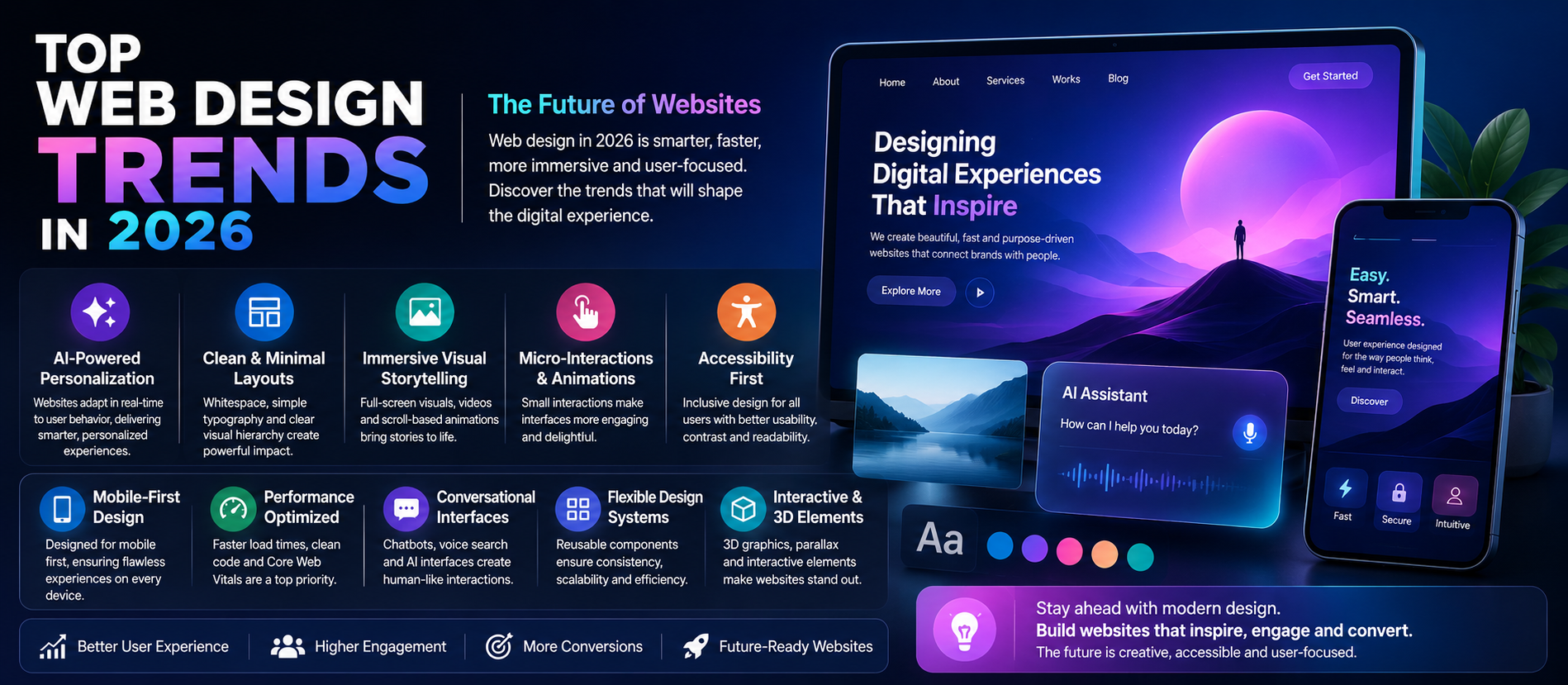
1. AI-Powered Personalization
2. Cleaner Layouts and Strong Visual Hierarchy
3. Immersive Visual Storytelling
4. Purposeful Micro-Interactions
5. Bold Typography and Strong Brand Personality
6. Accessibility-First Design
7. Mobile-First Experiences
Focus Keyword: Top Web Design Trends in 2026
The top web design trends in 2026 are changing the way businesses think about websites. A modern website is no longer just a digital brochure. It is a sales platform, customer experience, content hub, brand asset, and increasingly a source of information that can be discovered through traditional search and AI-powered search experiences.
The most successful web design in 2026 balances visual creativity with usability. Businesses are moving beyond decorative design and focusing on websites that load efficiently, work across devices, provide clear information, support accessibility, and make it easy for visitors to take action.
Designfo helps businesses build modern digital experiences through website design and development, SEO, conversion optimization, content strategy, AEO, GEO, AI Search Optimization, and digital marketing.
Why Web Design Matters More in 2026
Customers often form an impression of a business within moments of visiting its website. If the design is confusing, slow, cluttered, or difficult to use on mobile, visitors may leave before understanding the value of the product or service.
Modern web design therefore needs to support several goals at the same time:
- Create a strong first impression
- Communicate the value proposition quickly
- Help users find information easily
- Build trust and credibility
- Support conversions
- Perform well on mobile devices
- Remain accessible to a broad range of users
- Support SEO and AI-powered search discovery
Google's current guidance continues to emphasize helpful, people-first content and a strong overall page experience. Good Core Web Vitals, mobile usability, security, clear main content, and the absence of intrusive distractions all contribute to a better user experience.
1. AI-Powered Personalization
AI-powered web design is becoming more practical as businesses use data and automation to create more relevant experiences. Personalization can include showing different content, recommendations, calls to action, or journeys based on user needs and context.
Examples of Personalization
- Relevant product recommendations
- Personalized content suggestions
- Location-aware service information
- Industry-specific landing page content
- AI-powered support and guidance
- Dynamic calls to action
💡 Key Insight
Personalization should remain useful and transparent. A website does not need to change every element for every visitor. Start by improving important journeys where relevance can genuinely reduce friction.
2. Cleaner Layouts and Strong Visual Hierarchy
One of the most important web design trends in 2026 is simplicity with purpose. Clean design does not mean empty design. It means giving important information enough space and creating a clear visual path.
Visitors should quickly understand:
- What the business offers
- Who it is for
- What makes it different
- What action to take next
Clear headings, whitespace, readable typography, grouped information, and focused calls to action can make a website easier to understand.
3. Immersive Visual Storytelling
High-quality visual storytelling is becoming more important as businesses compete for attention. Instead of relying only on stock images, modern websites can use product demonstrations, authentic photography, custom illustrations, motion, short videos, and interactive visual elements.
Useful Visual Content
- Product demonstrations
- Before-and-after examples
- Short explainer videos
- Interactive illustrations
- Customer stories
- Data visualizations
- Behind-the-scenes content
Visual elements should support the message rather than slow down or distract from the main purpose of the page.
4. Purposeful Micro-Interactions
Small interactive details can make a website feel responsive and intuitive. These are often called micro-interactions.
- Button feedback
- Form validation cues
- Progress indicators
- Subtle hover effects
- Confirmation animations
- Interactive navigation states
The key word is purposeful. Excessive animation can distract visitors, increase loading costs, and create accessibility issues. The best micro-interactions provide feedback and help users understand what is happening.
5. Bold Typography and Strong Brand Personality
Typography is becoming a more prominent design element. Large, readable headings can communicate brand personality and help visitors scan a page quickly.
A strong typography system should include a limited number of font styles, clear heading levels, comfortable line spacing, and sufficient contrast. The goal is not to make every heading dramatic. The goal is to establish hierarchy and make information easier to consume.
6. Accessibility-First Design
Accessible web design is an important part of creating a better digital experience. A website should be designed so more people can understand, navigate, and interact with it.
Accessibility Considerations
- Readable text and adequate contrast
- Clear focus states
- Keyboard-friendly navigation
- Descriptive form labels
- Meaningful image alternatives where needed
- Logical heading structure
- Captions or alternatives for relevant media
Accessibility also supports clearer design and can improve usability for all visitors, including people using mobile devices, keyboards, screen readers, or different network conditions.
7. Mobile-First Experiences
Mobile-friendly design is no longer a secondary requirement. Many visitors will first interact with a business through a smartphone.
A mobile-first web design process considers smaller screens from the beginning. Important information, navigation, forms, and calls to action should remain easy to use without requiring excessive zooming or scrolling through unnecessary elements.
Mobile Design Priorities
- Responsive layouts
- Readable font sizes
- Touch-friendly controls
- Fast loading assets
- Simple forms
- Clear navigation
- Visible calls to action
8. Faster Websites and Performance-Focused Design
A visually impressive website can still fail if visitors must wait too long for important content or interactions. Performance is therefore a major design consideration.
Google recommends considering page experience broadly, including good Core Web Vitals, secure delivery, mobile usability, and avoiding excessive ads or intrusive interstitials.
Performance Improvements May Include
- Optimized images
- Appropriate video delivery
- Efficient code
- Reduced unnecessary scripts
- Better caching
- Lazy loading where appropriate
- Careful use of animation and third-party tools
Design and development teams should test performance throughout the project instead of treating speed as a final-stage task.
9. Conversational Interfaces and AI Assistants
More websites are experimenting with conversational interfaces that help visitors find information, compare options, or receive support. An AI assistant can be useful when it solves a real navigation or support problem.
However, an AI chatbot should not hide important information that users could otherwise access easily. The website should still provide clear pages, navigation, pricing information, documentation, and contact options.
10. Modular and Scalable Design Systems
Businesses with growing websites increasingly benefit from reusable design systems. Instead of designing every new page from scratch, teams can build reusable components for buttons, cards, forms, sections, navigation, and content blocks.
Benefits of a Design System
- More consistent branding
- Faster page creation
- Easier maintenance
- Better collaboration between design and development
- More scalable websites
A practical design system does not need to be overly complex. Even a well-organized component library can create significant efficiency.
11. Interactive Content and Tools
Static pages remain useful, but interactive content can help visitors understand complex information. Calculators, product configurators, quizzes, comparison tools, interactive demos, and planning tools can create genuine value.
The best interactive experiences solve a problem. A mortgage calculator, service cost estimator, product comparison tool, or ROI calculator may be more valuable than an animation added only for visual novelty.
12. Authentic and Human-Centered Design
As AI-generated content and imagery become more common, authenticity can become a stronger differentiator. Real team photos, genuine customer stories, first-hand experience, original research, and transparent business information can help build trust.
Modern design should create space for evidence. Testimonials, case studies, expert profiles, process explanations, and original visuals can make a website feel more credible than generic marketing claims.
13. Dark Mode and User-Controlled Preferences
Dark interfaces continue to be useful for certain products and audiences, but dark mode should be treated as a design option rather than a universal trend. When appropriate, websites can respect system preferences or provide user controls.
The same principle applies to motion, font size, and other preferences. Giving users reasonable control can improve comfort and accessibility.
14. Data Visualization and Scannable Information
Modern users often scan before they read deeply. Tables, comparison blocks, diagrams, timelines, charts, and well-structured summaries can make complex information easier to understand.
Visualizing information should not remove important context. Provide enough explanation for users to understand what the data means and where it comes from.
15. Designing for SEO, AEO, GEO, and AI Search
Website design and search optimization are becoming more closely connected. A visually attractive website still needs clear, accessible, crawlable information.
For SEO, use descriptive page titles, clear headings, logical internal links, useful text, and technically accessible content. For AEO, organize information so common customer questions can be answered clearly. For GEO and AI Search Optimization, focus on unique expertise, accurate information, useful images and videos, and strong technical foundations.
Google's current 2026 guidance makes an important point: generative AI visibility does not require special “AEO/GEO hacks.” Foundational SEO, crawlable content, a good page experience, and unique, valuable information remain the practical priorities.
16. Semantic HTML and Clear Content Structure
Behind a polished visual interface, the website should also have a clear structure. Meaningful HTML elements and logical heading organization can support accessibility and help users and systems understand the content.
Google's current AI optimization guidance notes that semantic HTML is generally useful for human readability and for technologies such as screen readers, while perfect code validity is not required for Google to understand a page.
17. Trust-Focused Conversion Design
In 2026, good conversion design is less about aggressive pop-ups and more about reducing uncertainty. Visitors want to understand what will happen when they click, submit a form, start a trial, or make a purchase.
Useful Trust Elements
- Clear pricing or pricing explanations
- Customer testimonials
- Case studies
- Secure payment indicators where relevant
- Transparent policies
- Team and company information
- Clear contact options
- Simple next steps
Trust should be built through real evidence, not decorative badges without context.
Common Web Design Mistakes to Avoid in 2026
- Using excessive animation that slows the site.
- Designing only for desktop screens.
- Hiding important information behind AI chat interfaces.
- Using low-contrast or difficult-to-read typography.
- Adding too many competing calls to action.
- Publishing visually attractive but thin content.
- Copying every design trend without considering the brand.
- Ignoring accessibility.
- Using large unoptimized images and videos.
- Building separate pages for every possible AI query variation.
- Relying on generic AI-generated content without original expertise.
How Designfo Helps Businesses Build Modern Websites
Designfo combines design, technology, search visibility, and conversion strategy to create websites designed for modern customer behavior.
Designfo Services
- Professional Website Design
- Responsive Web Development
- UI and UX Design
- Landing Page Development
- Website Performance Optimization
- SEO and Technical SEO
- Conversion Rate Optimization
- Content Strategy
- AEO, GEO, and AI Search Optimization
- Digital Marketing and Marketing Automation
Frequently Asked Questions
What are the biggest web design trends in 2026?
Important trends include AI-assisted personalization, cleaner layouts, immersive visual storytelling, purposeful micro-interactions, accessibility-first design, mobile-first experiences, faster performance, conversational interfaces, reusable design systems, and interactive tools.
Is AI changing web design?
Yes. AI is helping teams improve personalization, content workflows, customer support, prototyping, and automation. However, human strategy, usability testing, brand direction, and quality control remain important.
Is SEO still important for modern web design?
Yes. A modern website should make useful information easy for people and search systems to discover. Clear structure, crawlable content, good technical foundations, and a strong page experience remain important.
Should every website use animations?
No. Animation should have a purpose, such as providing feedback, explaining a process, or improving orientation. Excessive motion can distract users and reduce performance.
Does AI Search Optimization require a completely different website?
No. Google's current guidance emphasizes that foundational SEO best practices remain relevant. Focus on unique and valuable content, crawlable pages, clear technical structure, useful multimedia, and a good overall page experience.
Conclusion
The top web design trends in 2026 are not simply about futuristic visuals. The strongest websites combine creativity with clarity, performance, accessibility, trust, and measurable business goals.
Businesses should use trends selectively. AI personalization, interactive tools, immersive media, design systems, and conversational interfaces can all add value when they solve real customer problems. At the same time, strong foundations such as responsive design, fast performance, useful content, and clear navigation remain essential.
For long-term visibility, modern web design should also support SEO, AEO, GEO, and AI Search Optimization through clear structure, crawlable content, original expertise, and a satisfying page experience.
Designfo
Website: www.designfo.in
Ready to Grow?
Talk to us about a strategy tailored to your brand — we will help you stand out in search, AI discovery and social.
Comments (0)
Log in to leave a comment.