📋 Quick Summary
In this article:
Quick Answer: What Is the Best Calendar and Scheduling Software?
What Is Calendar and Scheduling Software?
Why Businesses Need Better Scheduling Tools
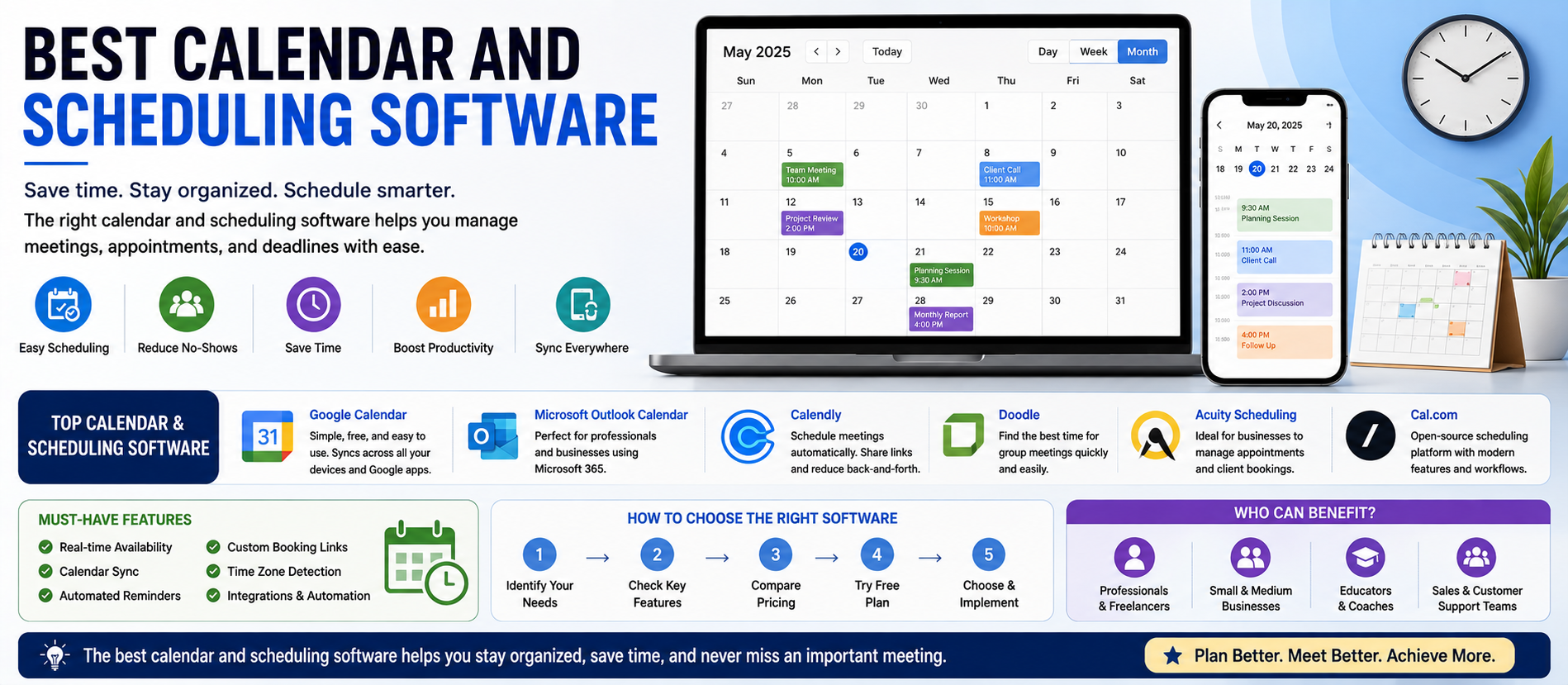
Best Calendar and Scheduling Software at a Glance
1. Google Calendar: Best for Google Workspace Users
2. Microsoft Outlook Calendar: Best for Microsoft 365 Organizations
3. Calendly: Best for Automated Meeting Scheduling
4. Doodle: Best for Finding a Time for a Group
5. Acuity Scheduling: Best for Appointment-Based Businesses
6. Cal.com: Best for Flexible Scheduling Workflows
7. Click Up and Project-Based Calendar Planning
8. AI-Powered Calendar and Planning Tools
Managing time has become more complicated. A typical workday may include internal meetings, client calls, project deadlines, personal appointments, video conferences, and tasks that require uninterrupted focus.
A good calendar helps organize these commitments. A good scheduling platform goes further. It can show availability, prevent double booking, automate reminders, collect booking information, coordinate teams, and reduce the long email conversations that often happen when people try to find a suitable meeting time.
This guide compares the main types of calendar and scheduling software and explains how to choose the right tool for your needs.
Digiifrog creates clear, structured, and search-friendly content about technology, business, education, and digital growth. Our content strategy considers SEO, AEO, GEO, and AI Search Optimization.
Quick Answer: What Is the Best Calendar and Scheduling Software?
There is no single best option for everyone. Google Calendar is a strong choice for people and teams already using Google Workspace. Microsoft Outlook Calendar works well for organizations built around Microsoft 365. Calendly is a focused choice for automated meeting booking. Doodle is useful for finding a time that works for groups. Acuity Scheduling is designed for appointment-based businesses, while Cal.com can appeal to teams that want a more flexible or developer-friendly scheduling approach.
The right choice depends on whether your main problem is calendar management, appointment booking, group coordination, task planning, or team scheduling.
What Is Calendar and Scheduling Software?
Calendar software helps users organize events, deadlines, meetings, reminders, and availability.
Scheduling software focuses on coordinating time between people. It can allow someone to select an available time without manually exchanging several emails.
Modern platforms often combine both functions.
Common features include:
- Personal and shared calendars.
- Meeting invitations.
- Availability sharing.
- Online booking pages.
- Time-zone support.
- Automated reminders.
- Video conferencing links.
- Team and round-robin scheduling.
- Group availability polls.
- Appointment forms.
- Payment collection.
- Task and project calendar views.
- AI-assisted time blocking and planning.
Why Businesses Need Better Scheduling Tools
Scheduling problems may look small, but they create repeated friction.
A salesperson may spend time coordinating discovery calls. A consultant may need clients to book appointments. A recruiting team may need several interviewers to share availability. A service business may need to manage staff appointments, reminders, and payments.
Scheduling software can automate parts of this process.
The potential benefits include:
- Less back-and-forth communication.
- Fewer double bookings.
- Faster meeting coordination.
- Automatic reminders.
- Better customer experience.
- More consistent team processes.
- Improved visibility into schedules.
- Support for global time zones.
Best Calendar and Scheduling Software at a Glance
| Software Best For Main Strength | ||
| Google Calendar | Google Workspace users | Simple calendar management and collaboration |
| Microsoft Outlook Calendar | Microsoft 365 organizations | Email, calendar, Teams, and Microsoft ecosystem integration |
| Calendly | Client and team meeting automation | Booking links, workflows, routing, and integrations |
| Doodle | Group scheduling | Availability polls and meeting coordination |
| Acuity Scheduling | Appointment-based businesses | Client booking and service scheduling workflows |
| Cal.com | Flexible and customizable scheduling | Developer-friendly and adaptable booking workflows |
| Click Up Calendar | Teams connecting work and schedules | Tasks, deadlines, and calendar planning |
| AI planning tools | Time blocking and focus management | Automatic task and schedule optimization |
1. Google Calendar: Best for Google Workspace Users
Google Calendar is one of the most familiar calendar tools for individuals and organizations. It works closely with Gmail, Google Meet, Google Drive, Contacts, and the wider Google Workspace ecosystem.
Its strengths are simplicity and collaboration. Users can create events, invite participants, manage shared calendars, set reminders, and schedule meetings with video links.
Best for: Individuals, startups, schools, and businesses already using Google Workspace.
Main advantages:
- Easy event creation.
- Shared calendars.
- Google Meet integration.
- Strong Gmail and Workspace connection.
- Useful across desktop and mobile devices.
Consider carefully: Google Calendar is primarily a calendar. Businesses that need advanced client booking, routing, payments, or complex scheduling automation may need an additional scheduling platform.
2. Microsoft Outlook Calendar: Best for Microsoft 365 Organizations
Microsoft Outlook combines email and calendar management in a familiar business environment. It is especially useful for organizations that already use Microsoft 365, Teams, Exchange, and other Microsoft services.
Teams can schedule meetings, manage invitations, view availability, and connect meetings with the wider Microsoft productivity environment.
Best for: Companies and teams using Microsoft 365.
Main advantages:
- Email and calendar in one ecosystem.
- Microsoft Teams integration.
- Enterprise administration and security options.
- Shared calendar workflows.
- Strong integration with Microsoft productivity tools.
Consider carefully: External appointment booking may require Microsoft Bookings or a third-party scheduling platform depending on the workflow.
3. Calendly: Best for Automated Meeting Scheduling
Calendly is designed to reduce scheduling friction. Users can connect calendars, define availability, create event types, share a booking link, and allow invitees to select an appropriate time.
Calendly also supports automated reminders and follow-ups, routing forms, team scheduling, round-robin events, collective events, website embeds, and integrations with many business tools.
Best for: Consultants, sales teams, agencies, recruiters, customer-facing teams, and professionals who schedule many meetings.
Main advantages:
- Simple booking links.
- Availability rules and buffers.
- Google and Microsoft calendar connections.
- Video conferencing integrations.
- Automated workflows.
- Routing and team scheduling options.
- Large integration ecosystem.
Consider carefully: Calendly is strongest when booking automation is the main need. It is not intended to replace a complete project management platform.
4. Doodle: Best for Finding a Time for a Group
Group scheduling can be difficult when several people have different calendars. Doodle is known for helping groups compare availability and identify a suitable meeting time.
This can be useful when the organizer does not want to send many separate booking links or manually check every participant's schedule.
Best for: Committees, teams, workshops, group meetings, and external coordination.
Main advantages:
- Group availability coordination.
- Polling-style scheduling.
- Useful for meetings with many participants.
- Reduces long email chains.
Consider carefully: If you need client-facing appointment booking with advanced automation, another platform may be a better primary tool.
5. Acuity Scheduling: Best for Appointment-Based Businesses
Appointment scheduling is different from ordinary meeting coordination. A business may need customers to select a service, choose a staff member, complete an intake form, receive reminders, and sometimes make a payment.
Acuity Scheduling is designed for appointment-based workflows.
Best for: Consultants, coaches, service providers, wellness businesses, instructors, and businesses that manage client appointments.
Main advantages:
- Client self-booking.
- Appointment management.
- Scheduling forms.
- Reminder workflows.
- Payment-related scheduling options.
Consider carefully: A service business should test the complete customer journey, including booking, cancellation, reminders, staff assignment, and payment requirements.
6. Cal.com: Best for Flexible Scheduling Workflows
Cal.com is a scheduling platform that can appeal to teams looking for flexibility and customization. It supports booking workflows that connect calendars and availability while offering options that may suit technical teams and businesses building scheduling into their own products.
Best for: Technical teams, startups, agencies, and organizations that need flexible scheduling workflows.
Main advantages:
- Flexible scheduling approach.
- Calendar connections.
- Booking workflows.
- Potential for deeper customization.
- Useful for teams with technical resources.
Consider carefully: More flexibility can also mean more setup decisions. A simple business may prefer a platform that requires less configuration.
7. ClickUp and Project-Based Calendar Planning
Some teams do not only need meetings on a calendar. They need to connect tasks, deadlines, projects, resources, and schedules.
Project management platforms with calendar views can help teams understand when work is due and how meetings relate to ongoing projects.
Best for: Teams that want scheduling connected directly to work management.
Main advantages:
- Task and deadline visibility.
- Project-based planning.
- Team coordination.
- Calendar views connected to work items.
Consider carefully: A project calendar does not always provide the same client self-booking features as dedicated appointment software.
8. AI-Powered Calendar and Planning Tools
A newer category of software focuses on AI-assisted time management. These tools may automatically schedule tasks, protect focus time, move lower-priority work, and reorganize a plan when meetings change.
This approach can be useful for people who have many tasks competing for limited calendar space.
However, AI planning is not magic. The quality of the schedule depends on accurate priorities, realistic deadlines, and clear availability rules.
Best for: Busy professionals and teams that use time blocking and structured task planning.
Calendar Software vs Scheduling Software
These categories overlap, but they solve slightly different problems.
Calendar software answers: “What is happening and when?”
Scheduling software answers: “How can another person choose an appropriate time?”
Many businesses use both.
For example, a consultant may use Google Calendar to manage the full workday and Calendly to allow clients to book available meeting times.
How to Choose the Right Software
1. Identify Your Main Scheduling Problem
Do not start with a feature list. Start with the problem.
- Too many booking emails?
- Frequent double bookings?
- Difficulty finding a group meeting time?
- Too many missed appointments?
- Need to connect meetings with a CRM?
- Need to manage staff availability?
- Need to schedule tasks and focus time?
The best software is the one that removes the biggest source of friction.
2. Check Calendar Compatibility
Make sure the platform works with your existing calendar system. Common environments include Google Calendar, Microsoft Outlook, Exchange, and Apple Calendar.
Real-time availability synchronization is important because outdated calendar information can lead to double booking.
3. Review Time-Zone Handling
Global teams and international clients need clear time-zone conversion. Test the booking experience from different locations before choosing a platform.
4. Review Automation
Useful automation can include:
- Confirmation messages.
- Reminder emails.
- SMS reminders.
- Follow-up messages.
- Automatic video links.
- CRM updates.
- Lead routing.
5. Evaluate Team Scheduling
Teams may need round-robin assignment, collective availability, pooled scheduling, staff calendars, or routing based on customer information.
6. Check Integration Requirements
Your scheduling tool may need to connect with:
- CRM systems.
- Email platforms.
- Video conferencing tools.
- Payment systems.
- Marketing automation.
- Project management software.
- Website forms.
7. Think About the Customer Experience
A booking page should be simple. Too many questions or unnecessary steps can reduce completion rates.
A Simple Scheduling Workflow for Businesses
Step 1: Define Appointment Types
Create clear categories such as a 15-minute introduction, 30-minute consultation, 60-minute strategy session, or product demonstration.
Step 2: Set Availability Rules
Decide working hours, buffers, minimum notice, maximum advance booking, and daily meeting limits.
Step 3: Connect Calendars
Connect all relevant calendars so the system can check real availability.
Step 4: Add Conferencing or Location Details
For online meetings, automatically create a video meeting link. For in-person appointments, provide clear location information.
Step 5: Add Confirmation and Reminder Messages
Automated communication can reduce missed appointments and ensure participants know what to expect.
Step 6: Connect Business Systems
Where needed, send booking information to a CRM, help desk, project system, or marketing automation workflow.
Step 7: Review Scheduling Data
Look for patterns such as high cancellation rates, common booking times, overloaded staff, or meeting types that consume too much time.
Common Scheduling Mistakes
Allowing Back-to-Back Meetings All Day
A calendar can look efficient while leaving no time for preparation, follow-up, or focused work. Use buffers where appropriate.
Offering Too Many Meeting Types
Too many options can confuse clients. Keep choices simple and meaningful.
Ignoring Time Zones
Always check how the booking page displays time for international participants.
Not Testing the Booking Experience
Complete a test booking from a user's perspective. Check confirmation messages, calendar updates, video links, reminders, and cancellation rules.
Using Automation Without Rules
Automation can create unnecessary meetings if availability rules are too open. Define boundaries before publishing a booking link.
AI and the Future of Scheduling
AI is increasingly being used to assist with time management. Instead of only storing events, software can help suggest meeting times, protect focus blocks, reorganize tasks, and respond to schedule changes.
💡 Key Insight
The future of scheduling is likely to involve more context-aware automation. However, users should remain in control of priorities, deadlines, permissions, and important decisions.
A useful AI scheduling system should make time management clearer, not create another layer of complexity.
Security and Privacy Considerations
Calendar information can reveal sensitive business details. Before adopting scheduling software, review:
- Calendar access permissions.
- What event information is shared externally.
- Data retention practices.
- Administrator controls.
- Single sign-on requirements.
- Third-party integrations.
- Compliance requirements relevant to your business.
Only connect the data and systems that are genuinely required for the workflow.
Best Software by Use Case
Best for Everyday Calendar Management
Google Calendar is a practical choice for people using Google services, while Outlook Calendar is a natural choice for Microsoft 365 environments.
Best for Client Meeting Automation
Calendly is a strong option when the main goal is to reduce back-and-forth and automate the booking process.
Best for Group Scheduling
Doodle can be useful when many participants need to identify a time that works.
Best for Appointment Businesses
Acuity Scheduling is worth evaluating when client appointments, service selection, intake workflows, and booking management are important.
Best for Flexible Technical Workflows
Cal.com can be worth considering for teams that need greater flexibility and customization.
Best for Work and Task Planning
Project and task platforms with calendar views can be useful when deadlines and scheduled work need to live together.
How Calendar and Scheduling Content Supports SEO, AEO, GEO, and AI Search
People searching for scheduling software often ask direct questions.
- What is the best calendar software for a small business?
- What is the best appointment scheduling software?
- How can clients book meetings automatically?
- Which calendar works best with Microsoft 365?
- How do I prevent double bookings?
SEO helps useful content appear for relevant search queries.
AEO focuses on answering specific questions clearly and directly.
GEO helps create structured information that is easier to use in generative search experiences.
AI Search Optimization emphasizes clear language, logical headings, direct answers, useful context, and information that is easy for both people and AI systems to understand.
How Digiifrog Supports Technology and Business Content
Digiifrog develops clear and structured digital content for businesses, technology platforms, educational organizations, and online audiences.
- SEO Content Strategy
- AEO and Answer-Focused Content
- GEO and Generative Search Optimization
- AI Search Optimization
- Software and Technology Content
- Business and Digital Growth Content
Frequently Asked Questions
What is the best calendar software?
The best calendar software depends on your existing ecosystem. Google Calendar is a practical option for Google users, while Outlook Calendar is a strong choice for Microsoft 365 organizations.
What is the best software for scheduling meetings?
Calendly is widely used for automated meeting scheduling because it allows users to share availability, create event types, automate reminders, and connect with business tools.
What is the difference between a calendar and a scheduling tool?
A calendar organizes your events and availability. Scheduling software helps other people select a suitable time based on the availability rules you define.
Can scheduling software prevent double bookings?
When correctly connected to your calendars and configured with real-time availability, scheduling software can help reduce double bookings. You should still test the synchronization and rules before relying on the system.
Is AI scheduling useful?
AI scheduling can be useful for automatically organizing tasks, focus time, and changing priorities. It works best when the user provides realistic deadlines and clear priorities.
What should a small business look for in scheduling software?
Start with calendar compatibility, ease of use, booking pages, reminders, integrations, staff scheduling needs, customer experience, and total cost.
Conclusion
The best calendar and scheduling software is not the platform with the longest feature list. It is the one that makes your time easier to manage.
Google Calendar and Microsoft Outlook Calendar are strong foundations for everyday schedule management. Calendly is useful for automated client and team meeting booking. Doodle can simplify group coordination. Acuity Scheduling can support appointment-based businesses. Cal.com can offer flexibility for teams that need customizable scheduling workflows. AI planning tools can help users organize tasks and protect focus time.
Start by identifying the scheduling problem you need to solve. Then test the full workflow before making the tool part of your business operations.
The best scheduling system should reduce administrative work, protect valuable time, and make booking simple for everyone involved.
Disclaimer: This article is for general educational and informational purposes. Software features, pricing, plans, integrations, AI capabilities, and availability can change. Review current official vendor information before selecting a product or purchasing a subscription.
Digiifrog
Website: www.digiifrog.com
Ready to Grow?
Talk to us about a strategy tailored to your brand — we will help you stand out in search, AI discovery and social.

Comments (0)
Log in to leave a comment.