📋 Quick Summary
In this article:
Quick Answer: What Is the Best Software for Virtual Classrooms?
What Is Virtual Classroom Software?
What Features Should a Good Virtual Classroom Include?
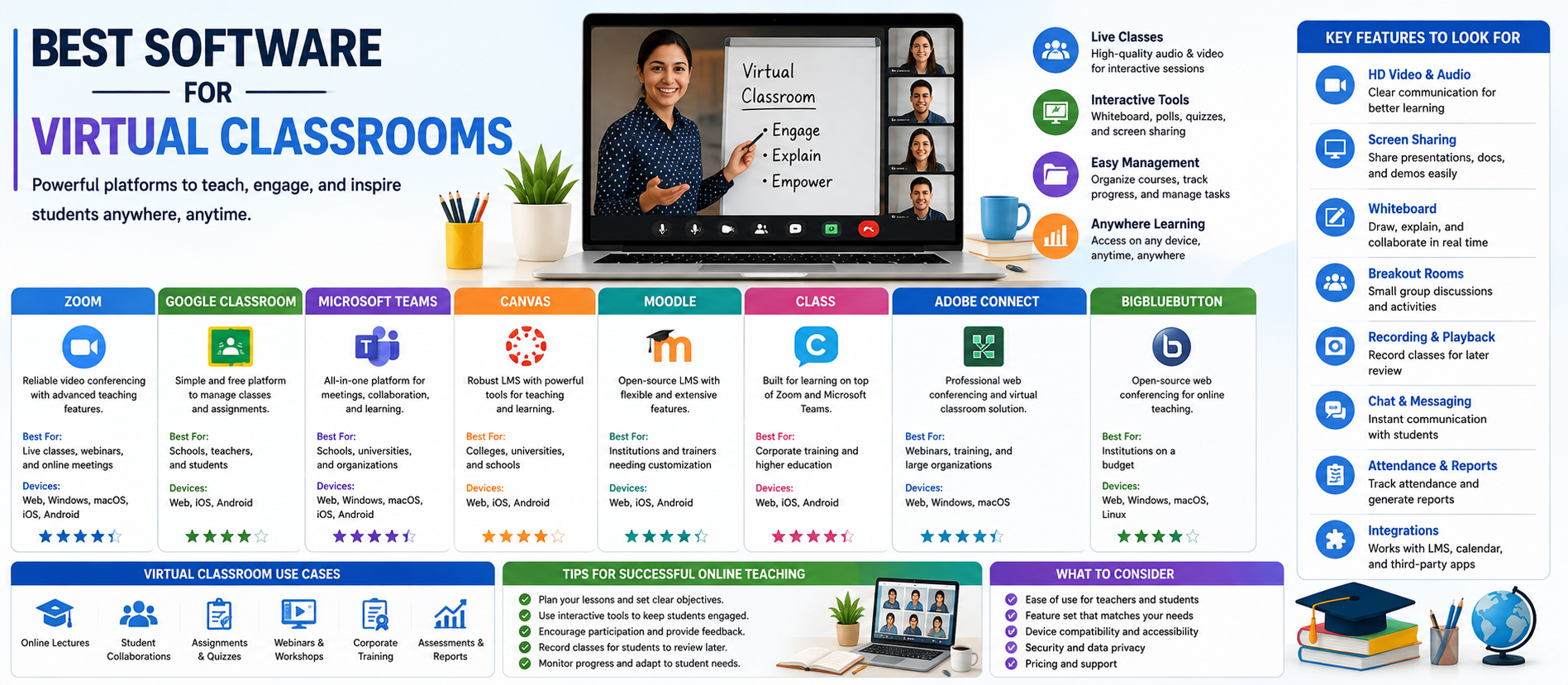
Best Virtual Classroom Software at a Glance
1. Zoom: Best for Live and Hybrid Virtual Classrooms
2. Google Classroom: Best for Simple Course and Assignment Management
3. Microsoft Teams for Education: Best for Microsoft-Based Institutions
4. Canvas: Best for Structured Learning and Course Delivery
5. Moodle: Best for Flexible and Customizable LMS Workflows
6. Class: Best for Live Instructor-Led Learning
7. Adobe Connect: Best for Configurable Enterprise Virtual Learning
8. Big Blue Button: Best for Education-Focused Open-Source Virtual Classrooms
💡 Key Insight
Virtual classrooms have become an important part of modern education and professional training. Schools, colleges, universities, tutors, coaching centers, and corporate learning teams now use digital platforms to teach, communicate, share resources, assess learners, and collaborate from different locations.
However, choosing the right platform can be difficult. Some tools are mainly designed for live video teaching. Others focus on course management, assignments, grades, learning content, and reporting. Some platforms combine virtual classroom features with an LMS, while others integrate with existing systems.
This guide compares the best software for virtual classrooms and explains which tools are suitable for different use cases. The goal is simple: help educators and organizations choose software that supports effective learning without adding unnecessary complexity.
Digiifrog creates clear, structured, and search-friendly content about technology, software, education, and digital growth. Our content strategy considers SEO, AEO, GEO, and AI Search Optimization.
Quick Answer: What Is the Best Software for Virtual Classrooms?
There is no single best platform for every type of online learning. Zoom is a strong choice for live and hybrid teaching, with breakout rooms, polls, whiteboards, recording, captions, transcripts, translation, LMS integration, and AI-supported education workflows. Google Classroom is useful for managing classes, assignments, and learning resources within the Google ecosystem. Microsoft Teams for Education supports lectures, discussions, focused content work, and integration with learning management systems. Canvas and Moodle are strong choices for structured course delivery, while Class is designed specifically to add learning-focused functionality to live instruction on Zoom and Microsoft Teams. Adobe Connect is another option for organizations that need configurable virtual rooms and enterprise-focused learning experiences.
What Is Virtual Classroom Software?
Virtual classroom software is a digital platform that allows teachers and learners to interact online. A complete solution may include live video, audio, chat, screen sharing, whiteboards, breakout groups, assignments, quizzes, attendance, recordings, learning content, and analytics.
A virtual classroom is not always the same as a learning management system. An LMS usually focuses more heavily on organizing courses, content, learners, assignments, assessments, grades, and records. A live classroom platform focuses on real-time teaching and interaction. Many institutions combine both.
For example, Microsoft explains that Teams can support lectures, one-to-one and group discussions, and focused content work, while an LMS such as Canvas, Schoology, Blackboard, D2L Brightspace, or Moodle supports curriculum and class rosters. Zoom can provide the live video and webinar layer.
What Features Should a Good Virtual Classroom Include?
- Live video and audio.
- Screen sharing and presentation tools.
- Chat and learner communication.
- Breakout rooms or small-group collaboration.
- Interactive whiteboards and annotations.
- Polls, quizzes, and other engagement tools.
- Recording and replay.
- Captions, transcripts, and accessibility features.
- Assignment and assessment support.
- Attendance and participation information.
- LMS integration.
- Role-based access and administrative controls.
- Security and privacy settings.
- Analytics and reporting.
- AI tools that genuinely improve teaching or administration.
Best Virtual Classroom Software at a Glance
| PlatformBest ForMain Strength | ||
| Zoom | Live and hybrid education | Video, collaboration, accessibility, AI, and LMS integration |
| Google Classroom | Google-based schools and simple class management | Assignments, class organization, and Workspace integration |
| Microsoft Teams for Education | Microsoft-based institutions | Communication, meetings, collaboration, and LMS connections |
| Canvas | Structured academic and professional learning | Course delivery, assessments, analytics, and integrations |
| Moodle | Customizable LMS deployments | Flexible course management and extensibility |
| Class | Live instructor-led learning | Learning-focused layer built for Zoom and Teams |
| Adobe Connect | Enterprise and configurable virtual learning | Virtual rooms, interaction, and training workflows |
| BigBlueButton | Education-focused open-source workflows | Virtual classroom tools and LMS integration |
1. Zoom: Best for Live and Hybrid Virtual Classrooms
Zoom is widely used for real-time online and hybrid teaching. Its education offering combines meetings, chat, whiteboards, webinars, recordings, integrations, administrative controls, and AI-supported workflows.
For teaching and learning, Zoom highlights breakout rooms, polls, annotations, captions, transcripts, translation, lecture recording, LMS integration, and AI Companion features such as summaries and study-guide support. Zoom also offers an education-focused video management approach for recording, publishing, sharing, and tracking learning content.
Best for: Schools, colleges, universities, tutors, hybrid classrooms, webinars, and organizations that need reliable live interaction.
Main advantages:
- Live video and audio teaching.
- Breakout rooms for group activities.
- Polls, reactions, annotations, and collaboration.
- Whiteboard support.
- Recording and sharing.
- Captions, transcripts, and translation.
- LMS integrations and LTI support.
- AI-supported summaries and learning workflows.
- Administrative and enterprise controls.
Potential limitation: Zoom is strongest as a communication and live learning platform. Institutions with complex curriculum, grading, and long-term course management may still want a dedicated LMS.
2. Google Classroom: Best for Simple Course and Assignment Management
Google Classroom is designed to help educators organize classes and manage learning activities within the Google ecosystem. It can support assignments, communication, shared files, feedback, and integration with other Google tools.
It is often a practical choice for institutions already using Google Workspace because teachers and students can work within familiar tools.
Best for: Schools, teachers, coaching programs, and organizations already using Google Workspace.
Main advantages:
- Simple class organization.
- Assignment workflows.
- Document and file sharing.
- Integration with Google tools.
- Accessible for many students and teachers.
- Useful for blended and asynchronous learning.
Potential limitation: Organizations needing advanced live-classroom controls or a highly specialized enterprise training environment may combine it with a separate video or virtual classroom platform.
3. Microsoft Teams for Education: Best for Microsoft-Based Institutions
Microsoft Teams for Education combines meetings, communication, collaboration, and content work. Microsoft specifically describes Teams as a platform for lectures, one-on-one and group discussions, and focused content work, while supporting connections with LMS platforms.
This can be valuable for institutions that already use Microsoft 365 and want a connected environment for educators, learners, and administrators.
Best for: Schools, colleges, universities, and organizations invested in the Microsoft ecosystem.
Main advantages:
- Online meetings and live discussions.
- Team and class communication.
- Collaboration on documents and content.
- Integration with Microsoft services.
- Connections with major LMS platforms.
- Suitable for distance and hybrid learning.
4. Canvas: Best for Structured Learning and Course Delivery
Canvas is a learning management platform used across academic and professional learning environments. It supports rich course content, multimedia, assessments, feedback, integrations, analytics, mobile access, and broader learning workflows.
Current product information and market listings emphasize Canvas support for course development, assessments, interactive media, credentials, analytics, and integrations with tools such as Google Workspace, Microsoft Teams, Adobe, and Zoom.
Best for: Schools, higher education, certification programs, professional learning, and organizations that need structured course delivery.
Main advantages:
- Course and curriculum management.
- Assignments and assessments.
- Feedback and grading workflows.
- Multimedia learning.
- Analytics and engagement information.
- Large integration ecosystem.
- Mobile access.
Potential limitation: Canvas is an LMS rather than simply a live video classroom. A complete live-learning setup may involve Zoom, Teams, or another integrated platform.
5. Moodle: Best for Flexible and Customizable LMS Workflows
Moodle is widely known as a flexible learning management platform. It is suitable for organizations that want more control over how courses, users, assessments, and integrations are organized.
A Moodle deployment can be combined with live virtual classroom tools such as BigBlueButton and other integrations. This approach can be useful for institutions that want an LMS at the center of their learning technology stack.
Best for: Schools, universities, training organizations, and institutions with technical resources for customization and administration.
Main advantages:
- Flexible course structure.
- Assessment and activity tools.
- Plugin and integration ecosystem.
- Support for different learning models.
- Can be combined with live classroom software.
6. Class: Best for Live Instructor-Led Learning
Class is designed specifically for virtual instructor-led learning. It adds learning-focused functionality to live experiences and integrates deeply with LMS environments while being built for Zoom and Microsoft Teams.
This makes Class particularly relevant when an organization already likes the reliability of Zoom or Teams but needs a more purpose-built environment for instruction and training.
Best for: Universities, professional training teams, corporate learning, and organizations focused heavily on live instructor-led sessions.
Main advantages:
- Designed around live learning.
- Built for Zoom and Microsoft Teams.
- Deep LMS integration.
- Learning-focused virtual experience.
- Suitable for formal instructor-led programs.
7. Adobe Connect: Best for Configurable Enterprise Virtual Learning
Adobe Connect is used for virtual training, webinars, and online learning experiences that require configurable virtual rooms and reusable session environments.
Best for: Enterprises, training organizations, and institutions that want highly structured virtual sessions.
Main advantages:
- Configurable virtual rooms.
- Interactive content areas.
- Polling and engagement tools.
- Training and webinar workflows.
- Support for structured learning experiences.
Potential limitation: It may be more specialized than necessary for a small teacher or a simple tutoring class.
8. BigBlueButton: Best for Education-Focused Open-Source Virtual Classrooms
BigBlueButton is an education-focused virtual classroom platform commonly connected with LMS environments. It can support live teaching, whiteboards, chat, polling, notes, and recorded sessions.
It is particularly useful for institutions that want a platform designed around online teaching rather than general business meetings.
Best for: Educational organizations and technical teams looking for open-source or LMS-centered virtual classroom workflows.
How AI Is Changing Virtual Classroom Software
AI is becoming a practical part of digital learning platforms. Useful AI features can include:
- Lecture and meeting summaries.
- Study-guide generation.
- Content organization.
- Transcription and captions.
- Translation.
- Quiz or assessment assistance.
- Learning analytics.
- Administrative support.
- Content search and retrieval.
Zoom's current education platform highlights AI Companion for lecture summaries and study guides, along with captions, transcripts, translation, and AI-enabled learning tools.
AI can save time, but educators should review generated summaries, assessments, and learning content. AI should support teaching rather than remove the educator's responsibility for accuracy and context.
How to Choose the Best Virtual Classroom Software
1. Start with Your Learning Model
Ask whether your teaching is mainly live, asynchronous, hybrid, or a combination. A live tutoring business may prioritize video and whiteboards. A university may need a complete LMS with assessments and integrations.
2. Measure Student Engagement
Look for breakout rooms, polls, chat, reactions, collaborative documents, whiteboards, quizzes, and participation tools.
3. Check LMS Integration
If you already use Canvas, Moodle, Blackboard, Brightspace, or another LMS, integration can reduce manual work.
4. Review Accessibility
Captions, transcripts, keyboard accessibility, translation, and support for different devices can improve access for learners.
5. Review Security and Administration
Schools and organizations should evaluate authentication, user roles, waiting rooms or access controls, recordings, data policies, and administrative reporting.
6. Test the Student Experience
A platform can have many features but still be difficult to use. Test joining a class, accessing content, submitting work, using chat, and viewing recordings from the learner's perspective.
7. Compare Total Cost, Not Only Subscription Price
Consider training, implementation, integrations, support, administration, hardware, storage, and future scaling.
Best Platform by Use Case
- Best for live and hybrid teaching: Zoom.
- Best for simple Google-based class management: Google Classroom.
- Best for Microsoft-based institutions: Microsoft Teams for Education.
- Best for structured course delivery: Canvas.
- Best for flexible LMS customization: Moodle.
- Best for purpose-built instructor-led learning: Class.
- Best for configurable enterprise virtual sessions: Adobe Connect.
- Best for education-focused open-source workflows: BigBlueButton.
A Simple Virtual Classroom Setup Process
Step 1: Define Learning Goals
Decide what learners should know or be able to do after the course.
Step 2: Choose the Core Platform
Select the live platform, LMS, or combined system based on your teaching model.
Step 3: Build a Clear Class Structure
Organize sessions, resources, assignments, recordings, and assessments so learners know where to find everything.
Step 4: Prepare Engagement Activities
Use polls, questions, breakout discussions, quizzes, collaborative tasks, and feedback instead of relying only on long lectures.
Step 5: Set Security Rules
Configure access, participant permissions, recordings, moderation, and institutional policies before launching the course.
Step 6: Train Educators and Learners
Short onboarding guides can prevent many technical problems.
Step 7: Measure and Improve
Review attendance, participation, assessment outcomes, technical issues, and learner feedback.
Common Mistakes to Avoid
Choosing Software Only Because It Is Popular
A popular meeting tool may not provide the assessments, reporting, integrations, or administrative controls your institution needs.
Using Too Many Platforms
When students must move constantly between unrelated applications, the learning experience becomes confusing.
Ignoring Accessibility
Captions, transcripts, readable materials, and accessible navigation should be part of planning from the beginning.
Turning Every Lesson into a Long Video Call
Online learners need interaction. Break content into manageable sections and add activities.
Using AI Without Human Review
AI-generated summaries and learning materials can contain mistakes or miss important context.
Virtual Classroom Software and SEO, AEO, GEO, and AI Search
Users frequently search for direct answers such as:
- What is the best software for virtual classrooms?
- Which platform is best for online teaching?
- What is the difference between an LMS and a virtual classroom?
- Is Zoom good for education?
- Which software is best for live online classes?
- How do I choose a virtual classroom platform?
SEO helps educational and software content become discoverable through search engines.
AEO focuses on clear, direct answers to common questions.
GEO helps structure information for generative search experiences.
AI Search Optimization emphasizes clear headings, direct explanations, structured comparisons, useful context, and readable language.
How Digiifrog Supports Education and Technology Content
Digiifrog creates structured and readable content for education companies, software businesses, technology brands, training organizations, and digital audiences.
- SEO Content Strategy
- AEO and Answer-Focused Content
- GEO and Generative Search Optimization
- AI Search Optimization
- Education and EdTech Content
- Software and Technology Content
Frequently Asked Questions
What is the best software for virtual classrooms?
The best choice depends on the learning model. Zoom is strong for live and hybrid teaching. Google Classroom is useful for simple class management. Microsoft Teams is suitable for Microsoft-based institutions. Canvas and Moodle are strong LMS options, while Class adds learning-focused functionality to live instruction.
What is the difference between a virtual classroom and an LMS?
A virtual classroom mainly supports real-time interaction, while an LMS focuses on managing courses, learners, content, assignments, assessments, and learning records. Many institutions use both together.
Is Zoom good for virtual teaching?
Yes. Zoom provides live teaching tools including breakout rooms, polls, annotations, recordings, captions, transcripts, translation, whiteboards, LMS integration, and education-focused AI features.
Which virtual classroom software is best for schools?
The best option depends on the existing technology stack. Google Classroom can fit Google-based schools, Microsoft Teams can fit Microsoft 365 environments, and Zoom can provide live and hybrid teaching. Larger institutions may combine an LMS such as Canvas or Moodle with a live classroom platform.
Can AI improve virtual learning?
AI can help with summaries, transcription, translation, study support, analytics, and administrative tasks. However, educators should review AI-generated output and maintain control over learning quality.
Do I need an LMS for online classes?
Not always. A tutor running live sessions may only need a video platform and file-sharing workflow. A school or large training organization usually benefits from an LMS when it needs structured content, assignments, assessments, grades, and reporting.
Conclusion
The best software for virtual classrooms depends on how you teach and what your learners need.
Zoom is a strong option for interactive live and hybrid learning. Google Classroom can simplify course organization within Google-based environments. Microsoft Teams supports meetings, discussions, collaboration, and LMS-connected distance learning. Canvas and Moodle provide stronger course-management foundations. Class focuses on purpose-built live instruction, while Adobe Connect and Big Blue Button can fit more specialized training and education workflows.
The best strategy is not to choose the platform with the longest feature list. Choose the platform that fits your learning model, technical environment, budget, accessibility needs, security requirements, and level of administrative support.
A successful virtual classroom combines the right software with clear teaching, active participation, accessible content, reliable processes, and continuous improvement.
Disclaimer: This article is for general educational and informational purposes. Software features, AI capabilities, pricing, licensing, integrations, privacy settings, and product availability can change. Review current official documentation and institutional requirements before making a purchasing or deployment decision.
Digiifrog
Website: www.digiifrog.com
Ready to Grow?
Talk to us about a strategy tailored to your brand — we will help you stand out in search, AI discovery and social.
Comments (0)
Log in to leave a comment.