📋 Quick Summary
In this article:
What Is a Social Media Management Tool?
1. Buffer: Simple and Easy to Start
2. Hootsuite: Broad All-in-One Management
3. Sprout Social: Strong Analytics and Social Intelligence
4. Later: Strong Choice for Visual Content
5. SocialPilot: Agency and Client Management
Analytics and Reporting Comparison
Social Inbox and Community Management
AI Features in Social Media Management Tools
Team Collaboration and Approval Workflows
Introduction
Managing social media becomes difficult when a business uses several platforms. Teams must plan posts, create content, schedule campaigns, answer messages, review performance, and prepare reports. Doing all of this manually can waste time and create inconsistent publishing.
Social media management tools bring many of these tasks into one workspace. They can help with scheduling, publishing, analytics, engagement, content planning, approvals, and reporting. Some also add AI writing assistance, social listening, trend insights, and customer-care features.
There is no single best tool for every business. Creators may need simple scheduling, agencies may need approvals, and larger companies may need listening and advanced analytics.
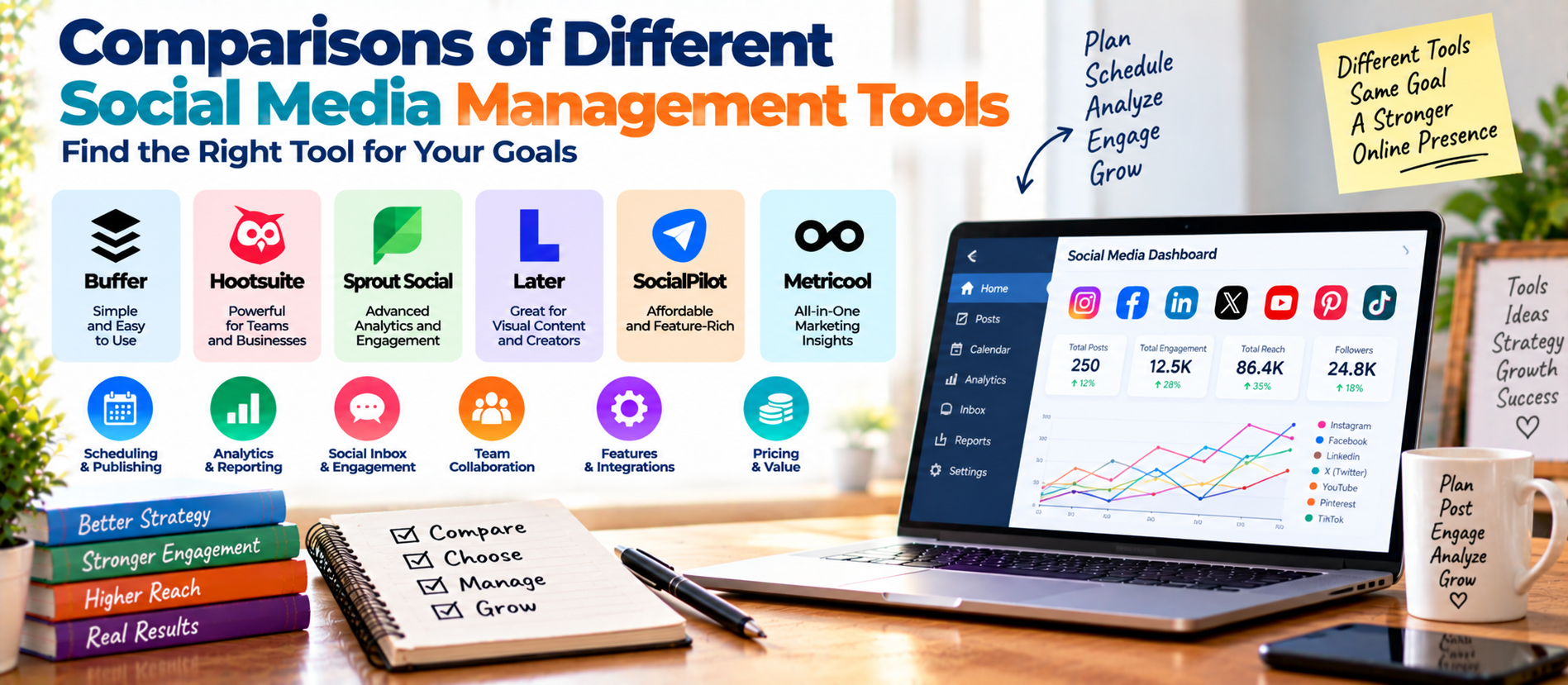
This guide compares popular options including Buffer, Hootsuite, Sprout Social, Later, SocialPilot, and Metricool. The comparison focuses on practical use rather than simply listing features. Tool features and pricing can change, so verify current plans before purchasing.
What Is a Social Media Management Tool?
A social media management platform helps you manage social activity from a central dashboard. Instead of logging into every network separately, you can often plan content, publish posts, review messages, and analyze results from one place.
Modern platforms commonly include calendars, scheduling, analytics, collaboration, media libraries, and AI assistance. Advanced products may add listening, competitive monitoring, approvals, and custom reporting.
Quick Comparison
| ToolBest ForMain StrengthWatch For | |||
| Buffer | Creators and small teams | Simple scheduling and analytics | Less suited to advanced enterprise workflows |
| Hootsuite | Growing teams and enterprises | Publishing, inbox, listening, analytics | Higher cost and broader feature set to learn |
| Sprout Social | Data-focused teams | Analytics, engagement, listening | Premium pricing |
| Later | Visual-first brands and creators | Visual planning and multi-platform publishing | Best fit depends on channel mix |
| SocialPilot | Agencies and multi-client teams | Approvals, reporting, multi-account management | May be more than a solo user needs |
| Metricool | Budget-conscious marketers | Planning and cross-channel analytics | Advanced enterprise needs may require another platform |
1. Buffer: Simple and Easy to Start
Buffer is a strong option for people who want a straightforward publishing workflow. Its current product emphasizes scheduling, content planning, engagement, and analytics. Buffer also provides tools for organizing ideas and reviewing performance across connected platforms.
Its main advantage is simplicity. A small business owner or creator can build a posting queue without learning a large enterprise system.
Best for: solo creators, freelancers, small businesses, and teams that mainly need reliable publishing and basic-to-moderate analytics.
Key strengths: clean workflow, scheduling, content planning, analytics, and relatively easy onboarding.
Potential limitation: businesses that require deep social listening, complex governance, or advanced customer-care workflows may eventually need a larger platform.
2. Hootsuite: Broad All-in-One Management
Hootsuite is designed for teams that want publishing, engagement, analytics, listening, and collaboration in one system. Its current standard offering includes scheduled publishing, a drag-and-drop calendar, a unified inbox, analytics, social listening, AI-powered insights, and approval features.
Best for: medium-sized teams, agencies, larger organizations, and businesses managing many conversations and channels.
Key strengths: broad feature coverage, unified inbox, social listening, reporting, collaboration, and automation.
Potential limitation: a small team that only needs scheduling may pay for features it does not use.
3. Sprout Social: Strong Analytics and Social Intelligence
Sprout Social is built for teams that need to connect publishing, engagement, analytics, and social intelligence. Its analytics tools include cross-network reporting, report building, premium analytics, listening, influencer marketing, and Smart Inbox capabilities.
Best for: mid-market and enterprise teams, organizations with strong reporting requirements, and businesses that need deeper social insights.
Key strengths: reporting, analytics, engagement management, listening, and measurement.
Potential limitation: its premium positioning can make it difficult to justify for very small businesses with simple requirements.
4. Later: Strong Choice for Visual Content
Later has strong roots in visual content planning and is useful for brands that depend heavily on images and short-form video. Its current tools include auto-publishing, analytics, visual planning, video scheduling, best-time recommendations, hashtag suggestions, and Link in Bio features.
Best for: creators, lifestyle brands, ecommerce teams, Instagram-focused marketers, and businesses that also publish on Tik Tok, Pinterest, LinkedIn, YouTube, or other supported networks.
Key strengths: visual calendar, content planning, publishing, analytics, and creator-friendly workflows.
Potential limitation: teams looking primarily for enterprise listening or highly complex governance should compare it with larger platforms.
5. Social Pilot: Agency and Client Management
Social Pilot is especially relevant to agencies and teams managing several client accounts. Its feature set includes scheduling, analytics, advanced reports, bulk import, content libraries, team management, AI assistance, approvals, and client collaboration.
Best for: agencies, freelancers with multiple clients, and businesses managing several brands.
Key strengths: client workflows, approvals, reporting, multi-account management, and white-label options.
Potential limitation: a single business with only a few social profiles may not need its broader agency-oriented capabilities.
Analytics and Reporting Comparison
Analytics should show which content formats, topics, platforms, and campaigns produce meaningful results.
Basic metrics include reach, impressions, engagement, follower growth, clicks, video views, and post performance. More advanced platforms can support cross-network reporting, competitive benchmarks, custom reports, and deeper audience insights.
Sprout Social and Hootsuite are strong choices for teams that need extensive reporting. Social Pilot is attractive for agencies that need client-ready reports. Buffer works well when straightforward performance analysis is enough.
Social Inbox and Community Management
Publishing is only one part of social media. Customers may ask questions through comments and direct messages. A unified inbox can reduce the need to switch between platforms.
Hootsuite provides a unified inbox across supported channels. Sprout Social offers Smart Inbox functionality. Social Pilot also provides a social inbox for comments and messages.
If customer service is a major part of your social strategy, give inbox capabilities high priority.
AI Features in Social Media Management Tools
AI is now part of many social management platforms. Common uses include caption ideas, content rewriting, post variations, scheduling recommendations, trend analysis, summaries, and performance insights.
AI can save time, but it should not replace strategy. Automatically generated content can become repetitive. It can also make inaccurate claims or produce posts that sound generic.
Use AI to accelerate research, ideation, drafting, and analysis. Keep human review for brand voice, facts, customer communication, and sensitive topics.
Google's current guidance for AI-assisted web content emphasizes accuracy, quality, relevance, and original value. The same principle is useful for social media: automation should improve the work, not create large amounts of low-value content.
Team Collaboration and Approval Workflows
Approval workflows become important when several people are involved. A typical process may include a writer, designer, social manager, account manager, and client.
Without a central approval system, teams often rely on email, spreadsheets, chat messages, and scattered files. This creates mistakes.
Social Pilot is especially relevant for client approval and multi-account workflows. Hootsuite and other larger platforms also provide collaboration and approval features.
Which Tool Is Best for Small Businesses?
A small business should usually start with simplicity. If the business has only a few social profiles and one person manages them, Buffer or Metricool may be enough. Later can be attractive for a visual-first brand.
Which Tool Is Best for Agencies?
Agencies have different needs. They may manage dozens of profiles, require client approvals, produce monthly reports, and need role-based access.
Social Pilot is a strong candidate because its current feature set emphasizes client management, approvals, reporting, multi-account management, and white-label workflows.
Hootsuite and Sprout Social are also worth evaluating when an agency needs broader engagement, listening, analytics, or enterprise capabilities.
Which Tool Is Best for Enterprise Teams?
Enterprise teams usually need more than scheduling. They may require governance, advanced reporting, social listening, customer care, multiple regions, approval controls, and integrations.
Hootsuite and Sprout Social are strong options to investigate. The right choice depends on the number of users, channels, regions, reporting requirements, and customer-care workflow.
How to Choose the Right Social Media Management Tool
Use this simple decision process:
- List your platforms. Include every network you actually use.
- Count your accounts. Include client and brand accounts.
- Define your workflow. Decide who creates, reviews, approves, and publishes.
- Define your reporting needs. Decide whether basic analytics or executive reports are required.
- Assess engagement. If you receive many messages, prioritize a unified inbox.
- Assess listening. If reputation monitoring matters, look for social listening.
- Check AI features. Choose features that solve real workflow problems.
- Calculate total cost. Include users, profiles, add-ons, and reporting costs.
- Test before buying. Use a trial or free version when available.
SEO, AEO, GEO, and Social Media Tools
Social management software does not automatically improve SEO or AI Search visibility. It helps you execute and measure content distribution.
Your website still needs strong technical SEO, useful content, internal links, good page experience, and clear information. Google's current guidance says existing SEO fundamentals remain foundational for AI Overviews and AI Mode. It also recommends useful, reliable, people-first content rather than special AI-search tricks.
Social media can support this strategy by distributing content, generating audience feedback, building brand awareness, and identifying questions worth answering on your website.
Best Tool by Use Case
| Need Strong Option to Consider Why | ||
| Simple scheduling | Buffer | Clean, accessible workflow |
| All-in-one management | Hootsuite | Publishing, inbox, listening, analytics |
| Advanced analytics | Sprout Social | Strong reporting and social intelligence |
| Visual content | Later | Visual planning and creator workflows |
| Agency management | Social Pilot | Approvals, clients, reports, multiple accounts |
| Practical analytics | Metricool | Useful balance of planning and measurement |
Frequently Asked Questions
What is the best social media management tool?
There is no universal winner. Buffer is a good starting point for simple workflows. Hootsuite suits broader management. Sprout Social is strong for analytics and social intelligence. Later fits visual-first teams. Social Pilot is useful for agencies. Metricool is worth considering for practical cross-channel measurement.
Are social media management tools worth it?
They can be valuable when you manage multiple platforms, publish regularly, work with a team, or need consolidated analytics. If you only publish occasionally to one network, a native platform tool may be enough.
Which social media tool is best for agencies?
Agencies should prioritize multi-account management, client approvals, permissions, reporting, and white-label options. Social Pilot is designed around several of these needs, while Hootsuite and Sprout Social may be better for agencies needing deeper listening or enterprise capabilities.
Do social media tools improve SEO directly?
Do not assume that using a scheduling tool directly improves search rankings. The value is operational. Better planning and distribution can increase content reach, engagement, referral traffic, and brand discovery.
Should businesses use AI features in social media tools?
Yes, when the features solve a real problem. Use AI for ideas, drafts, variations, summaries, and analysis. Review the output before publishing, especially for factual, legal, financial, health, or customer-service content.
How often should social media tools be reviewed?
Review your tool when your number of accounts, team size, reporting requirements, or content workflow changes. Also check platform support and pricing before annual renewal.
Final Thoughts
The best social media management tool is the one your team can use consistently and confidently. A solo creator does not need the same platform as a global enterprise. An agency needs different controls from a local business.
Start with your workflow. Identify the platforms, accounts, approval steps, reporting requirements, and engagement volume. Then compare tools based on those needs.
Use automation to reduce repetitive work, but keep strategy and quality under human control. Connect social content with strong website resources to support SEO, AEO, GEO, and AI Search.
For digital marketing, SEO, social media strategy, and AI Search solutions, visit Digiifrog at www.digiifrog.com.
Editorial note: Tool features, supported networks, pricing, and plan limits can change. Check each provider's current official plan page before making a purchase.
Ready to Grow?
Talk to us about a strategy tailored to your brand — we will help you stand out in search, AI discovery and social.

Comments (0)
Log in to leave a comment.