📋 Quick Summary
In this article:
CRM Software vs ERP Software: The Main Difference
CRM vs ERP: Front Office vs Back Office
Why Businesses Need CRM Software
1. Better Lead Management
2. Clear Sales Pipeline
3. Better Customer Service
4. Marketing Automation
5. Better Sales Productivity
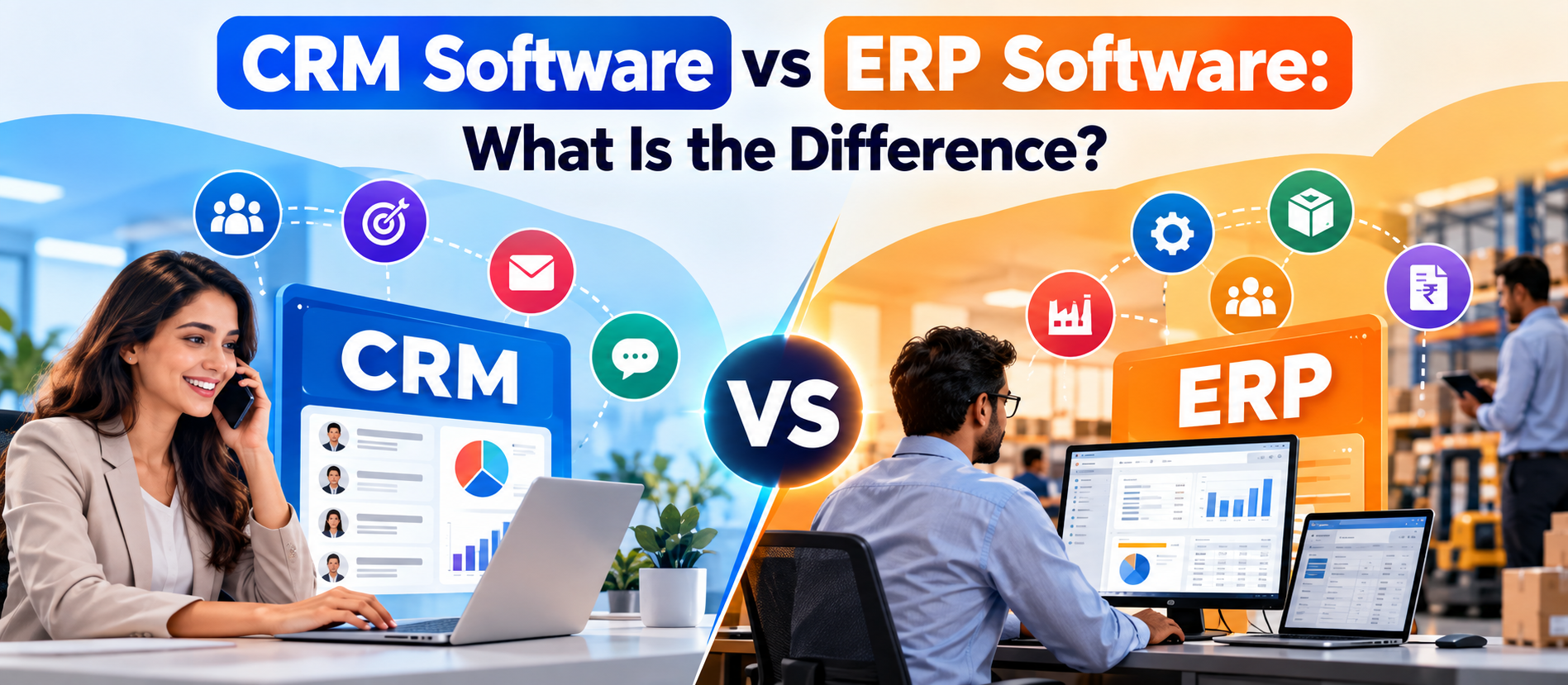
CRM software vs ERP software is a common question for growing businesses. Both systems centralize data, automate work, improve visibility, and help teams make better decisions. But they solve different business problems.
A CRM (Customer Relationship Management) system is mainly built around customers, prospects, sales, marketing, and service. An ERP (Enterprise Resource Planning) system is built around internal operations such as finance, procurement, inventory, supply chain, production, projects, and human resources.
The easiest way to remember the difference is this:
- CRM helps you win, serve, and retain customers.
- ERP helps you run the business behind those customers.
Modern businesses often need both. When CRM and ERP systems are connected, sales, customer service, finance, inventory, and operations can work from consistent information instead of separate spreadsheets and disconnected databases.
What Is CRM Software?
CRM software is designed to manage a company's relationships and interactions with prospects and customers. It gives sales, marketing, and customer service teams a shared place to store customer information and track what happens at every stage of the customer journey.
A CRM can store contact details, company information, sales activities, emails, calls, meetings, leads, opportunities, proposals, service requests, campaign responses, and other customer-related information.
For example, imagine a sales representative speaks with a potential customer today. The CRM can record the conversation, schedule a follow-up, move the opportunity to the next sales stage, and remind the representative about the next action.
CRM systems are especially useful when a company has many leads, customers, sales representatives, campaigns, or customer interactions to manage.
Common CRM Features
- Contact and account management
- Lead management
- Sales pipeline management
- Opportunity tracking
- Email and communication tracking
- Marketing automation
- Customer service and support management
- Sales forecasting
- Reports and dashboards
- Customer segmentation
- Workflow automation
- AI-assisted recommendations and customer insights
What Is ERP Software?
ERP software is designed to connect and manage the internal processes that keep a business operating. Instead of focusing mainly on customer interactions, an ERP focuses on resources, transactions, financial records, operations, and cross-department workflows.
An ERP may connect accounting, purchasing, inventory, supply chain, manufacturing, projects, human resources, compliance, and other operational functions through a shared platform and database.
For example, when a company receives an order, an ERP can help connect that transaction with inventory availability, purchasing requirements, fulfillment, accounting, and financial reporting.
The goal is to create a reliable operational view of the business and reduce duplicated data and manual work.
Common ERP Features
- Accounting and financial management
- Accounts payable and receivable
- Procurement and purchasing
- Inventory management
- Order management
- Supply chain management
- Manufacturing and production planning
- Project management
- Human resources and workforce management
- Budgeting and financial reporting
- Business intelligence and operational reporting
- Workflow and process automation
CRM Software vs ERP Software: The Main Difference
The biggest difference is the business area each system is designed to manage.
| Area CRM Software ERP Software | ||
| Primary focus | Customers and revenue growth | Internal operations and resources |
| Main users | Sales, marketing, customer service | Finance, operations, procurement, HR, supply chain |
| Core data | Leads, contacts, accounts, opportunities, interactions | Transactions, finance, inventory, purchasing, resources |
| Main objective | Win and retain customers | Run the business efficiently |
| Business side | Front office | Back office |
| Typical reports | Pipeline, conversion, sales forecast, customer activity | Profitability, cash flow, inventory, costs, financial performance |
| Typical automation | Lead routing, follow-ups, campaigns, service workflows | Invoices, purchasing, inventory, approvals, accounting workflows |
CRM vs ERP: Front Office vs Back Office
Another simple way to understand the difference is to think about the front office and back office.
The CRM usually supports the front office. It helps teams interact with customers and prospects. Sales teams use it to manage opportunities. Marketing teams use it to manage campaigns and audiences. Customer service teams use it to manage cases and customer history.
The ERP usually supports the back office. It helps the company manage money, products, inventory, procurement, employees, projects, production, and other internal processes.
There can be overlap. Some ERP platforms include CRM modules, and some CRM platforms offer functions that touch orders, billing, or revenue workflows. However, the primary purpose of each system remains different.
Why Businesses Need CRM Software
A business can start with spreadsheets and email. As the customer base grows, that approach becomes harder to manage.
Customer information may be stored in different spreadsheets. Sales representatives may keep private notes. Marketing may have separate campaign data. Customer service may use another application. This creates information gaps.
A CRM creates a shared customer record.
1. Better Lead Management
CRM software helps businesses capture, organize, qualify, assign, and follow up with leads. This reduces the chance of losing potential customers because someone forgot to respond.
2. Clear Sales Pipeline
Sales managers can see opportunities by stage. They can identify deals that are progressing, delayed, or at risk.
3. Better Customer Service
Support teams can access customer history and previous interactions. This can reduce repeated questions and help employees provide more relevant responses.
4. Marketing Automation
Many CRM platforms connect marketing campaigns with customer records. Businesses can segment audiences, automate communications, and measure campaign results.
5. Better Sales Productivity
Automation can reduce repetitive tasks such as data entry, reminders, lead assignment, and routine follow-ups. Salespeople can spend more time on conversations and opportunities.
Why Businesses Need ERP Software
As a business becomes more complex, internal operations can become difficult to manage with separate systems.
Finance may have one database. Inventory may be managed somewhere else. Procurement may use spreadsheets. Operations may maintain another set of records.
An ERP brings important operational information together.
1. Centralized Financial Data
ERP systems can connect accounting and financial processes so authorized teams can work from consistent transaction data.
2. Inventory Visibility
Businesses can track inventory levels, movements, orders, purchasing requirements, and other supply-related information.
3. Better Procurement
ERP workflows can help organizations manage purchase requests, approvals, suppliers, purchase orders, and related financial records.
4. Operational Efficiency
When related processes are connected, employees spend less time transferring information between systems.
5. Better Business Reporting
ERP systems can combine operational and financial data to support reporting, planning, budgeting, and management decisions.
CRM and ERP Integration: Why It Matters
CRM and ERP systems do not always need to be replaced by one platform. In many organizations, the better approach is to connect them.
Consider a simple example.
A salesperson closes a deal in the CRM. The customer, order, and product information may then need to move into operational and financial processes. The ERP can use that information for fulfillment, inventory, invoicing, accounting, and reporting.
⚠ Watch Out
Without integration, employees may have to copy information manually from one system to another. That creates delays and increases the risk of errors.
With integration, relevant information can move between systems automatically or through controlled workflows.
Benefits of CRM-ERP Integration
- Less duplicate data entry
- Better data consistency
- Faster order processing
- Better sales and inventory visibility
- Improved customer service
- More accurate forecasting
- Better coordination between sales and finance
- Stronger reporting across the customer and operational lifecycle
CRM vs ERP: Which One Should You Buy First?
There is no universal answer. The right starting point depends on the biggest problem your business is trying to solve.
Choose CRM First If:
- You are losing leads because follow-up is inconsistent.
- Your sales pipeline is difficult to track.
- Customer information is scattered across spreadsheets and inboxes.
- Your sales team needs better visibility.
- Marketing and sales data are disconnected.
- Customer service needs a shared interaction history.
- You want to automate lead and sales workflows.
Choose ERP First If:
- Financial data is difficult to consolidate.
- Inventory accuracy is a major problem.
- Procurement is heavily manual.
- Multiple departments use disconnected operational systems.
- Production or supply chain processes are becoming complex.
- Management needs stronger financial and operational reporting.
- Manual data transfer is slowing internal processes.
Consider Both If:
- Your company has grown across multiple departments.
- Sales volume and operational complexity are both increasing.
- Customer data and financial data need to work together.
- You need end-to-end visibility from lead to order to payment.
- Different teams are already using separate systems.
CRM vs ERP for Small Businesses
Small businesses do not always need a large enterprise platform on day one. The better approach is to identify the most expensive or damaging operational problem first.
If the main problem is sales follow-up, start with a CRM. If the main problem is accounting, inventory, purchasing, or operational control, an ERP may have more immediate value.
Cloud software can also make it easier to start small and expand later. However, businesses should still check data ownership, integrations, security, user permissions, reporting, scalability, and total cost before choosing a platform.
CRM vs ERP for Growing and Mid-Sized Businesses
Growing businesses often reach a stage where one system is no longer enough.
For example, a company may use a CRM for sales and customer service while using an ERP for accounting, inventory, procurement, and fulfillment.
The challenge then becomes integration.
Teams need clear rules for which system owns each type of data. Customer interaction data may be primarily managed in the CRM. Financial transactions may be controlled by the ERP. Shared data such as customer accounts, products, orders, and invoices may need synchronization.
This design prevents two systems from becoming competing sources of truth.
CRM vs ERP for E-commerce Businesses
E-commerce businesses can benefit from both systems because customer relationships and operations are closely connected.
A CRM can track customer behavior, campaigns, support requests, repeat purchases, and sales opportunities. An ERP can manage inventory, procurement, accounting, fulfillment, suppliers, and financial reporting.
Integration can connect marketing and customer information with operational reality. For example, marketing may promote a product, while ERP data can provide the inventory and order information needed by operations.
CRM vs ERP for B2B Businesses
B2B organizations often have longer sales cycles and more complex operational workflows.
💡 Key Insight
A CRM can manage accounts, decision-makers, opportunities, proposals, activities, and sales stages. Once an opportunity becomes an order, ERP processes may become more important for purchasing, delivery, invoicing, inventory, and financial management.
Connecting the systems can give teams a clearer view of the entire journey.
Can ERP Replace CRM?
Usually, no.
Some ERP platforms include CRM functionality. That may be enough for businesses with simple sales and customer management requirements.
However, companies with advanced sales, marketing, customer service, or customer engagement needs may require a dedicated CRM platform.
The important question is not whether an ERP technically has a CRM module. The question is whether that functionality supports the depth, scale, automation, reporting, and user experience your teams need.
Can CRM Replace ERP?
In most cases, no.
A CRM can manage customer relationships and revenue activities, but a business may still need specialized capabilities for accounting, inventory, procurement, production, supply chain, and other operational functions.
A CRM should not automatically be treated as a replacement for an ERP simply because it offers billing, quoting, or order-related features.
How AI Is Changing CRM and ERP Software
AI is becoming an important layer across modern business software.
In CRM systems, AI can help summarize customer interactions, suggest next actions, score leads, analyze conversations, generate content, and support sales or service teams.
In ERP systems, AI can support forecasting, anomaly detection, document processing, financial workflows, demand planning, operational analysis, and other tasks.
The bigger opportunity comes when AI can work across connected systems. A business may use customer signals from CRM together with inventory, finance, and operational information from ERP to make better decisions.
However, AI should not remove the need for data governance. Businesses still need clear permissions, reliable source data, human oversight, security controls, and measurable business objectives.
CRM vs ERP: Cost and Implementation
Software cost is only one part of the total investment.
Businesses should also consider implementation, data migration, integration, customization, training, administration, support, and ongoing improvements.
CRM projects can sometimes start with one team and expand gradually. ERP projects can affect many departments at the same time, so implementation can be more complex.
Do not choose a system only because its subscription price is lower. The better comparison is total cost of ownership against expected business value.
How to Choose the Right Software
Use a structured process instead of choosing software from a feature list.
- Define the business problem. Identify the process that needs improvement.
- Map the workflow. Document what happens today and where delays or errors occur.
- List required data. Decide which information must be captured and shared.
- Identify users. Include the teams that will actually use the system.
- Review integrations. Check accounting, e-commerce, communication, analytics, payment, and other systems.
- Check scalability. Choose a platform that can support future growth.
- Evaluate security. Review permissions, authentication, auditability, backups, and data controls.
- Calculate total cost. Include licenses, implementation, migration, training, integrations, and support.
- Run a realistic demo. Test your actual workflows rather than generic vendor examples.
- Plan adoption. A technically strong platform can fail if employees do not use it correctly.
CRM Software vs ERP Software: A Simple Example
Imagine a manufacturing company receives a new business inquiry.
The CRM records the prospect, sales conversations, requirements, meetings, proposal, and opportunity stage.
When the customer places an order, the ERP can become central to the next steps. It can manage inventory, purchasing, production planning, shipping, invoicing, and accounting.
If the systems are integrated, the journey can be connected:
Lead → Opportunity → Customer → Order → Inventory/Production → Delivery → Invoice → Payment
This is why CRM and ERP should not always be viewed as competing products. They often manage different parts of the same business journey.
Common Mistakes When Choosing CRM or ERP
- Choosing software based only on price
- Buying too many features before defining business needs
- Ignoring integration requirements
- Keeping duplicate customer or product records
- Underestimating data migration
- Failing to involve employees who will use the software
- Ignoring reporting requirements
- Skipping security and permission planning
- Assuming AI will fix poor-quality data
- Focusing on software selection without planning adoption
CRM vs ERP: Frequently Asked Questions
What is the main difference between CRM and ERP?
CRM focuses mainly on customers, sales, marketing, and service. ERP focuses mainly on internal business operations such as finance, inventory, procurement, supply chain, production, and HR.
Is CRM better than ERP?
Neither is universally better. CRM is better for customer and revenue workflows. ERP is better for internal operations and resource management. The right choice depends on the business problem.
Do small businesses need CRM and ERP?
Not always. A small business may start with one system and add the other as its needs become more complex.
Can CRM and ERP work together?
Yes. Integration can connect customer, order, product, inventory, financial, and operational information across systems.
Which should a growing business implement first?
If sales and customer management are the main challenges, CRM may come first. If finance, inventory, procurement, or operations are the main challenges, ERP may come first.
Does every ERP include CRM?
No. Some ERP platforms include CRM capabilities, while others rely on separate CRM products. The depth of CRM functionality varies by platform.
Does every CRM include ERP features?
No. CRM platforms are primarily designed for customer-facing activities. They generally do not replace the full accounting, inventory, procurement, manufacturing, or operational capabilities of an ERP.
Is CRM-ERP integration important?
It can be very important for growing businesses. Integration reduces duplicate entry and helps teams connect customer activity with orders, inventory, finance, and operations.
Final Thoughts
CRM software vs ERP software is not really a question of choosing the “better” technology. It is a question of choosing the right system for the right business problem.
CRM helps a business manage relationships, sales, marketing, and customer service. ERP helps manage the internal machinery of the business, including finance, procurement, inventory, supply chain, production, projects, and other operations.
As organizations grow, the strongest technology strategy may involve both. CRM can manage the customer-facing journey, while ERP can manage the operational and financial journey. When the systems share reliable data, businesses can create a more connected view from the first customer interaction through delivery, invoicing, and beyond.
For businesses planning digital transformation, the goal should not be to buy the most software. The goal should be to build a simple, connected, secure, and scalable system that helps people work better and make better decisions.
Article by Digiifrog
Digital Marketing, SEO, AI Search, AEO, GEO, Content Marketing and Web Solutions
Ready to Grow?
Talk to us about a strategy tailored to your brand — we will help you stand out in search, AI discovery and social.
Comments (0)
Log in to leave a comment.