📋 Quick Summary
In this article:
1. Malware
2. Virus
3. Ransomware
4. Phishing
5. Spear Phishing
6. Social Engineering
7. Firewall
8. Encryption
9. Authentication
10. Authorization
11. Multi-Factor Authentication
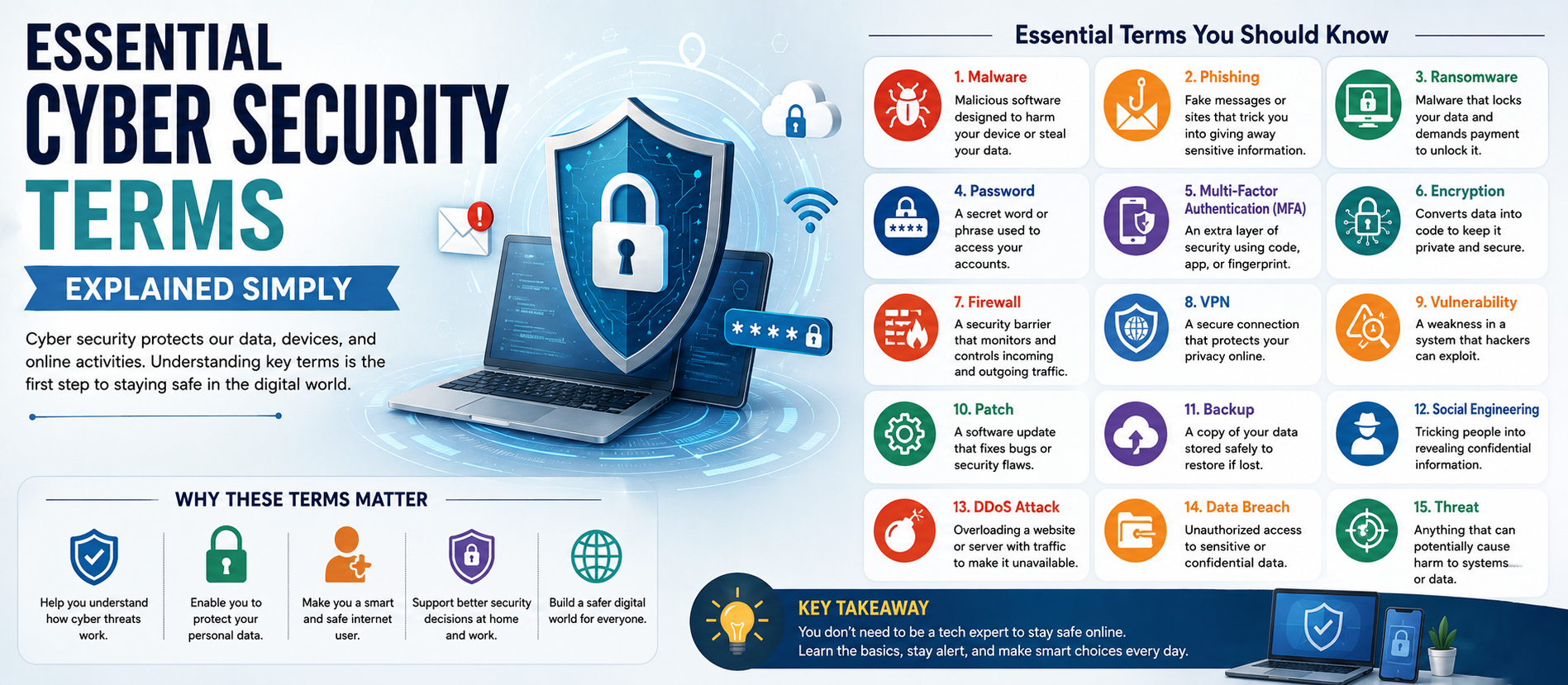
Cyber security can seem complicated because it contains hundreds of technical words and acronyms. Understanding the basic vocabulary helps business owners, employees, students, website administrators, and everyday internet users recognize risks and make better security decisions. This beginner-friendly WordPress-ready guide explains essential cyber security terms in simple language and is optimized for SEO, AEO, GEO, and AI Search.
What Is Cyber Security?
Cyber security is the practice of protecting computers, networks, applications, cloud systems, devices, and data from unauthorized access, attacks, damage, or disruption. It combines technology, policies, processes, and human awareness.
1. Malware
Malware means malicious software designed to damage systems, steal information, spy on users, disrupt operations, or provide attackers with unauthorized access. Viruses, worms, Trojans, spyware, and ransomware are examples.
2. Virus
A computer virus is malicious software that can attach itself to legitimate files or programs and spread when those files are executed.
3. Ransomware
Ransomware can encrypt files or block access to systems and demand payment. Some attackers also steal data before encryption. Strong backups, MFA, patching, endpoint protection, segmentation, and incident response planning can reduce risk.
4. Phishing
Phishing uses fake emails, websites, text messages, or other communications to trick people into revealing information or clicking malicious links. Warning signs include urgency, suspicious links, unexpected attachments, and unusual payment requests.
5. Spear Phishing
Spear phishing is targeted phishing in which an attacker creates a personalized message for a particular person or organization.
6. Social Engineering
Social engineering manipulates people into taking unsafe actions. Attackers may pretend to be executives, banks, vendors, or technical support staff. Awareness training and verification procedures are important defenses.
7. Firewall
A firewall controls network traffic according to security rules. It can help prevent unauthorized connections between trusted and untrusted networks. A firewall is one security layer, not a complete security solution.
8. Encryption
Encryption converts readable information into protected data that requires an appropriate key to decode. It helps protect information when stored and transmitted.
9. Authentication
Authentication verifies who a user, device, or system is. Passwords, security keys, verification codes, and biometrics can provide authentication.
10. Authorization
Authorization determines what an authenticated user or system is allowed to access or do. Authentication asks “Who are you?” while authorization asks “What are you allowed to do?”
11. Multi-Factor Authentication
Multi-Factor Authentication (MFA) requires two or more verification factors. It provides additional protection if a password is stolen and should be enabled on important accounts such as email, cloud platforms, administrator accounts, and remote access.
12. Password Manager
A password manager securely stores and generates passwords, helping users maintain unique passwords for different accounts.
13. VPN
A Virtual Private Network (VPN) creates an encrypted connection between a device and a VPN service or network. VPNs can support privacy and secure remote access when properly configured.
14. Endpoint Security
Endpoint security protects laptops, desktops, smartphones, servers, and other connected devices. Modern tools may provide malware prevention, device control, behavioral monitoring, and threat detection.
15. EDR
Endpoint Detection and Response (EDR) monitors endpoint activity to identify suspicious behavior and support investigation and response.
16. Network Security
Network security protects network infrastructure and traffic from unauthorized access and attacks. Firewalls, segmentation, secure configurations, intrusion detection, and monitoring are common controls.
17. Zero Trust
Zero Trust is a security approach in which access is not automatically trusted simply because a user or device is inside a network. Access is verified and limited according to identity, context, and need.
18. Least Privilege
Least privilege means giving users and systems only the permissions needed for their responsibilities. Limiting unnecessary access can reduce the impact of compromised accounts.
19. Vulnerability
A vulnerability is a weakness in software, hardware, configuration, process, or security controls that could potentially be exploited.
20. Exploit
An exploit is a technique or code that takes advantage of a vulnerability.
21. Patch Management
Patch management is the process of identifying, testing, deploying, and tracking software updates that fix bugs and security weaknesses.
22. Penetration Testing
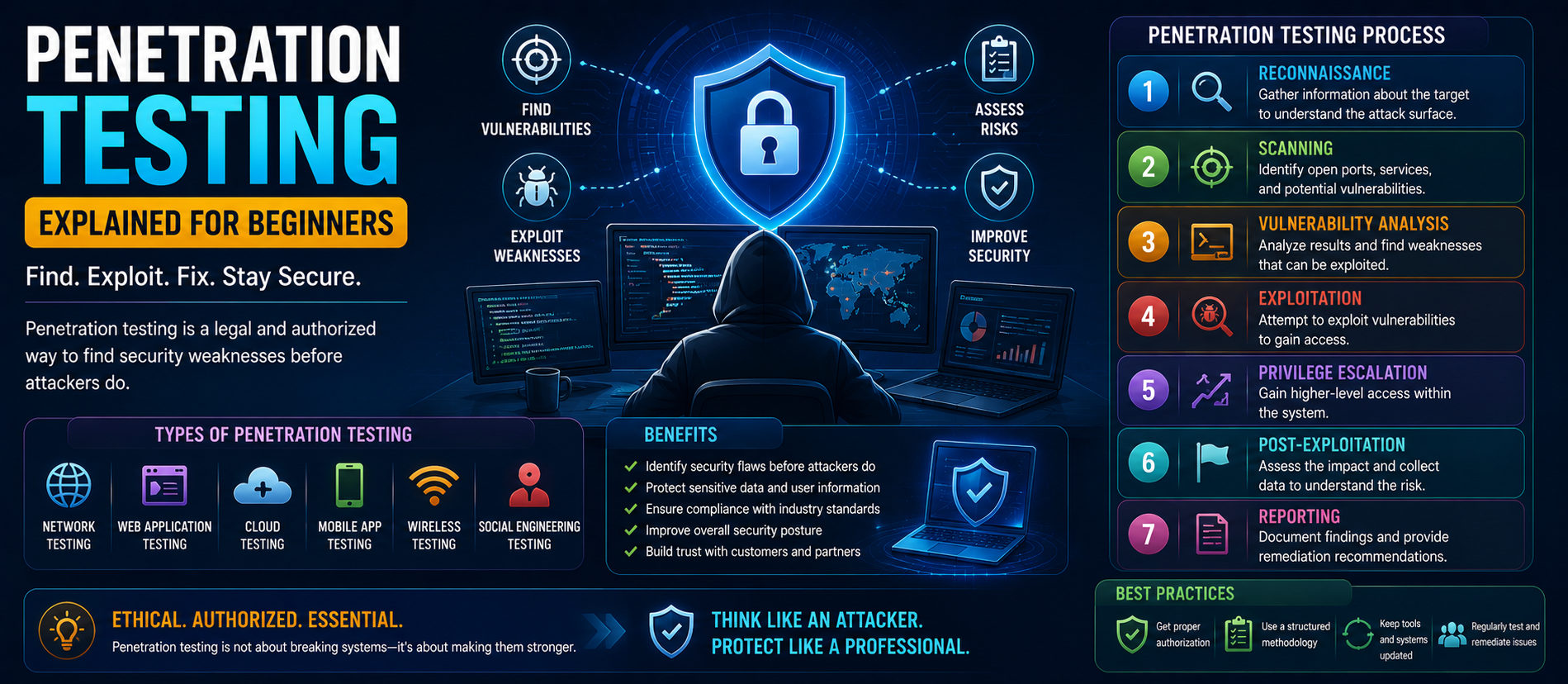
Penetration testing is an authorized security assessment in which professionals simulate realistic attacks to identify weaknesses before malicious attackers can exploit them.
23. Vulnerability Assessment
A vulnerability assessment identifies and prioritizes known weaknesses in systems, applications, networks, or configurations.
24. SIEM
Security Information and Event Management (SIEM) platforms collect and analyze security logs from multiple sources to identify suspicious patterns and support investigations.
25. SOC
A Security Operations Center (SOC) is a team or function responsible for monitoring, detecting, investigating, and responding to security threats.
26. Incident Response
Incident response is the organized process used to detect, contain, investigate, eradicate, and recover from a cyber security incident.
27. Data Breach
A data breach occurs when sensitive, confidential, or protected information is accessed, disclosed, or acquired without authorization.
28. DDoS Attack
A Distributed Denial-of-Service (DDoS) attack attempts to overwhelm a service, network, or application with excessive traffic or requests, making access difficult for legitimate users.
29. Cloud Security
Cloud security protects applications, data, identities, workloads, and infrastructure hosted in cloud environments. Common controls include IAM, encryption, secure configuration, logging, monitoring, and access policies.
30. IAM
Identity and Access Management (IAM) controls digital identities and their access to systems and resources. Strong IAM supports authentication, authorization, least privilege, and account lifecycle management.
31. Security Awareness
Security awareness is employee understanding of cyber risks and safe behavior. Training commonly covers phishing, passwords, MFA, social engineering, data protection, device security, and incident reporting.
32. Backup
A backup is a separate copy of important data used for recovery after deletion, hardware failure, ransomware, or another incident. Backups should be protected and regularly tested.
33. Disaster Recovery
Disaster recovery focuses on restoring technology, applications, and data after a disruptive event. It supports broader business continuity planning.
34. Security by Design
Security by design means considering security from the beginning of a product, application, or system's development rather than adding it only after problems appear.
35. DevSecOps
DevSecOps integrates security into software development and operations. Security testing, dependency checks, code analysis, and secure development practices can be used throughout the software lifecycle.
36. Threat Intelligence
Threat intelligence is information about threats, attackers, techniques, vulnerabilities, and indicators that helps organizations make better security decisions.
37. Attack Surface
An organization's attack surface includes systems, applications, devices, accounts, services, and other entry points that attackers could potentially target.
38. Zero-Day Vulnerability
A zero-day vulnerability is a security weakness unknown to the vendor or not yet fully addressed when it is discovered or exploited. Such threats can be difficult to defend against before a fix is available.
39. Cyber Resilience
Cyber resilience is an organization's ability to prepare for, withstand, respond to, recover from, and learn from cyber security incidents. It combines prevention, detection, response, backup, recovery, and continuous improvement.
How These Terms Work Together
Cyber security works best as a layered strategy. An organization can use MFA and IAM to protect identities, firewalls and segmentation to control traffic, endpoint security and EDR to monitor devices, encryption to protect data, SIEM to analyze events, and incident response procedures to manage attacks.
Employees are another critical layer. Security awareness can reduce phishing success, while clear reporting procedures help security teams respond quickly when suspicious activity is discovered.
Why Businesses Should Understand Cyber Security Vocabulary
Security terminology helps leaders communicate risk clearly. Understanding the difference between a vulnerability, threat, exploit, incident, and breach supports better decisions about security budgets, policies, priorities, compliance, and risk management.
Simple Cyber Security Checklist
- Use strong and unique passwords.
- Enable MFA on important accounts.
- Keep software and operating systems updated.
- Back up critical information.
- Be cautious with unexpected links and attachments.
- Limit unnecessary account permissions.
- Secure remote access.
- Train employees regularly.
- Monitor important systems and logs.
- Maintain an incident response plan.
SEO, AEO, GEO & AI Search FAQs
What are the most important cyber security terms for beginners?
Beginners should understand malware, phishing, ransomware, firewall, encryption, authentication, MFA, vulnerability, patching, backup, incident response, IAM, and Zero Trust.
What is the difference between authentication and authorization?
Authentication verifies identity, while authorization determines what an authenticated identity can access or perform.
What is the difference between a vulnerability and an exploit?
A vulnerability is a weakness that can potentially be abused. An exploit is a technique or code that takes advantage of that weakness.
What is MFA?
MFA requires multiple verification factors before access is granted, providing protection beyond a password.
Why is phishing dangerous?
Phishing targets human trust and can lead to stolen credentials, malware infections, financial fraud, or unauthorized access.
What is Zero Trust?
Zero Trust continuously verifies access and limits permissions instead of automatically trusting users or devices based on network location.
What is cyber resilience?
Cyber resilience is the ability to prepare for, withstand, respond to, recover from, and learn from cyber security incidents.
Conclusion
Understanding essential cyber security terms makes digital security easier to navigate. From phishing and malware to MFA, encryption, Zero Trust, SIEM, incident response, and cyber resilience, each concept represents an important part of modern protection.
Businesses and individuals do not need to become cyber security experts overnight. Starting with the fundamentals, applying practical controls, and continuing to learn can significantly improve protection against evolving threats.
For more expert content on Cyber Security, SEO, AEO, GEO, and AI Search Optimization, visit Digiifrog at www.digiifrog.com.
41. Threat, Risk, and Exposure
A threat is something that could cause harm, such as a criminal group, malicious software, or a natural event affecting technology. Risk describes the possibility and potential impact of a harmful event. Exposure refers to a condition in which systems, data, or services are unnecessarily accessible or vulnerable. These terms help security teams prioritize what needs attention first.
42. Security Control
A security control is a safeguard used to reduce cyber risk. Controls can be technical, administrative, or physical. Examples include MFA, access policies, security training, firewalls, encryption, backups, and locked server rooms. Effective programs use multiple controls so that one failure does not automatically become a major incident.
43. Intrusion Detection and Prevention
Intrusion Detection Systems (IDS) monitor activity for signs of suspicious behavior and generate alerts. Intrusion Prevention Systems (IPS) can also take action to block or stop certain detected activity. These technologies can complement firewalls, endpoint protection, and security monitoring.
44. Security Policy
A security policy is a documented set of organizational rules and expectations for protecting information and technology. Policies may cover passwords, acceptable device use, remote access, data handling, incident reporting, software installation, and employee responsibilities. Clear policies help turn security goals into consistent workplace practices.
45. Security Audit
A security audit evaluates whether security practices and controls meet defined requirements. Audits may examine access records, policies, configurations, employee procedures, documentation, and compliance evidence. Regular reviews help organizations discover gaps before they become larger problems.
46. Security Incident
A security incident is an event that may compromise confidentiality, integrity, or availability of information or systems. Not every suspicious event becomes a confirmed breach, but organizations should have procedures for investigating and classifying incidents.
47. Confidentiality, Integrity, and Availability
The CIA triad is a simple model used in cyber security. Confidentiality means information is accessible only to authorized people. Integrity means information remains accurate and is not improperly changed. Availability means systems and information are accessible when authorized users need them.
48. Security Culture
A security culture exists when people throughout an organization understand that security is part of their everyday responsibilities. Employees should feel comfortable reporting suspicious messages or mistakes quickly instead of hiding them. A supportive culture can improve early detection and reduce the impact of incidents.
Practical Example: How a Phishing Attack Can Escalate
Imagine an employee receives a convincing fake login message. If the employee enters a password, an attacker may obtain account credentials. If MFA is not enabled, the attacker may gain access to email or cloud resources. From there, the attacker could attempt to steal information, send additional fraudulent messages, or access other systems.
Several security layers can interrupt this chain. Employee awareness may stop the initial click. Email filtering may block the message. MFA can make stolen passwords less useful. Least privilege can limit what the account can access. Monitoring can identify unusual login behavior. Incident response can contain the account quickly. This example shows why cyber security is about layers rather than one perfect product.
How Beginners Can Learn Cyber Security
Start with networking, operating systems, authentication, basic cloud concepts, and common attack methods. Then learn practical defensive habits such as MFA, secure passwords, patching, backups, and safe browsing. Students can build legal practice environments and use authorized training platforms to understand security concepts without targeting real systems.
For professionals, useful next steps include learning risk management, security monitoring, vulnerability management, cloud security, application security, and incident response. Cyber security changes constantly, so continuous learning is more valuable than memorizing a fixed list of terms.
Final Takeaway
The goal of learning cyber security vocabulary is not to memorize complicated definitions. It is to understand how risks connect to everyday decisions. When people know what phishing, MFA, vulnerabilities, encryption, least privilege, backups, incident response, and resilience mean, they can communicate problems faster and make safer choices.
Ready to Grow?
Talk to us about a strategy tailored to your brand — we will help you stand out in search, AI discovery and social.

Comments (0)
Log in to leave a comment.