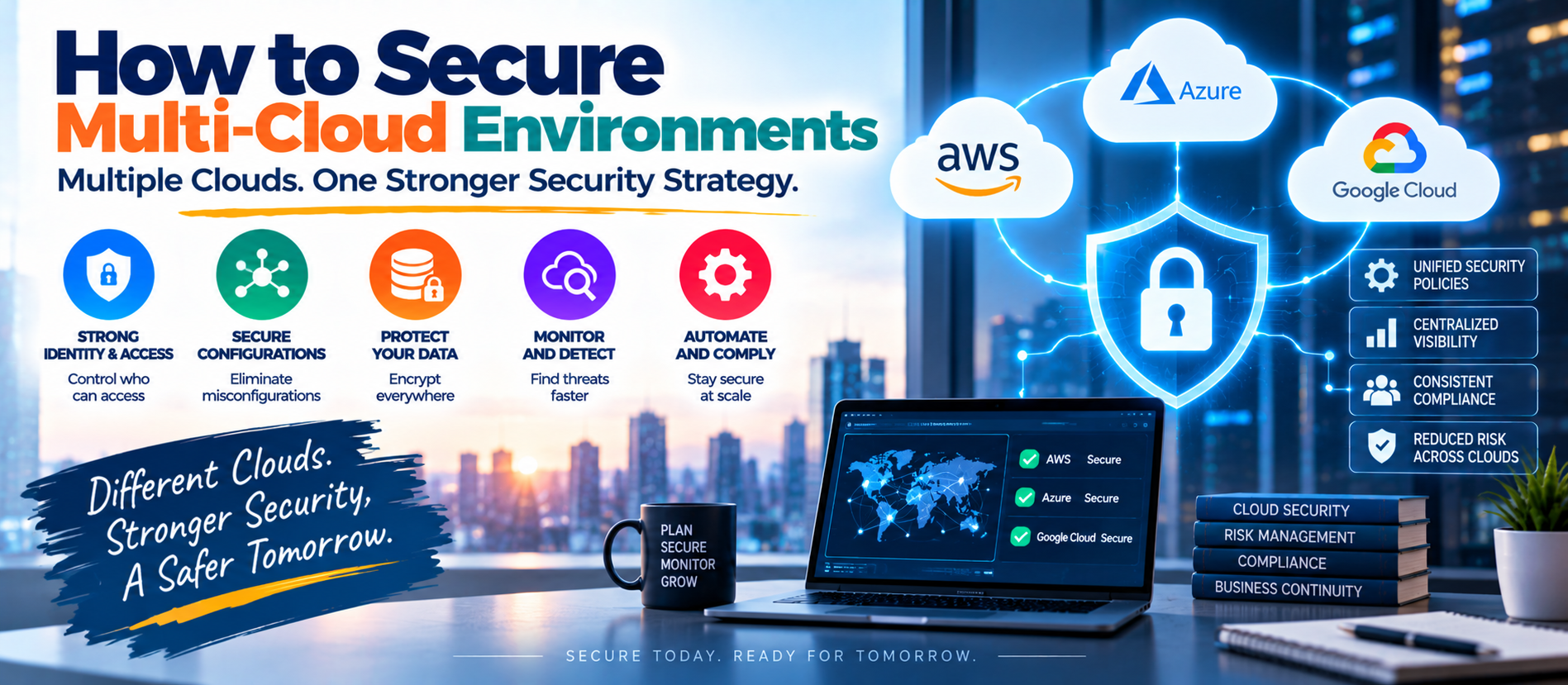
📋 Quick Summary
In this article:
What Is a Multi-Cloud Environment?
Why Multi-Cloud Security Is Difficult
1. Build a Clear Multi-Cloud Security Strategy
2. Centralize Identity and Access Management
3. Apply Least Privilege Everywhere
4. Use Multi-Factor Authentication
5. Create Secure Cloud Configuration Baselines
6. Encrypt Data at Rest and in Transit
7. Protect Data Across Cloud Boundaries
8. Centralize Logging and Security Monitoring
9. Use Zero Trust Principles
10. Secure Cloud-to-Cloud Connections
Many businesses no longer depend on one cloud provider. They may use one platform for applications, another for analytics, another for storage, and additional services for backup, artificial intelligence, development, or disaster recovery. This approach is called a multi-cloud environment.
Multi-cloud can provide flexibility, resilience, and access to specialized services. It can also create security challenges. Each provider has different tools, permissions, configurations, logging systems, and security responsibilities. A security team must protect all of these environments without creating gaps between them.
NIST's 2026 initial public draft on multi-cloud architecture identifies several challenges that become more difficult across cloud providers, including identity and access management, telemetry and logging, configuration management, data protection, and compliance.
This guide explains how to secure multi-cloud environments using practical and readable security principles.
What Is a Multi-Cloud Environment?
A multi-cloud environment uses services from two or more independent cloud providers. For example, a company may run customer applications on one cloud, data analytics on another, and backup systems on a third.
This architecture can reduce dependence on one provider. It can also help businesses select the best service for a specific workload. However, security policies must work consistently across all environments.
Why Multi-Cloud Security Is Difficult
The main challenge is inconsistency. Cloud providers do not use identical security models. The names of services may differ, access policies may work differently, and logging capabilities may not be identical.
NIST's current multi-cloud research highlights differences between providers, staffing complexity, and difficulty implementing centralized security capabilities across provider boundaries.
- Different identity and access systems.
- Different security configurations.
- Separate logging and monitoring tools.
- Inconsistent encryption settings.
- Different compliance requirements.
- Unclear ownership of security tasks.
- Configuration drift between environments.
- Limited visibility into cloud-to-cloud traffic.
1. Build a Clear Multi-Cloud Security Strategy
Do not begin with individual cloud products. Begin with a security strategy.
Define which data and applications are hosted in each environment. Identify business owners, security owners, administrators, and service accounts. Document the controls that must apply to every cloud.
Create a common security baseline for identity, encryption, logging, vulnerability management, backups, incident response, and access control. Provider-specific features can then be added without changing the basic security standard.
2. Centralize Identity and Access Management
Identity is one of the most important parts of multi-cloud security. A user should not receive broad access simply because they have an account in one cloud.
Use centralized identity management where practical. Apply strong authentication and multi-factor authentication. Use role-based or attribute-based access controls. Review privileged accounts regularly.
Also protect non-human identities. Applications, APIs, containers, automation tools, and AI agents may have permissions. These identities should receive only the access they need.
3. Apply Least Privilege Everywhere
Least privilege means giving users and systems the minimum permissions required for their tasks.
A developer who needs to deploy an application may not need access to production databases. A reporting service may need to read specific records but should not be allowed to delete them.
Apply the same principle across every cloud. Excessive permissions in one provider can become a serious risk even if the other environments are well protected.
4. Use Multi-Factor Authentication
MFA adds an extra verification layer beyond a password. It is especially important for administrators, cloud-console users, developers, and other accounts with powerful permissions.
Where supported, consider stronger authentication methods such as passkeys or phishing-resistant security keys for high-value accounts.
5. Create Secure Cloud Configuration Baselines
Misconfiguration is a major multi-cloud concern. A storage service, database, identity role, or network rule can become risky because of one incorrect setting.
Create approved configuration baselines for each cloud. These baselines should cover areas such as:
- Public access settings.
- Identity permissions.
- Encryption.
- Network exposure.
- Logging.
- Backup policies.
- Security monitoring.
- Administrative access.
Use automated checks where possible. Automation can detect configuration drift before it becomes a serious security problem.
6. Encrypt Data at Rest and in Transit
Protect sensitive information when it is stored and when it moves between systems.
Encryption at rest helps protect stored files, databases, backups, and other information. Encryption in transit protects data moving between users, applications, cloud services, APIs, and providers.
Manage encryption keys carefully. Separate key-management responsibilities where appropriate and monitor access to sensitive keys.
7. Protect Data Across Cloud Boundaries
Data may move between providers for analytics, processing, backup, or application integration. Every transfer creates another point that must be controlled.
💡 Key Insight
Know where sensitive data is stored and where it can travel. Classify important information and define rules for cross-cloud transfers.
Do not assume that data is secure simply because every cloud provider has strong security features. Your organization remains responsible for applying the right controls to its own data and workloads.
8. Centralize Logging and Security Monitoring
Each cloud can generate large amounts of security information. If logs remain isolated, attackers may exploit the gaps between environments.
Send important security events into a centralized monitoring or SIEM platform where practical. Monitor authentication events, privilege changes, administrative actions, network activity, data access, and unusual behavior.
Centralized visibility helps security teams understand an incident that crosses multiple providers.
9. Use Zero Trust Principles
Zero Trust is especially useful for multi-cloud environments because network location alone cannot establish trust. NIST's guidance for cloud-native applications in multi-cloud environments recommends combining network-tier controls with identity-based policies for users and services.
Verify identities, evaluate devices and workloads, apply least privilege, and continuously monitor access. Do not assume that a request is safe simply because it originates from another internal cloud environment.
10. Secure Cloud-to-Cloud Connections
Applications often communicate across cloud providers. These connections need careful protection.
⚠ Watch Out
Use strong authentication between services. Restrict network paths. Avoid exposing internal services directly to the public internet unless there is a clear business need and strong protection.
Document which applications communicate across providers. Remove unused connections and credentials.
11. Protect APIs and Service-to-Service Traffic
APIs often connect applications, data, and cloud services. An exposed or poorly secured API can become an entry point for attackers.
Use authentication, authorization, rate limits, input validation, encryption, and logging. Give service accounts narrow permissions.
For cloud-native applications, service identity can help enforce access rules between workloads. NIST specifically discusses application and service identities for multi-cloud and hybrid environments.
12. Secure Containers and Kubernetes
Containers can run across multiple clouds, which makes consistent security important.
Use trusted images, scan images for vulnerabilities, limit container permissions, protect secrets, and monitor workloads. Secure the Kubernetes control plane and restrict administrative access.
Keep development, testing, and production environments separated. Do not allow a compromised development workload to reach sensitive production resources without strong authorization.
13. Manage Secrets Securely
Passwords, API keys, certificates, tokens, and cloud credentials should not be stored in source code or public repositories.
Use dedicated secrets-management tools where possible. Rotate sensitive credentials regularly and remove credentials that are no longer needed.
14. Secure Backups and Disaster Recovery
Multi-cloud strategies often include backup across providers. This can improve resilience, but backups must also be protected.
Use encryption, access controls, separate credentials, and recovery testing.
A backup that cannot be restored is not a reliable recovery plan. Test restoration before an emergency occurs.
15. Monitor Vulnerabilities and Patch Quickly
Cloud infrastructure changes constantly. New virtual machines, containers, packages, libraries, and services can appear quickly.
Maintain an accurate inventory and scan workloads for known vulnerabilities. Prioritize critical issues based on exposure, exploitability, and business impact.
Patch operating systems, applications, container images, and cloud components according to risk.
16. Manage the Shared Responsibility Model
Cloud providers secure parts of the underlying infrastructure, but customers remain responsible for many configuration and data-security tasks. The exact division depends on the service.
Do not assume that moving a workload to the cloud transfers all security responsibility to the provider. Document who is responsible for identity, data, applications, configurations, operating systems, monitoring, and incident response.
17. Control Third-Party and Contractor Access
External users can create additional risk. Give contractors and partners only the access they need and only for the required period.
Use separate identities instead of shared accounts. Review external access regularly and remove it when contracts or projects end.
18. Use Infrastructure as Code Securely
Infrastructure as Code can improve consistency across clouds. It can also reproduce insecure settings quickly if templates are poorly designed.
Store infrastructure code securely. Review changes before deployment. Scan templates for risky configurations and use approved modules or patterns.
19. Automate Security Checks
Manual security reviews do not scale well across several cloud platforms. Automation can continuously check configurations, identities, vulnerabilities, exposed resources, and policy violations.
Use automation carefully. High-impact changes should have appropriate approval and testing. The goal is to reduce repetitive work without creating uncontrolled security changes.
20. Prepare a Multi-Cloud Incident Response Plan
An incident may begin in one cloud and spread to another. Your response plan should therefore cover all providers.
Define who can isolate workloads, disable accounts, revoke credentials, preserve logs, contact providers, and communicate with customers or regulators when required.
Run tabletop exercises. Test realistic scenarios such as stolen cloud credentials, exposed storage, compromised containers, malicious insiders, and ransomware.
Common Multi-Cloud Security Mistakes
- Using different security standards in different clouds.
- Giving administrators excessive permissions.
- Leaving old accounts active.
- Failing to centralize important logs.
- Allowing public exposure of sensitive services.
- Storing secrets in source code.
- Ignoring configuration drift.
- Assuming the cloud provider handles every security responsibility.
- Failing to test backups.
- Not preparing for cross-cloud incidents.
Multi-Cloud Security Checklist
- Maintain an inventory of cloud accounts, workloads, data, and identities.
- Use centralized identity management where practical.
- Enable MFA for privileged and sensitive accounts.
- Apply least privilege.
- Use secure configuration baselines.
- Encrypt sensitive data at rest and in transit.
- Centralize important security logs.
- Protect APIs and service identities.
- Secure containers, Kubernetes, and secrets.
- Test backups and recovery.
- Patch vulnerable systems quickly.
- Review third-party access.
- Automate security checks.
- Test the incident response plan.
Frequently Asked Questions
What is multi-cloud security?
Multi-cloud security is the practice of protecting applications, identities, data, networks, and workloads that operate across multiple cloud providers.
Why is multi-cloud security difficult?
Different cloud providers have different security models, tools, configurations, permissions, and monitoring capabilities. Consistency becomes harder as the number of environments increases.
What is the first step in securing a multi-cloud environment?
Start with visibility. Identify cloud accounts, users, applications, workloads, data, connections, and privileged identities. You cannot secure assets you do not know about.
Is Zero Trust useful for multi-cloud security?
Yes. Zero Trust helps replace implicit trust with explicit identity, authorization, device, workload, and risk-based controls. It is particularly useful when resources are distributed across multiple clouds.
Should security monitoring be centralized?
Centralized monitoring is usually valuable because it gives security teams a broader view of activity across providers. Provider-specific tools can still be used for detailed investigation.
How can businesses reduce multi-cloud security risk?
Use common security baselines, strong identity controls, MFA, least privilege, encryption, centralized monitoring, secure configurations, automated checks, and regular security reviews.
Final Thoughts
How to secure multi-cloud environments is ultimately a question of consistency, visibility, and control. Using multiple cloud providers can create business advantages, but security cannot be managed as separate islands.
The strongest approach combines centralized security principles with cloud-specific controls. Start with identity and asset visibility. Add least privilege, secure configurations, encryption, monitoring, Zero Trust, vulnerability management, and tested recovery processes.
Multi-cloud security is not a one-time project. Cloud environments change continuously, so security controls must change with them.
For more practical cybersecurity, AI, technology, and digital business insights, explore Digiifrog at www.digiifrog.com.
Sources and Further Reading
- NIST SP 800-207A — Zero Trust Architecture for Cloud-Native Applications in Multi-Cloud Environments.
- NIST SP 1800-35 — Implementing a Zero Trust Architecture.
- NIST IR 8613 — Multi-Cloud Architecture Challenges: Security and Compliance Implications.
- CISA — Cloud Security Technical Reference Architecture.
Ready to Grow?
Talk to us about a strategy tailored to your brand — we will help you stand out in search, AI discovery and social.

Comments (0)
Log in to leave a comment.