📋 Quick Summary
In this article:
Quick Answer: Which Password Manager Is Best?
What Is Password Manager Software?
Why Password Reuse Is a Serious Problem
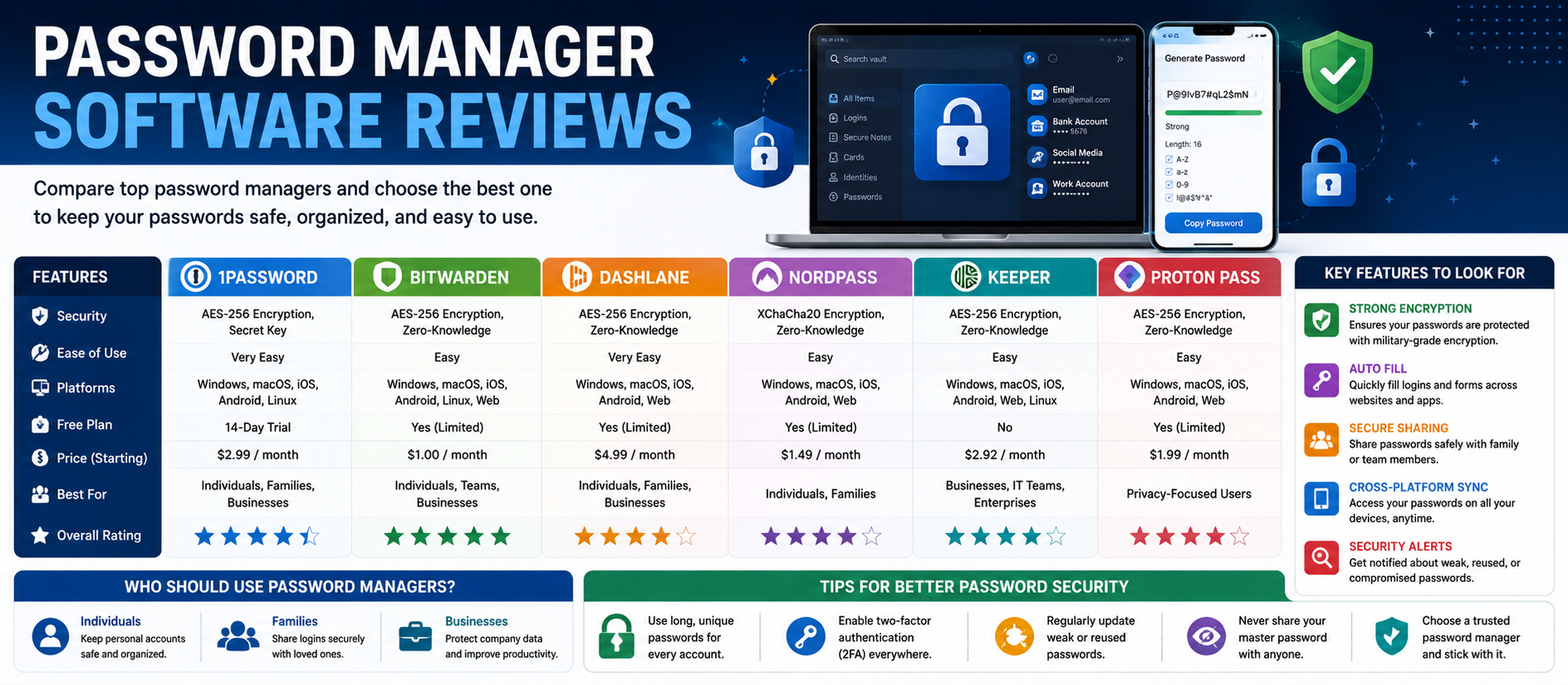
Top Password Manager Software at a Glance
1. 1Password Review: Strong Overall Experience
2. Bit warden Review: Best Value and Strong Free Option
3. Dash lane Review: Feature-Rich Password Security
4. Nord Pass Review: Simple Password Management for Everyday Users
5. Keeper Review: Business and Enterprise Credential Management
6. Proton Pass Review: A Privacy-Focused Option
How to Compare Password Managers
1. Security Architecture
💡 Key Insight
Passwords remain one of the most common weak points in digital security. Most people use dozens or hundreds of online accounts. Creating a unique, strong password for every account is difficult. Remembering all of them is even harder.
This is where password manager software can help. A password manager stores credentials in an encrypted vault and can generate strong passwords, autofill logins, sync data across devices, and securely share selected credentials.
Modern password managers now do more than store passwords. Many support passkeys, two-factor authentication codes, security alerts, breach monitoring, secure notes, payment details, identity information, and business access controls.
This guide provides practical password manager software reviews for individuals, families, small businesses, and larger organizations. The goal is not to declare one universal winner. The right product depends on your security needs, budget, devices, sharing requirements, and level of technical control.
Digiifrog creates clear, structured, and search-friendly content about technology, business, education, and digital growth. Our approach considers SEO, AEO, GEO, and AI Search Optimization.
Quick Answer: Which Password Manager Is Best?
The best password manager depends on the user. 1Password is a strong choice for people who want a polished experience, secure sharing, and broad platform support. Bit warden is attractive for users who want a generous free option, open-source transparency, and flexible deployment. Dash lane offers a feature-rich experience with security alerts and additional protection features. Keeper is often evaluated by organizations that need business controls and secure credential sharing. Nord Pass can appeal to users who want a simple premium experience.
For many people, the most important decision is not choosing the “perfect” product. It is moving away from weak or reused passwords and adopting a secure system that you will actually use consistently.
What Is Password Manager Software?
A password manager is an application that securely stores login credentials and other sensitive information. The user normally remembers one primary method of access, while the software handles the individual credentials stored inside the vault.
Common password manager features include:
- Strong password generation.
- Encrypted password storage.
- Browser and mobile autofill.
- Cross-device synchronization.
- Secure password sharing.
- Passkey storage and management.
- Two-factor authentication support.
- Security alerts for weak or compromised credentials.
- Secure notes and identity information.
- Business administration and access controls.
A password manager can make good security practices easier. Instead of creating a memorable but weak password, the software can generate a long and unique credential for every account.
Why Password Reuse Is a Serious Problem
Password reuse creates a chain of risk. If the same password is used on several websites and one service suffers a breach, attackers may try those credentials on other services.
Using a unique password for every important account limits this type of exposure. A password manager makes this approach more practical because the user does not need to remember every random password manually.
A password manager does not make phishing, malware, or account compromise impossible. It is one part of a broader security strategy. Users should also enable multi-factor authentication where available, keep devices updated, protect recovery information, and remain cautious about suspicious websites and messages.
Top Password Manager Software at a Glance
| Software Best For Main Strength | ||
| 1Password | Individuals, families, and teams | Polished experience, sharing, broad platform support |
| Bit warden | Value-focused and technical users | Free plan, open-source approach, flexible deployment |
| Dash lane | Users wanting extra security features | Autofill, alerts, sharing, and scam protection features |
| Nord Pass | Simple premium password management | Modern interface and cross-device password storage |
| Keeper | Businesses and security-focused teams | Business controls and credential management |
| Proton Pass | Privacy-focused users | Password management within the wider Proton ecosystem |
Features and plans can change, so businesses should confirm current product details before purchasing.
1. 1Password Review: Strong Overall Experience
1Password is one of the most established password management platforms. It is designed for individuals, families, and organizations that want to store, generate, organize, and share sensitive information.
Its core experience includes password generation, encrypted vaults, autofill, secure sharing, passkey support, and security monitoring. The platform also supports storing other information such as payment details, addresses, and authentication codes.
One of 1Password's distinctive security design elements is its Secret Key, used alongside the account password. The company also offers Watchtower, which helps users identify weak, reused, or potentially compromised credentials.
Best for: Users who value a polished interface, family sharing, secure organization, and strong cross-platform support.
Main advantages:
- Strong password generation and autofill.
- Shared vaults and controlled password sharing.
- Passkey support.
- Security monitoring through Watchtower.
- Support across major desktop and mobile platforms.
- Business features for access management and security workflows.
Potential limitation: Users looking specifically for a long-term free password manager may prefer another option.
2. Bit warden Review: Best Value and Strong Free Option
Bit warden is a popular password manager for users who value transparency, affordability, and cross-platform access. It provides password generation, encrypted vaults, autofill, sharing features, and support for additional authentication options.
Bit warden is also known for its open-source approach. For technically minded users and organizations, this can be an important part of the evaluation process. The platform also offers options that can support self-hosting in appropriate environments.
Best for: Individuals, families, technical users, and organizations looking for strong value and flexible deployment options.
Main advantages:
- Useful free option.
- Unlimited password storage and broad device access.
- Open-source approach.
- Cross-platform applications.
- Autofill and password generation.
- Business and sharing capabilities.
Potential limitation: Some users may find premium competitors more polished or simpler for advanced family and business workflows.
3. Dash lane Review: Feature-Rich Password Security
Dash lane combines core password management with additional security-oriented features. Depending on the plan and platform, its capabilities can include password and passkey management, autofill, secure notes, sharing, password health information, security alerts, and other protective features.
Dash lane also emphasizes protection against suspicious or phishing websites. Its product lineup has evolved, and feature availability can differ across web, mobile, desktop, and plan types.
Best for: Users who want password management combined with a broader security feature set.
Main advantages:
- Password and passkey management.
- Cross-device access.
- Password health and security alerts.
- Secure sharing.
- Autofill for passwords and personal information.
- Additional scam and phishing protection features on supported plans.
Potential limitation: Buyers should check which features are included in the exact plan they choose because feature availability can vary.
4. Nord Pass Review: Simple Password Management for Everyday Users
Nord Pass is a password management product designed for individuals, families, and businesses. It focuses on storing and generating passwords, syncing credentials, and supporting access across devices.
It may appeal to users who want a modern interface and a relatively simple setup experience.
Best for: Users who want straightforward password management and are already familiar with the broader Nord security ecosystem.
Main advantages:
- Cross-device password access.
- Password generation.
- Autofill support.
- Secure sharing options.
- Personal, family, and business plans.
Potential limitation: Compare the exact plan and features against alternatives because product bundles and subscription structures can change.
5. Keeper Review: Business and Enterprise Credential Management
Keeper is widely considered by organizations that need password management with centralized administration. Businesses often need more than a shared password spreadsheet. They may require user provisioning, role-based access, reporting, secure sharing, and controls for employee access.
Best for: Businesses, IT teams, and organizations that require stronger administrative control.
Main advantages:
- Business-focused credential management.
- Secure password sharing.
- Administrative controls.
- Support for team and organizational workflows.
- Broader security product ecosystem.
Potential limitation: Smaller teams should compare the complexity and cost against simpler password management products.
6. Proton Pass Review: A Privacy-Focused Option
Proton Pass is part of the broader Proton ecosystem. It is aimed at users who want password management alongside privacy-focused services.
It supports the basic functions expected from a modern password manager, including credential storage, password generation, autofill, and cross-device access. Users already working with other Proton services may find ecosystem integration attractive.
Best for: Privacy-focused users and people already using Proton services.
Potential limitation: The best ecosystem fit does not automatically mean it is the best fit for every business or advanced enterprise workflow.
How to Compare Password Managers
Do not choose software only because it appears at the top of a review list. Use a structured comparison.
1. Security Architecture
Understand how the provider protects vault data. Look for clear documentation about encryption, encryption keys, account recovery, authentication, and the company's security model.
2. Independent Security Review
Third-party audits and public security documentation can provide useful information. An audit does not mean a product is permanently risk-free, but it can demonstrate that security practices have been independently reviewed.
3. Device and Browser Support
Check every environment you use: Windows, macOS, Linux, Android, iPhone, iPad, Chrome, Firefox, Edge, Safari, and other relevant browsers.
4. Autofill Quality
Autofill should work reliably without creating confusion. Test the product on your most important devices and websites.
5. Passkey Support
Passkeys are becoming more important as online services adopt password less authentication. If you expect to use passkeys, verify how the password manager stores, syncs, and uses them.
6. Secure Sharing
Families and businesses often need to share credentials. Avoid sending passwords through ordinary email or chat when a controlled sharing feature is available.
7. Emergency Access and Recovery
Think about what happens if a device is lost or a user becomes unavailable. Recovery and emergency access procedures should be understood before an emergency occurs.
8. Business Administration
Organizations should review user provisioning, deprovisioning, access policies, reporting, SSO support where relevant, and integration with existing identity systems.
Personal Password Managers vs Business Password Managers
A personal user usually needs convenience, secure storage, autofill, and access across devices.
A business needs additional control.
Business features may include:
- Centralized administration.
- User provisioning and removal.
- Shared vault policies.
- Role-based access.
- Activity reporting.
- Security integrations.
- Compliance support.
Employees should not depend on a single shared spreadsheet or an informal chat message to access company credentials. A business password manager can help organizations control access and remove it when roles change.
Are Browser Password Managers Enough?
Browser-based password storage is convenient and can be useful for many users. However, dedicated password managers may offer additional features such as secure vault organization, controlled sharing, emergency access, security monitoring, cross-browser support, and business administration.
The best choice depends on the user's risk profile and requirements. For a business managing many shared credentials, a dedicated solution is often easier to govern.
How to Set Up a Password Manager Safely
Step 1: Choose a Strong Primary Login
Your main account protects access to the vault. Use a strong and unique account password or passphrase and enable the strongest appropriate multi-factor authentication option.
Step 2: Secure Recovery Information
Store recovery codes according to the provider's guidance. Do not leave recovery information in an unprotected document.
Step 3: Import Existing Passwords Carefully
If importing from a browser or another password manager, review the imported data and remove unnecessary copies where appropriate.
Step 4: Replace Weak and Reused Passwords
Start with email, banking, cloud storage, business systems, social accounts, and other high-value services.
Step 5: Enable Multi-Factor Authentication
Where available, add MFA or passkey-based protection to important accounts.
Step 6: Review Sharing
Only share credentials with people who genuinely need access. Remove access when a project or employment relationship ends.
Common Password Manager Mistakes
Using a Weak Master Password
A password manager does not help if its primary account is protected with a weak or reused password.
Ignoring Security Alerts
If the software reports a compromised, reused, or weak password, review the alert and update the credential when appropriate.
Leaving Old Credentials Active
Unused accounts and outdated shared credentials create unnecessary exposure.
Sharing Passwords Through Plain Text
Use the password manager's sharing system when possible instead of sending credentials through ordinary chat or email.
Skipping Multi-Factor Authentication
Additional authentication can provide another layer of protection for the password manager account itself.
Password Managers and the Move Toward Passkeys
Passkeys are designed to reduce reliance on traditional passwords. Many password managers now support storing and using passkeys on compatible websites and devices.
This transition will take time. Businesses and consumers will continue to use passwords for many services, so password managers are likely to remain important even as password less sign-in expands.
How Password Manager Reviews Support SEO, AEO, GEO, and AI Search
People researching password security often ask direct questions:
- What is the best password manager?
- Is Bit warden good for free password management?
- Is 1Password safe for families?
- Which password manager is best for a business?
- Do password managers support passkeys?
SEO helps useful comparison content become discoverable in search results.
AEO focuses on answering direct questions clearly.
GEO helps organize content for generative search experiences.
AI Search Optimization emphasizes clear structure, direct answers, useful context, readable language, and trustworthy source-based information.
How Digiifrog Supports Technology Content
Digiifrog develops clear and structured digital content for technology companies, businesses, educational organizations, and online audiences.
- SEO Content Strategy
- AEO and Answer-Focused Content
- GEO and Generative Search Optimization
- AI Search Optimization
- Software and Technology Content
- Business and Digital Growth Content
Frequently Asked Questions
What is the best password manager software?
There is no single best choice for every user. 1Password is a strong option for a polished experience and sharing, Bit warden offers strong value and a useful free option, while Dash lane, Keeper, Nord Pass, and Proton Pass each fit different requirements.
Are password managers safe?
A reputable password manager can improve security by helping users create unique, strong passwords. However, users should still protect the password manager account with strong authentication and follow good device security practices.
Is Bit warden free?
Bit warden offers a free plan with core password management capabilities. Premium and business features may require a paid subscription. Check the current plan details before choosing.
Does 1Password support passkeys?
Yes. 1Password supports passkey-related workflows on compatible websites and applications. Availability can depend on the platform and service being used.
Should a small business use a password manager?
Yes, especially if employees share access to business accounts. A business password manager can provide controlled sharing and make it easier to manage access when staff roles change.
Can a password manager prevent phishing?
No tool can guarantee complete protection against phishing. Some products provide additional warnings or protective features, but users should still verify websites and remain cautious about suspicious messages and login pages.
Conclusion
The best password manager is the one that provides the security and usability you need without becoming too difficult to maintain.
1Password is a strong all-around choice for users who value a polished experience and secure sharing. Bit warden is an excellent option for people who prioritize value, open-source transparency, and a strong free plan. Dash lane offers a feature-rich security experience. Keeper can be attractive for business and administrative use. Nord Pass and Proton Pass provide additional choices depending on ecosystem preferences and privacy priorities.
Before choosing, test the software on your actual devices. Check autofill, sharing, passkey support, recovery options, business controls, and total cost.
The most important security improvement is simple: stop reusing passwords and start using strong, unique credentials for every important account.
Disclaimer: This article is for general educational and informational purposes. Password manager features, plans, pricing, security capabilities, and availability can change. Review current official vendor documentation and obtain professional cybersecurity advice where required before making a security or purchasing decision.
Digiifrog
Website: www.digiifrog.com
Ready to Grow?
Talk to us about a strategy tailored to your brand — we will help you stand out in search, AI discovery and social.

Comments (0)
Log in to leave a comment.