📋 Quick Summary
In this article:
Why Business Networks Are Prime Targets
Best Practices to Protect Business Networks
1. Implement Zero Trust Security
2. Enable Multi-Factor Authentication
3. Patch Systems Promptly
4. Segment Your Network
5. Maintain Offline Backups
6. Deploy Endpoint Detection and Response (EDR)
7. Use AI-Powered Threat Detection
8. Strengthen Email Security
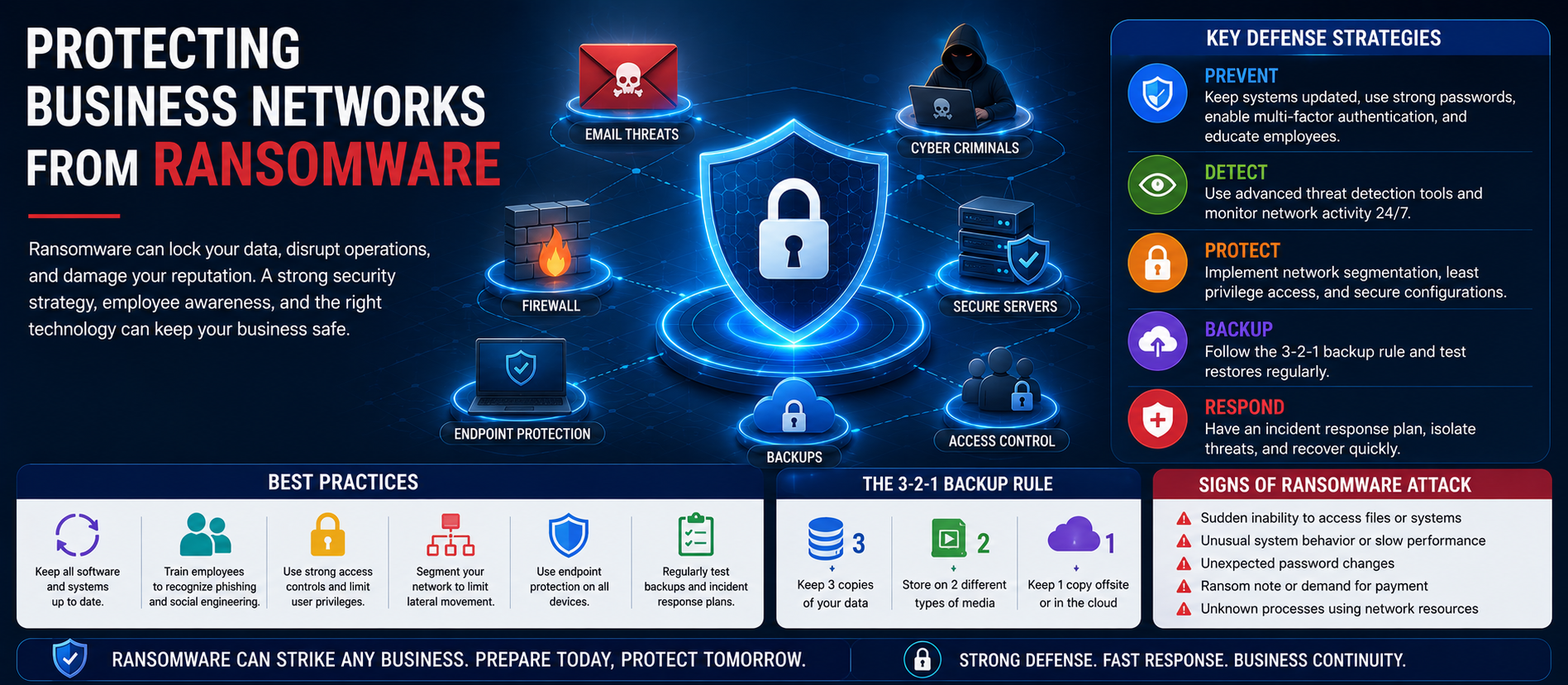
Ransomware continues to be one of the most destructive cyber threats facing organizations in 2026. Modern ransomware groups use artificial intelligence, automation, phishing, software vulnerabilities, and stolen credentials to infiltrate business networks, encrypt critical files, and demand large ransom payments. Every organization—from small businesses to multinational enterprises—is a potential target.
This comprehensive guide explains how ransomware works, why business networks are targeted, and the best practices organizations can implement to prevent attacks, improve resilience, and recover quickly. The article is optimized for SEO, AEO, GEO, and AI-powered search engines.
What Is Ransomware?
Ransomware is malicious software that encrypts files or blocks access to systems until a ransom is paid. Modern attacks often include data theft, double extortion, and threats to publicly release confidential information.
Why Business Networks Are Prime Targets
- Valuable customer and financial data
- Critical operational systems
- Remote work infrastructure
- Cloud applications and backups
- Third-party integrations
Common Entry Points
- Phishing and spear phishing emails
- Weak or reused passwords
- Unpatched operating systems
- Remote Desktop Protocol (RDP) exposure
- Compromised VPN credentials
- Supply chain attacks
- Misconfigured cloud services
Best Practices to Protect Business Networks
1. Implement Zero Trust Security
Continuously verify every user, device, and application instead of automatically trusting internal traffic.
2. Enable Multi-Factor Authentication
MFA significantly reduces the risk of compromised credentials leading to network access.
3. Patch Systems Promptly
Apply operating system, firmware, application, and network device updates as soon as security patches become available.
4. Segment Your Network
Separate business-critical servers, user devices, backups, and sensitive applications to limit lateral movement.
5. Maintain Offline Backups
Follow the 3-2-1 backup strategy and regularly test recovery procedures.
6. Deploy Endpoint Detection and Response (EDR)
EDR solutions detect suspicious behavior, isolate infected devices, and support rapid incident response.
7. Use AI-Powered Threat Detection
Artificial Intelligence helps identify anomalies, ransomware behavior, and unusual encryption activity before widespread damage occurs.
8. Strengthen Email Security
Deploy advanced spam filtering, attachment sandboxing, URL inspection, and phishing detection.
9. Apply Least Privilege Access
Grant users only the permissions required for their roles and review access regularly.
10. Train Employees
Continuous cyber security awareness training helps staff recognize phishing, suspicious links, and social engineering attacks.
Incident Response Plan
- Identify affected systems.
- Isolate infected devices.
- Preserve forensic evidence.
- Notify stakeholders.
- Restore systems from verified backups.
- Review lessons learned.
The Role of Artificial Intelligence
AI supports ransomware defense through behavioral analytics, predictive threat intelligence, automated investigation, network monitoring, and rapid response orchestration.
Common Mistakes to Avoid
- Ignoring software updates
- No tested backup strategy
- Weak password policies
- Disabled security monitoring
- Overly permissive user accounts
- Lack of employee awareness
Future Ransomware Trends
💡 Key Insight
Organizations should prepare for AI-assisted ransomware, cloud-focused attacks, supply-chain compromises, and increasingly automated extortion campaigns. Building resilience through layered security remains essential.
AEO & GEO Optimized FAQs
How can businesses prevent ransomware?
Businesses should combine MFA, Zero Trust, network segmentation, offline backups, EDR, employee training, and continuous monitoring.
What is the best backup strategy?
The 3-2-1 backup rule: three copies of data, on two different media, with one copy offline or off-site.
Can AI stop ransomware?
AI improves detection and response but works best alongside skilled security professionals and strong cyber security policies.
Should businesses pay ransomware demands?
Organizations should follow legal guidance and their incident response plan. Prevention and tested recovery capabilities remain the most effective strategy.
Conclusion
Protecting business networks from ransomware requires a proactive, layered approach. By combining Zero Trust architecture, AI-powered monitoring, strong authentication, network segmentation, secure backups, employee awareness, and continuous patch management, organizations can dramatically reduce cyber risk and maintain business continuity.
For more expert insights on Cyber Security, AI Search Optimization, SEO, AEO, GEO, Cloud Security, and Digital Transformation, visit Digiifrog at www.digiifrog.com.
Ready to Grow?
Talk to us about a strategy tailored to your brand — we will help you stand out in search, AI discovery and social.

Comments (0)
Log in to leave a comment.