📋 Quick Summary
In this article:
Quick Answer: Which ERP Software Is Best?
Why Businesses Use ERP Systems
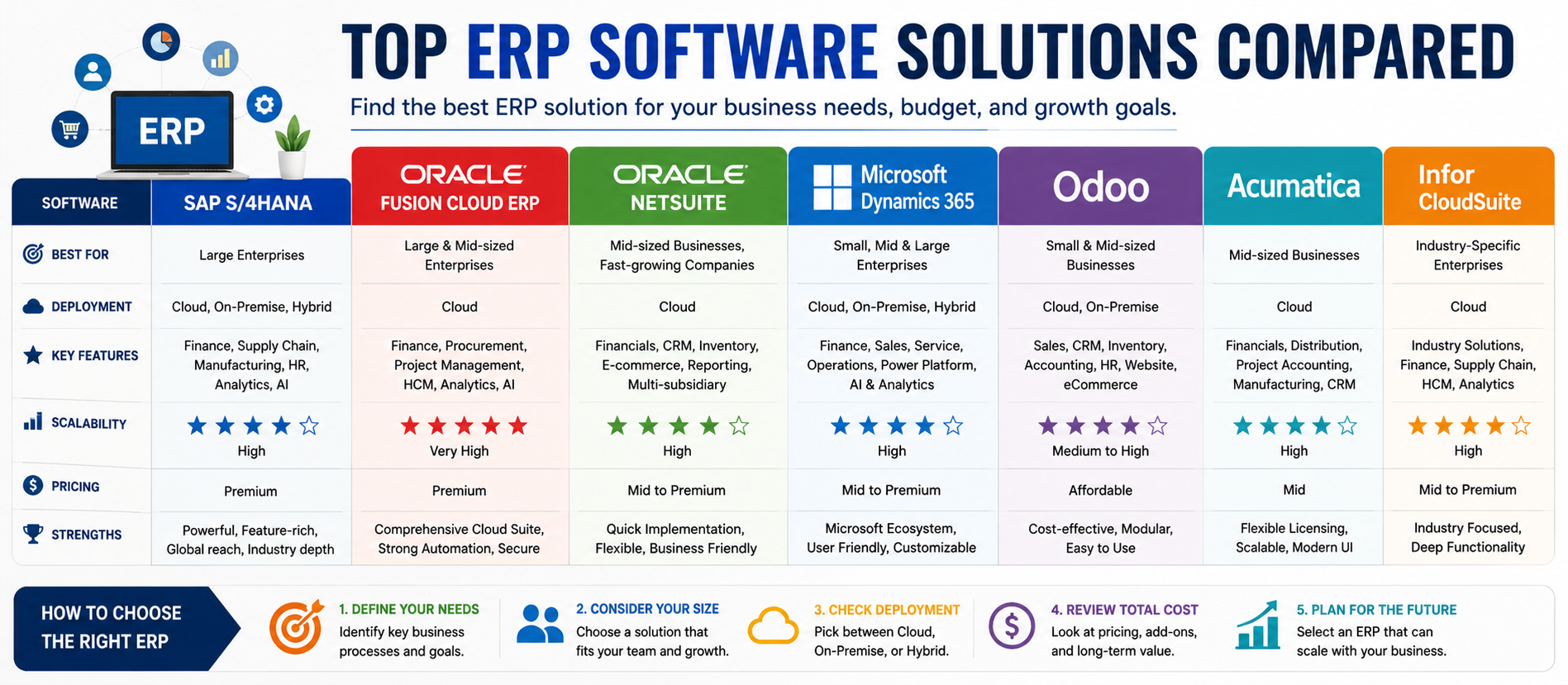
Top ERP Software Solutions at a Glance
1. SAP S/4HANA: Strong for Complex Enterprise Operations
2. Oracle Fusion Cloud ERP: Enterprise Finance and Cloud Operations
3. Oracle NetSuite: A Unified Cloud Option for Growing Businesses
4. Microsoft Dynamics 365: Strong Ecosystem Integration
5. Odoo: Flexible and Modular ERP for Growing Businesses
6. Acumatica: Cloud ERP for Mid-Market Organizations
7. Infor Cloud Suite: Industry-Specific ERP
How to Compare ERP Software Properly
💡 Key Insight
Enterprise Resource Planning, or ERP, software helps businesses connect important operations in one system. Instead of managing finance, inventory, purchasing, sales, projects, manufacturing, and reporting through disconnected tools, an ERP platform can bring key business data and processes together.
Choosing an ERP is not a simple software comparison. The right solution depends on company size, industry, existing systems, budget, growth plans, implementation capacity, and the level of customization required.
This guide compares several major ERP solutions and explains where each type of platform can fit. It is designed to help business owners, managers, IT teams, and decision-makers create a practical shortlist.
Digiifrog creates clear, structured, and search-friendly content for technology, business, education, and digital growth with a focus on SEO, AEO, GEO, and AI Search Optimization.
Quick Answer: Which ERP Software Is Best?
There is no single ERP system that is best for every business. Large and complex organizations may need enterprise-scale platforms such as SAP S/4HANA or Oracle Fusion Cloud ERP. Fast-growing mid-market companies may consider Oracle NetSuite, Microsoft Dynamics 365, or Acumatica. Smaller or budget-conscious businesses may evaluate Odoo, SAP Business One, or other focused ERP solutions.
The best choice is the one that fits your business processes and growth plans without creating unnecessary implementation complexity.
What Is ERP Software?
ERP software is a business management system that connects and automates important operational processes.
A typical ERP system may include modules for:
- Financial management and accounting.
- Procurement and purchasing.
- Inventory management.
- Supply chain operations.
- Manufacturing.
- Sales and order management.
- Project management.
- Human resources.
- Reporting and analytics.
- Customer and vendor information.
The main goal is to reduce disconnected data and provide a more complete view of business operations.
Why Businesses Use ERP Systems
Growing businesses often start with separate tools for accounting, spreadsheets, inventory, sales, and reporting. This can work at a small scale. Over time, disconnected systems may create duplicate data, manual work, reporting delays, and inconsistent processes.
An ERP system can help by creating a more connected operating environment.
Potential benefits include:
- Better visibility across departments.
- Reduced manual data entry.
- More consistent business processes.
- Improved inventory and order visibility.
- Centralized financial information.
- Real-time or near-real-time reporting.
- Better support for growth and multi-entity operations.
- Automation and AI-assisted workflows.
However, ERP software is not automatically successful. A poorly planned implementation can create disruption. Business process analysis, data preparation, training, governance, and change management are just as important as the software itself.
Top ERP Software Solutions at a Glance
| ERP Solution Best Fit Main Strength Deployment Direction | |||
| SAP S/4HANA | Large and complex enterprises | Deep enterprise processes and global scale | Cloud and enterprise deployment options |
| Oracle Fusion Cloud ERP | Large enterprises | Cloud finance, procurement, analytics, and AI | Cloud |
| Oracle NetSuite | Growing and mid-market businesses | Unified cloud business management | Cloud |
| Microsoft Dynamics 365 | SMB to enterprise, especially Microsoft users | Microsoft ecosystem integration | Cloud-focused |
| Odoo | Small and mid-sized businesses | Modular and flexible application ecosystem | Cloud and self-hosted options |
| Acumatica | Mid-market organizations | Cloud ERP with industry-focused capabilities | Cloud |
| Infor CloudSuite | Industry-specific organizations | Vertical and industry-focused functionality | Cloud-focused |
The table is a starting point, not a final recommendation. Each platform has different editions, modules, partner ecosystems, and implementation options.
1. SAP S/4HANA: Strong for Complex Enterprise Operations
SAP is one of the best-known names in enterprise software. Its cloud ERP portfolio is designed to support large and complex business processes across finance, supply chain, procurement, manufacturing, and other operational areas.
SAP S/4HANA Cloud includes real-time processing, analytics, AI capabilities, and preconfigured business processes. SAP also provides different cloud deployment approaches, allowing organizations to choose between more standardized and more flexible enterprise models.
Best for: Large enterprises, multinational companies, complex manufacturers, and organizations with extensive operational requirements.
Main advantages:
- Deep enterprise functionality.
- Strong support for complex processes.
- Global and multi-entity capabilities.
- Embedded analytics and AI features.
- Large partner and implementation ecosystem.
Consider carefully: Enterprise implementations can require significant planning, investment, process redesign, training, and specialist support.
2. Oracle Fusion Cloud ERP: Enterprise Finance and Cloud Operations
Oracle Fusion Cloud ERP is designed as a modern cloud ERP suite for enterprise organizations. Its capabilities include finance, accounting, procurement, project management, enterprise performance management, analytics, automation, and AI-assisted workflows.
Oracle positions Fusion Cloud ERP as a connected cloud platform that can help organizations automate manual processes and respond to business changes with analytics and regularly updated cloud services.
Best for: Large enterprises, complex finance organizations, and businesses building a broader Oracle cloud ecosystem.
Main advantages:
- Strong financial and enterprise management capabilities.
- Cloud-based architecture.
- AI and automation features.
- Procurement and project management support.
- Integration with the broader Oracle ecosystem.
Consider carefully: Organizations should evaluate implementation scope, existing systems, integration needs, and long-term total cost before making a decision.
3. Oracle NetSuite: A Unified Cloud Option for Growing Businesses
Oracle NetSuite is a cloud-based business management platform that combines ERP and financial management with related capabilities such as CRM and ecommerce.
Its unified approach can be attractive for growing organizations that want to reduce the number of disconnected business systems.
Best for: Growth-stage companies, mid-market organizations, multi-entity businesses, and companies that prefer a cloud-first operating model.
Main advantages:
- Cloud-based platform.
- Unified financial and business management.
- Support for multiple business processes.
- Global and multi-entity capabilities.
- Broad ecosystem of extensions and services.
Consider carefully: The final cost and implementation effort can depend on modules, users, customizations, integrations, and partner services.
4. Microsoft Dynamics 365: Strong Ecosystem Integration
Microsoft Dynamics 365 includes multiple business applications for different company sizes and operational requirements. Business Central is aimed at small and mid-sized organizations, while other Dynamics products support larger and more specialized finance and supply chain needs.
Business Central connects finance, sales, service, operations, and other business processes. It also integrates with familiar Microsoft tools such as Outlook, Excel, Teams, Power Platform, Power BI, and Microsoft Copilot capabilities.
Best for: Businesses already using Microsoft 365, Azure, Power Platform, Teams, or other Microsoft services.
Main advantages:
- Strong Microsoft ecosystem integration.
- Business Central for small and mid-sized companies.
- AI and Copilot capabilities.
- Reporting and analytics connections.
- Large partner and extension ecosystem.
Consider carefully: Dynamics 365 includes different products. Businesses should identify whether they need Business Central or a more enterprise-focused finance and supply chain solution.
5. Odoo: Flexible and Modular ERP for Growing Businesses
Odoo is known for its broad collection of connected business applications. Organizations can use applications for accounting, CRM, sales, inventory, manufacturing, ecommerce, project management, and other functions.
Its modular approach can appeal to businesses that want to start with selected applications and expand their system over time.
Best for: Small and mid-sized businesses, organizations seeking flexibility, and companies comfortable evaluating customization and deployment choices.
Main advantages:
- Large modular application ecosystem.
- Flexible implementation options.
- Can support many common business processes.
- Suitable for gradual expansion.
- Active ecosystem of developers and partners.
Consider carefully: Custom development should be controlled carefully. Too much customization can increase maintenance and upgrade complexity.
6. Acumatica: Cloud ERP for Mid-Market Organizations
Acumatica is a cloud ERP platform focused on mid-market businesses and industry-specific operational needs. It is often evaluated by companies in areas such as manufacturing, distribution, construction, retail, and services.
Best for: Mid-market companies that want cloud ERP with industry-oriented capabilities and flexible deployment architecture.
Main advantages:
- Cloud-focused ERP approach.
- Industry-specific capabilities.
- Support for business growth.
- Integration and customization options.
- Useful for organizations that need more than basic accounting software.
Consider carefully: Review industry editions, implementation partners, integrations, and the commercial model for your expected usage.
7. Infor Cloud Suite: Industry-Specific ERP
Infor offers ERP and business software designed around industry requirements. This approach can be useful when a company has specialized workflows that are difficult to manage through a generic ERP configuration.
Best for: Manufacturing, distribution, healthcare, hospitality, and other industries where specialized process support is important.
Main advantages:
- Industry-focused product strategy.
- Cloud-based capabilities.
- Support for specialized workflows.
- Broader enterprise software ecosystem.
Consider carefully: The value of industry-specific software depends on how closely the product matches your actual operating model.
How to Compare ERP Software Properly
A feature checklist alone is not enough. Compare ERP platforms using a structured evaluation framework.
1. Business Process Fit
List your important processes before reviewing software. Examples include procure-to-pay, order-to-cash, inventory replenishment, production planning, financial close, project billing, and multi-company consolidation.
Ask vendors to demonstrate your actual workflows, not only generic product demonstrations.
2. Industry Requirements
A manufacturing business may need production scheduling and shop-floor integration. A service company may care more about project accounting and billing. A distributor may prioritize inventory, warehouse, procurement, and order management.
3. Scalability
Consider where the company will be in three to five years. Review support for new users, legal entities, countries, currencies, business units, and transaction volume.
4. Integration
ERP systems rarely operate alone. Review how the platform connects with ecommerce, CRM, payroll, banking, business intelligence, warehouses, manufacturing systems, and custom applications.
5. Customization
Customization can solve important business problems, but every custom change should have a clear business reason.
A useful question is: “Can we adapt our process to a standard best practice, or does the software genuinely need to change?”
6. Data and Reporting
Review dashboards, financial reports, operational analytics, data access, and integration with business intelligence tools.
7. AI and Automation
Modern ERP platforms increasingly include AI, predictive capabilities, copilots, agents, and workflow automation.
Do not choose a system simply because it uses the word “AI.” Ask what specific business task the feature improves, what data it uses, how users review the output, and what governance controls exist.
Cloud ERP vs On-Premises ERP
Cloud ERP is delivered through hosted infrastructure and is generally managed through subscriptions and ongoing vendor updates. It can reduce the need for businesses to manage their own application infrastructure.
On-premises or privately managed ERP can provide greater control over the environment and may fit organizations with specific security, customization, or legacy requirements.
The right model depends on regulation, IT strategy, customization needs, existing investments, and internal technical resources.
Implementation Is More Important Than Many Buyers Expect
ERP implementation is a business transformation project, not only a software installation.
A successful project usually requires:
- Clear executive sponsorship.
- Defined business requirements.
- Process mapping.
- Data cleanup and migration planning.
- Integration design.
- User training.
- Testing.
- Change management.
- Post-launch support.
Trying to copy every old process into a new ERP system can increase complexity. At the same time, changing too many processes without preparing employees can create adoption problems.
Common ERP Selection Mistakes
Choosing Based Only on Price
The lowest subscription price may not produce the lowest total cost. Include implementation, integration, customization, training, support, upgrades, and internal project time.
Choosing Based Only on Brand
A well-known vendor may still be the wrong fit for your company size or workflow.
Ignoring Data Quality
An ERP cannot automatically fix poor source data. Duplicate customers, inaccurate inventory records, inconsistent charts of accounts, and incomplete product information should be addressed early.
Over-Customizing
Every customization can create future maintenance requirements. Prefer standard functionality when it genuinely meets the business need.
Underestimating Training
Users need more than a login and a manual. Training should be role-specific and connected to real work.
A Simple ERP Selection Process
Step 1: Define Business Goals
Identify the problems you want to solve. Examples may include slow reporting, poor inventory visibility, disconnected financial data, or manual order processing.
Step 2: Document Core Processes
Map how work happens today and identify where bottlenecks occur.
Step 3: Separate Requirements
Create categories such as:
- Must have.
- Should have.
- Nice to have.
Step 4: Build a Shortlist
Shortlist platforms based on company size, industry, process complexity, geography, and technical ecosystem.
Step 5: Run Scenario-Based Demonstrations
Ask vendors to demonstrate real scenarios using your requirements.
Step 6: Evaluate Total Cost
Calculate the expected cost across several years, not only the first subscription payment.
Step 7: Check Implementation Partners
The quality of the implementation partner can significantly affect the outcome. Evaluate industry experience, project methodology, support, and local knowledge.
Step 8: Plan Governance
Decide who owns data standards, configuration decisions, security roles, integrations, and future changes.
ERP Software and SEO, AEO, GEO, and AI Search
Businesses researching ERP solutions often ask direct questions such as:
- What is the best ERP software for a small business?
- Which ERP is best for manufacturing?
- What is the difference between SAP and NetSuite?
- Is cloud ERP better for a growing company?
- How much does ERP implementation cost?
SEO helps useful ERP content become discoverable through search engines.
AEO focuses on providing clear and direct answers to specific user questions.
GEO helps structure information so it can be useful in generative search experiences.
AI Search Optimization emphasizes clear language, logical structure, direct answers, useful context, and trustworthy information that can be understood by both people and AI-powered search systems.
How Digiifrog Supports Technology and Business Content
Digiifrog develops structured and readable digital content for businesses, technology platforms, educational organizations, and online audiences.
- SEO Content Strategy
- AEO and Answer-Focused Content
- GEO and Generative Search Optimization
- AI Search Optimization
- Technology and Software Content
- Business and Digital Growth Content
Frequently Asked Questions
What is the best ERP software for a small business?
The best option depends on budget, industry, user count, process complexity, and growth plans. Smaller businesses may evaluate Odoo, SAP Business One, Microsoft Dynamics 365 Business Central, and other SMB-focused platforms.
What is the best ERP for large enterprises?
Large enterprises often evaluate platforms such as SAP S/4HANA and Oracle Fusion Cloud ERP because they support complex finance, supply chain, global, and multi-entity requirements. The final decision should depend on specific business processes and implementation strategy.
Is NetSuite an ERP system?
Yes. Oracle NetSuite provides a cloud business management suite that includes ERP and financial management along with related CRM and ecommerce capabilities.
Is Odoo suitable for growing businesses?
Odoo can be suitable for businesses that want a modular platform and the ability to add applications as needs change. Organizations should still evaluate customization, hosting, support, and implementation requirements.
How long does ERP implementation take?
Implementation time varies widely. Scope, data quality, integrations, customization, company size, user training, and process complexity can all affect the timeline.
Does every business need an ERP?
No. A very small business may operate effectively with focused accounting, CRM, inventory, or project tools. ERP becomes more valuable when disconnected systems and manual processes create significant operational problems.
Conclusion
Comparing the top ERP software solutions is not about finding one universal winner.
SAP S/4HANA and Oracle Fusion Cloud ERP can be strong choices for large and complex enterprises. Oracle NetSuite can appeal to growing companies looking for a unified cloud platform. Microsoft Dynamics 365 can be especially attractive for organizations already working in the Microsoft ecosystem. Odoo offers a flexible modular approach, while platforms such as Acumatica and Infor provide options for mid-market and industry-focused requirements.
The best ERP decision starts with the business, not the software.
Understand your processes. Identify the real bottlenecks. Define future growth requirements. Compare total cost. Evaluate implementation partners. Test real workflows. Prepare your people and data.
The right ERP should simplify the way your business operates, not add unnecessary complexity.
Disclaimer: This article is for general educational and informational purposes. ERP features, editions, deployment models, AI capabilities, pricing, licensing, and availability can change. Review current official vendor information and obtain professional implementation advice before making a purchasing decision.
Digiifrog
Website: www.digiifrog.com
Ready to Grow?
Talk to us about a strategy tailored to your brand — we will help you stand out in search, AI discovery and social.
Comments (0)
Log in to leave a comment.