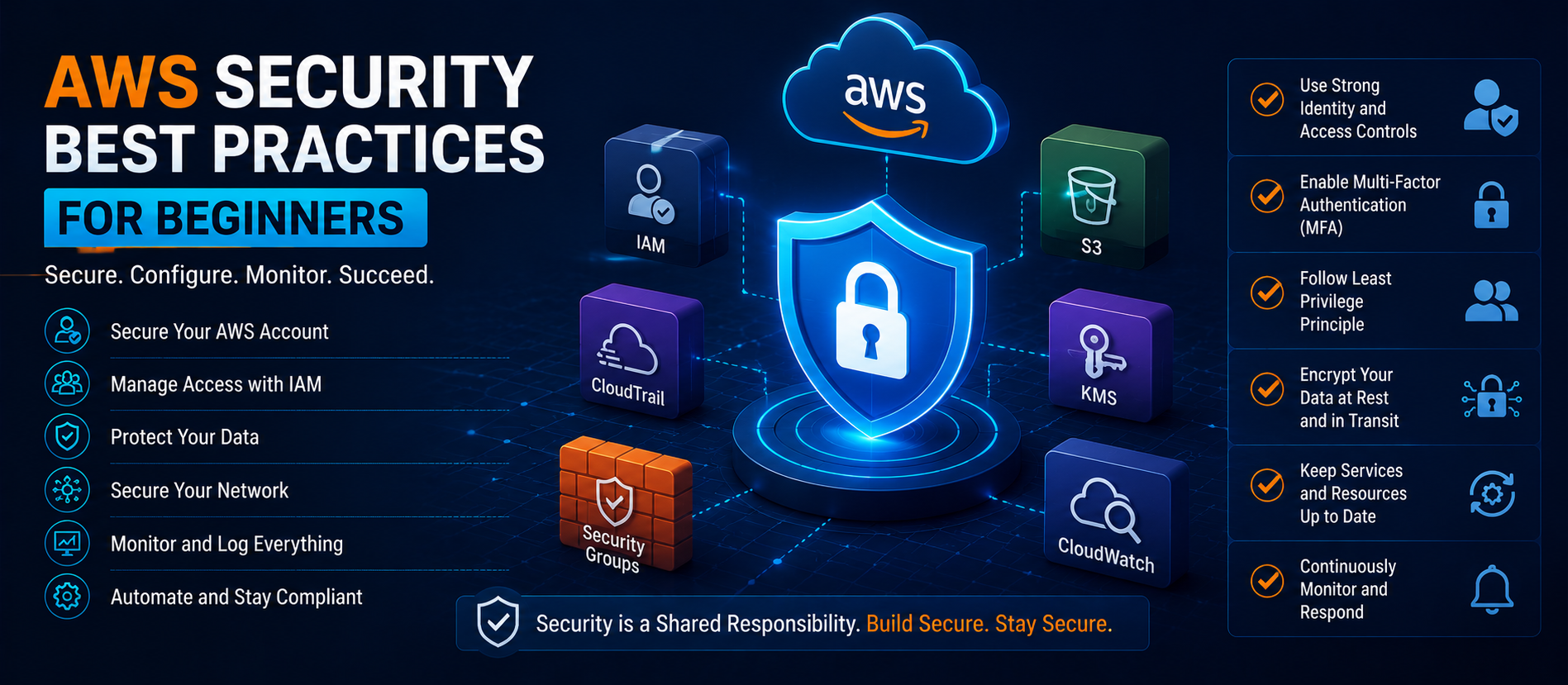
📋 Quick Summary
In this article:
Understanding the AWS Shared Responsibility Model
Why AWS Security Matters in 2026
Best Practice #1: Secure the AWS Root Account
Best Practice #2: Use IAM Effectively
Best Practice #3: Enable Multi-Factor Authentication Everywhere
Best Practice #4: Follow the Principle of Least Privilege
Best Practice #5: Encrypt Data at Rest and in Transit
Best Practice #6: Secure Amazon S3 Storage
Best Practice #7: Implement Network Security Controls
Best Practice #8: Enable AWS CloudTrail
Best Practice #9: Monitor with Amazon CloudWatch
Best Practice #10: Use AWS Config for Compliance
💡 Key Insight
Amazon Web Services (AWS) remains the world's most widely used cloud computing platform, powering millions of applications, websites, startups, enterprises, and government organizations. As businesses continue migrating workloads to the cloud, understanding AWS security has become essential for IT professionals, business owners, developers, and cyber security practitioners.
While AWS provides a highly secure cloud infrastructure, customers are responsible for protecting their own data, applications, identities, and configurations. Many cloud security incidents occur due to misconfigurations rather than weaknesses within AWS itself.
This comprehensive beginner-friendly guide explains AWS security best practices in 2026, helping organizations strengthen cloud security, reduce cyber risks, maintain compliance, and improve resilience against evolving threats.
Understanding the AWS Shared Responsibility Model
Before implementing security controls, beginners must understand AWS's Shared Responsibility Model.
AWS is responsible for:
- Physical data center security
- Global infrastructure protection
- Networking hardware
- Cloud platform security
- Underlying infrastructure maintenance
Customers are responsible for:
- Identity management
- Access control
- Data encryption
- Operating system security
- Application security
- Network configuration
- Compliance management
Understanding this division of responsibility is the foundation of effective AWS security.
Why AWS Security Matters in 2026
Cloud environments continue expanding as organizations embrace digital transformation, AI workloads, big data analytics, remote work solutions, and SaaS applications.
Without proper security controls, organizations may face:
- Data breaches
- Unauthorized access
- Ransomware attacks
- Compliance violations
- Service disruptions
- Financial losses
Strong AWS security practices reduce exposure to these risks while supporting business growth.
Best Practice #1: Secure the AWS Root Account
The AWS root account has unrestricted access to all AWS resources.
Beginners should:
- Enable Multi-Factor Authentication (MFA)
- Create administrative IAM users
- Avoid daily use of the root account
- Store credentials securely
- Monitor root account activity
The root account should only be used for tasks that specifically require it.
Best Practice #2: Use IAM Effectively
AWS Identity and Access Management (IAM) is one of the most important security services.
IAM enables organizations to:
- Create users
- Assign permissions
- Manage groups
- Control access policies
- Implement least privilege access
Always grant users only the permissions necessary to perform their job functions.
Best Practice #3: Enable Multi-Factor Authentication Everywhere
Passwords alone are no longer sufficient.
MFA provides an additional security layer by requiring users to verify their identity through:
- Authentication apps
- Security keys
- Hardware tokens
- Mobile verification methods
MFA dramatically reduces account compromise risks.
Best Practice #4: Follow the Principle of Least Privilege
Least privilege means users receive only the minimum permissions required.
Benefits include:
- Reduced attack surface
- Limited insider threats
- Better compliance
- Improved access control
Regularly review permissions and remove unnecessary access rights.
Best Practice #5: Encrypt Data at Rest and in Transit
Encryption protects sensitive information from unauthorized access.
AWS provides several encryption options:
- AWS Key Management Service (KMS)
- Server-side encryption
- TLS encryption
- Client-side encryption
Always encrypt business-critical and customer-sensitive data.
Best Practice #6: Secure Amazon S3 Storage
Amazon S3 is one of the most widely used AWS services.
Common S3 security recommendations include:
- Disable public access unless required
- Use bucket policies carefully
- Enable encryption
- Monitor access logs
- Implement versioning
- Enable MFA delete where appropriate
Many cloud data breaches result from misconfigured storage buckets.
Best Practice #7: Implement Network Security Controls
AWS provides multiple networking security tools.
Important components include:
- Security Groups
- Network ACLs
- Virtual Private Cloud (VPC)
- Private Subnets
- NAT Gateways
- AWS Network Firewall
Proper network segmentation improves cloud security significantly.
Best Practice #8: Enable AWS CloudTrail
AWS CloudTrail records account activity and API usage.
Benefits include:
- Security auditing
- Incident investigation
- Compliance reporting
- Threat detection
- Operational visibility
CloudTrail should be enabled in every AWS environment.
Best Practice #9: Monitor with Amazon CloudWatch
Continuous monitoring is essential for detecting security incidents.
CloudWatch helps organizations:
- Track performance metrics
- Monitor logs
- Create security alerts
- Identify anomalies
- Automate responses
Real-time visibility supports faster threat detection.
Best Practice #10: Use AWS Config for Compliance
AWS Config continuously evaluates resource configurations.
Organizations can:
- Track changes
- Detect policy violations
- Improve governance
- Maintain compliance standards
Configuration monitoring reduces security drift.
Best Practice #11: Deploy AWS Security Hub
AWS Security Hub centralizes security findings across AWS services.
It helps organizations:
- Identify vulnerabilities
- Monitor compliance
- Prioritize threats
- Manage security posture
Security Hub provides a unified security dashboard.
Best Practice #12: Enable Amazon GuardDuty
Amazon GuardDuty uses machine learning and threat intelligence to detect suspicious activity.
GuardDuty identifies:
- Compromised accounts
- Malicious IP activity
- Unauthorized access attempts
- Data exfiltration behavior
GuardDuty provides valuable threat detection capabilities for beginners and enterprises alike.
Best Practice #13: Patch and Update Systems Regularly
Unpatched systems remain a major security risk.
Organizations should:
- Update operating systems
- Patch applications
- Review dependencies
- Monitor vulnerability reports
Regular maintenance helps prevent exploitation of known vulnerabilities.
Best Practice #14: Backup Critical Data
Backup and recovery planning are essential components of cloud security.
Recommended practices include:
- Automated backups
- Cross-region replication
- Backup encryption
- Regular recovery testing
Backups provide protection against accidental deletion, ransomware, and system failures.
Best Practice #15: Adopt a Zero Trust Approach
Zero Trust security assumes no user or device should be automatically trusted.
Key principles include:
- Continuous verification
- Identity-based security
- Least privilege access
- Device validation
- Micro-segmentation
Zero Trust architectures are becoming standard across cloud environments.
Common AWS Security Mistakes Beginners Make
- Using the root account regularly
- Granting excessive permissions
- Disabling logging services
- Leaving S3 buckets public
- Ignoring MFA requirements
- Failing to monitor activity
- Skipping security audits
- Neglecting backup strategies
⚠ Watch Out
Avoiding these mistakes significantly improves cloud security.
Future AWS Security Trends
Several trends will shape AWS security in the coming years:
- AI-powered threat detection
- Automated compliance monitoring
- Cloud-native security platforms
- Zero Trust adoption
- Post-quantum cryptography
- Advanced identity protection
Organizations that stay ahead of these developments will improve resilience against emerging cyber threats.
AEO & GEO Optimized Frequently Asked Questions
What is AWS security?
AWS security refers to the policies, tools, services, and practices used to protect cloud resources hosted on Amazon Web Services.
Why is MFA important in AWS?
Multi-Factor Authentication adds an additional layer of protection and helps prevent unauthorized access.
What is the AWS Shared Responsibility Model?
The Shared Responsibility Model divides security responsibilities between AWS and its customers.
How can beginners secure AWS accounts?
Beginners should enable MFA, use IAM, encrypt data, monitor activity, and implement least privilege access controls.
Which AWS security services are most important?
IAM, CloudTrail, GuardDuty, Security Hub, CloudWatch, AWS Config, and KMS are among the most important AWS security services.
Conclusion
AWS offers powerful security capabilities, but effective protection requires proper configuration, continuous monitoring, and strong governance practices. Beginners who understand IAM, MFA, encryption, monitoring, logging, backup strategies, and Zero Trust principles can significantly improve cloud security.
As cloud adoption continues accelerating in 2026, organizations that implement AWS security best practices will be better prepared to defend against cyber threats, maintain compliance, and protect valuable business assets.
For more expert insights on Cyber Security, AWS Security, Cloud Computing, AI Search Optimization, SEO, AEO, GEO, and Digital Transformation strategies, visit Digiifrog at www.digiifrog.com.
Ready to Grow?
Talk to us about a strategy tailored to your brand — we will help you stand out in search, AI discovery and social.
Comments (0)
Log in to leave a comment.