
📋 Quick Summary
In this article:
Quick Answer: What Are Common Cyber Threats?
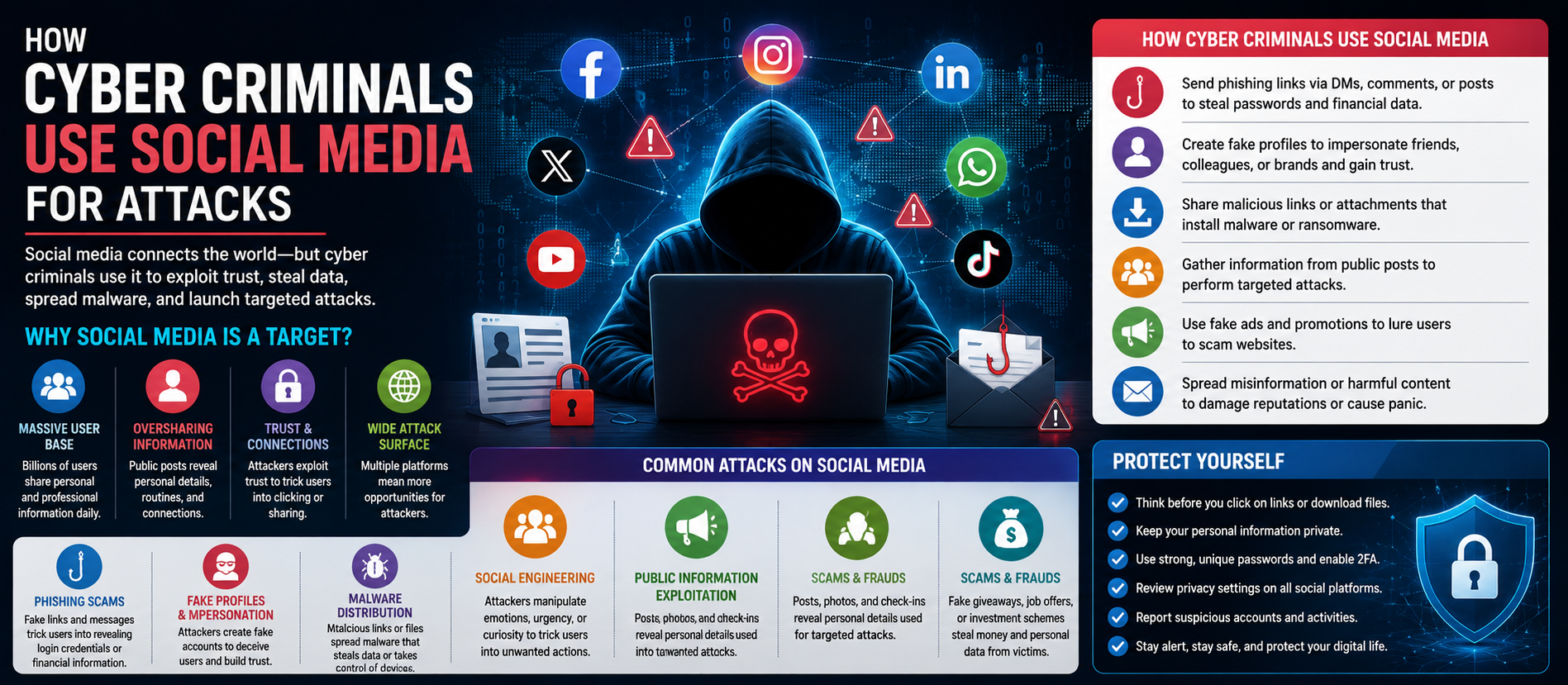
1. Phishing Attacks
2. Malware
3. Ransomware
4. Password Attacks
5. Credential Stuffing
6. Social Engineering
7. Business Email Compromise
8. Identity Theft
9. Spyware
10. Keylogging
11. Man-in-the-Middle Attacks
Cyber threats can affect individuals, families, businesses, and organizations of every size. Attackers do not always need advanced tools to cause damage. A stolen password, fake email, malicious download, weak security setting, or compromised account can be enough to create serious problems.
💡 Key Insight
As more daily activities move online, understanding common cyber threats has become an important part of digital safety. Knowing how attacks work can help people recognize warning signs before clicking a dangerous link or sharing sensitive information.
This guide explains the common cyber threats everyone should know in simple language. It covers phishing, malware, ransomware, password attacks, social engineering, identity theft, unsafe websites, insider threats, and other risks. It also provides practical steps for improving cybersecurity at home and at work.
Quick Answer: What Are Common Cyber Threats?
Common cyber threats include phishing, malware, ransomware, password attacks, social engineering, identity theft, business email compromise, unsafe downloads, data breaches, and denial-of-service attacks. These threats can steal information, disrupt services, damage systems, or cause financial loss.
The best defense is layered security. Strong passwords, multi-factor authentication, software updates, secure backups, employee awareness, and careful online behavior can reduce many common risks.
1. Phishing Attacks
Phishing is one of the most common cyber threats. Attackers send fake emails, messages, or websites that look legitimate. Their goal is often to trick people into revealing passwords, payment information, or other sensitive data.
A phishing message may create urgency. It might claim that an account will be closed, a payment failed, or an important document needs immediate approval.
Before clicking, check the sender, website address, message context, and request. When possible, open the official website or app directly instead of using a link in an unexpected message.
2. Malware
Malware means malicious software. It includes programs designed to damage systems, steal information, spy on users, or provide unauthorized access.
Malware can arrive through malicious attachments, compromised websites, fake applications, infected files, or unsafe downloads.
Keep operating systems and security software updated. Download applications only from trusted sources and avoid opening unexpected files.
3. Ransomware
Ransomware is malware that can prevent access to files or systems and demand payment from victims. It can affect individuals, businesses, hospitals, schools, and other organizations.
Ransomware can spread through phishing, vulnerable systems, stolen credentials, or other security weaknesses.
Regular offline or otherwise protected backups are an important defense. Backups should be tested so that an organization knows they can actually be restored.
4. Password Attacks
Weak or reused passwords can make accounts easier to compromise.
Attackers may use stolen password lists, automated guessing, credential stuffing, or other techniques. If the same password is reused across several services, one compromised account can put other accounts at risk.
Use unique passwords for important accounts. A reputable password manager can help create and store strong passwords.
5. Credential Stuffing
Credential stuffing occurs when attackers use usernames and passwords stolen from one service to try logging into other services.
This works because people sometimes reuse passwords.
Using a different password for every important account is one of the simplest ways to reduce this risk. Multi-factor authentication provides another important layer of protection.
6. Social Engineering
Social engineering attacks target human behavior rather than only technical weaknesses.
An attacker may pretend to be a manager, bank employee, customer, delivery company, technical support agent, or trusted contact.
The attacker may ask for a password, payment, verification code, or confidential document.
Pause when a request is unusual or urgent. Verify the person's identity using a trusted communication channel.
7. Business Email Compromise
Business email compromise involves fraudulent messages designed to make employees transfer money, change payment details, share information, or perform another unauthorized action.
Attackers may compromise an account or imitate an executive, supplier, or customer.
Businesses should use approval procedures for financial requests. Any request to change bank details or make an unusual payment should be independently verified.
8. Identity Theft
Identity theft occurs when someone uses another person's personal information without authorization. Stolen information may be used for financial fraud, account takeover, impersonation, or other crimes.
Protect personal information, avoid sharing unnecessary details online, monitor important accounts, and use multi-factor authentication where available.
9. Spyware
Spyware is malicious software that can secretly monitor activity or collect information.
It may record browsing behavior, credentials, messages, or other sensitive information depending on the software.
Use reputable security tools, keep devices updated, and avoid installing unknown applications.
10. Keylogging
A keylogger can record keystrokes. If installed maliciously, it may capture passwords, messages, and other information typed by a user.
Good endpoint security, software updates, and safe downloading habits can help reduce exposure.
11. Man-in-the-Middle Attacks
In a man-in-the-middle attack, an attacker attempts to intercept or manipulate communication between two parties.
Unsecured networks can increase certain risks. Use trusted networks, encrypted connections, secure applications, and appropriate VPN or enterprise security controls when required.
12. Unsafe Public Wi-Fi
Public Wi-Fi can be convenient, but users should not automatically assume every network is trustworthy.
A fake hotspot can be created to attract users. Attackers may also attempt to monitor poorly protected traffic.
Avoid sensitive transactions on unknown networks when possible. Use secure websites and applications, disable automatic connections, and follow your organization's security policy.
13. Malicious Websites and Downloads
Some websites are designed to trick visitors into downloading malware or entering sensitive information.
Fake software updates and fake browser warnings are common examples of deceptive tactics.
Download software from official sources. Do not install programs simply because a pop-up says your device is infected or requires an urgent update.
14. Data Breaches
A data breach occurs when unauthorized parties gain access to protected information.
Breached data can include names, email addresses, passwords, financial information, health-related information, or business records.
Organizations should limit access to sensitive data, encrypt appropriate information, monitor systems, and maintain an incident-response plan.
15. Insider Threats
An insider threat comes from someone with legitimate access to an organization's systems or information.
The risk can be intentional or accidental. An employee might deliberately steal data, or accidentally send confidential information to the wrong recipient.
Use least-privilege access, employee training, access reviews, logging, and clear data-handling procedures.
16. Supply Chain Attacks
Organizations often depend on software vendors, cloud platforms, contractors, and technology suppliers.
A supply chain attack targets one part of this wider ecosystem to reach other organizations or users.
Businesses should evaluate important vendors, limit third-party access, maintain software inventories, and understand how suppliers handle security incidents.
17. Denial-of-Service Attacks
A denial-of-service attack attempts to make a website, application, or network unavailable by overwhelming it or exploiting a weakness.
Distributed denial-of-service attacks use many systems to generate traffic.
Businesses that depend on online services may need specialized protection, traffic filtering, monitoring, and incident-response procedures.
18. Mobile Device Threats
Smartphones and tablets contain valuable information and provide access to email, banking, business systems, and social media.
Threats include malicious apps, device theft, phishing messages, insecure connections, and outdated software.
Use a screen lock, device encryption where available, automatic updates, reputable applications, and remote-wipe features where appropriate.
19. Cloud Account Attacks
Cloud services are widely used for email, file storage, collaboration, and business applications.
An attacker who obtains a cloud account may gain access to large amounts of information.
Use multi-factor authentication, strong access controls, activity monitoring, and separate administrator accounts where appropriate.
20. Deepfakes and AI-Powered Social Engineering
Artificial intelligence can make some social engineering attempts more convincing. Attackers may use generated text, synthetic voices, altered images, or other deceptive content to impersonate people.
Do not rely only on a familiar voice, image, or writing style. For sensitive requests, use an independent verification method.
Warning Signs of a Cyber Attack
- Unexpected password-reset messages.
- Login alerts from unfamiliar locations.
- Unusual payment requests.
- Files that suddenly become inaccessible.
- Unknown applications or browser extensions.
- Unexpected account changes.
- Slow or unusual device behavior.
- Messages asking for verification codes.
- Security warnings that appear suddenly.
How to Protect Yourself From Common Cyber Threats
- Use unique, strong passwords.
- Enable multi-factor authentication.
- Keep operating systems and applications updated.
- Back up important files regularly.
- Be careful with unexpected links and attachments.
- Use reputable security software.
- Verify unusual financial or account requests.
- Limit the personal information you share publicly.
- Review account activity regularly.
- Train employees on security awareness.
What Businesses Should Do
Businesses need a layered cybersecurity strategy. Start by identifying important systems and data. Then control access, protect endpoints, secure email, maintain backups, monitor important activity, and prepare an incident-response plan.
Employees should know how to report suspicious messages or security incidents. Security training should be practical and repeated regularly.
What to Do If You Think You Were Hacked
Act quickly. Disconnect an affected device from the network when appropriate, but avoid destroying evidence if an investigation may be required.
Change compromised passwords from a trusted device, enable multi-factor authentication, contact the relevant service provider, and monitor accounts for unusual activity. If financial information may have been exposed, contact the financial institution and follow its fraud-reporting process.
Businesses should activate their incident-response procedures and involve qualified cybersecurity professionals when necessary.
Why Cybersecurity Is an Ongoing Process
Cybersecurity is not a one-time setup. Threats change, software changes, employees change, and new devices are added over time.
Regular updates, security reviews, backup tests, access reviews, and employee training help keep defenses effective.
SEO, AEO, GEO, and AI Search Optimization
This article uses direct answers, clear headings, practical lists, and question-focused content to support modern search experiences.
SEO targets phrases such as common cyber threats, cybersecurity threats everyone should know, types of cyber attacks, and how to protect against cyber threats.
AEO directly answers questions such as “What are common cyber threats?” and “How can I protect myself from cyber attacks?”
GEO recognizes that cybersecurity requirements, privacy rules, breach-reporting obligations, and compliance standards vary by country and industry.
AI Search optimization is supported through concise definitions, structured headings, checklists, and direct explanations.
Frequently Asked Questions
What is the most common cyber threat?
Phishing is one of the most common threats because attackers can use convincing messages to trick people into revealing information or installing malicious software.
How can I protect myself from cyber threats?
Use unique passwords, enable multi-factor authentication, update software, maintain backups, avoid suspicious links, and verify unusual requests.
What is ransomware?
Ransomware is malicious software that can restrict access to files or systems and demand payment. Reliable backups are an important defense.
Can AI create new cybersecurity risks?
Yes. AI can make phishing and impersonation attempts more convincing. People and organizations should use independent verification for sensitive requests.
Are small businesses at risk of cyber attacks?
Yes. Small businesses can hold valuable data and may have limited security resources. Basic controls such as MFA, updates, backups, access management, and employee training can significantly improve resilience.
Final Thoughts
Understanding common cyber threats is the first step toward better digital security. Phishing, malware, ransomware, password attacks, social engineering, identity theft, data breaches, insider threats, and other attacks can affect almost anyone.
The strongest defense is not a single security product. It is a combination of secure technology, careful behavior, strong access controls, reliable backups, regular updates, and ongoing awareness.
For more educational content about cybersecurity, AI, technology, digital marketing, SEO, AEO, GEO, and AI Search optimization, visit www.digiifrog.com.
Disclaimer
This article is for general educational and informational purposes only and does not constitute cybersecurity, legal, financial, or professional advice. Security risks change over time, and the appropriate controls depend on the device, system, organization, industry, and circumstances. For serious incidents, consult qualified cybersecurity professionals and relevant authorities.
Ready to Grow?
Talk to us about a strategy tailored to your brand — we will help you stand out in search, AI discovery and social.
Comments (0)
Log in to leave a comment.