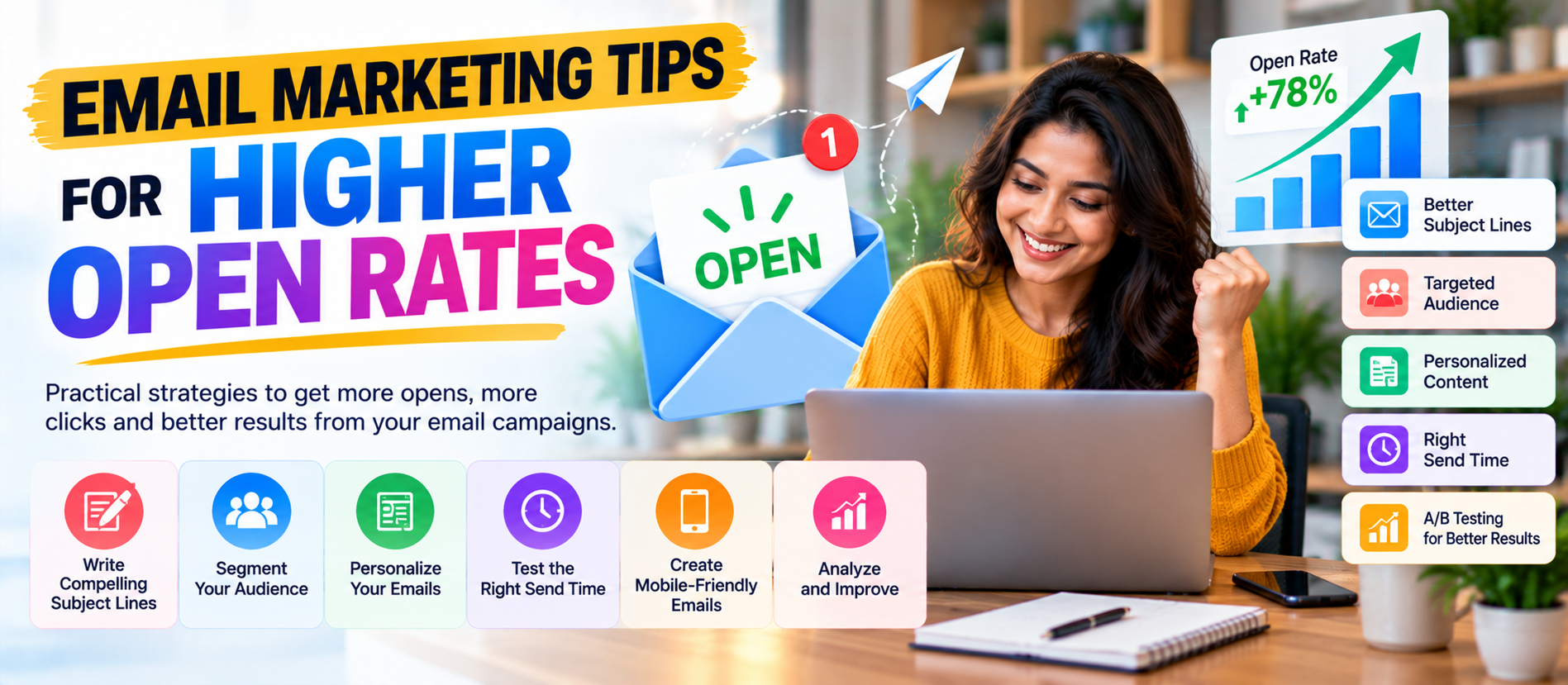
📋 Quick Summary
In this article:
1. Build a Permission-Based Email List
2. Protect Email Deliverability Before Chasing Opens
3. Use a Recognizable Sender Name
4. Write Subject Lines That Are Clear, Specific, and Useful
5. Focus on One Main Idea Per Email
6. Write Better Preheader Text
7. Segment Your Audience
8. Use Personalization With a Purpose
9. Send Emails at a Time Your Audience Can Actually Use Them
10. Use Behavioral Triggers
Email remains one of the most useful channels for building direct relationships with customers and prospects. But sending more emails does not automatically create better results. If people do not open your messages, even excellent content stays unseen.
Higher open rates begin before the subject line. Deliverability, sender reputation, audience quality, relevance, timing, trust, and message expectations all influence whether people engage with your email.
What Is an Email Open Rate?
An email open rate is a metric used by email platforms to estimate how many delivered messages were opened. It is useful for comparing campaigns and identifying trends, but it should not be treated as a perfect measure of attention.
Email technology has changed. Privacy features, image loading behavior, security systems, and inbox providers can affect how opens are recorded. For that reason, a strong email program should look beyond open rate.
Also track clicks, replies, conversions, unsubscribes, spam complaints, revenue, and other business outcomes. The goal is not simply to get an email opened. The goal is to get the right person to engage with a useful message.
Why Higher Open Rates Matter
An open is the first step in the email journey. If your audience does not open the message, they cannot read the content, click the link, use the offer, or complete the next action.
Higher open rates can indicate that your audience recognizes your sender identity and expects useful communication. However, chasing open rates at any cost can create the wrong incentives.
For example, a sensational subject line may increase opens but disappoint readers. That can lead to fewer clicks, more unsubscribes, and more spam complaints.
A better objective is simple: earn attention by being relevant and trustworthy.
1. Build a Permission-Based Email List
List quality is one of the strongest foundations of email performance. Send marketing messages to people who have a legitimate reason to receive them and who understand what they are signing up for.
A permission-based list usually produces better engagement than a large list built from unclear or unwanted sources.
Use clear signup forms. Explain what subscribers will receive. If you send a newsletter every week, say so. If subscribers will receive product offers, educational content, or event updates, explain that expectation.
Google's current sender guidance recommends that recipients opt in and emphasizes sending messages to people who want them. It also recommends periodically confirming that subscribers still want the communication.
2. Protect Email Deliverability Before Chasing Opens
You cannot improve open rates consistently if your emails are not reaching inboxes.
Deliverability depends on many factors, including sender reputation, authentication, recipient engagement, message quality, spam complaints, and sending practices.
For Gmail recipients, Google currently requires all senders to use at least SPF or DKIM authentication. Bulk senders to personal Gmail accounts must use SPF, DKIM, and DMARC, along with additional requirements. Google also recommends keeping spam rates low.
This means technical email setup is not optional for serious email marketing. Work with your email service provider and domain administrator to verify your authentication records.
3. Use a Recognizable Sender Name
People often decide whether to open an email by looking at the sender name and subject line together.
Use a sender identity your audience recognizes. Depending on your brand, this could be a company name, a person's name with the company, or another consistent identity.
⚠ Watch Out
Avoid changing the sender name randomly from campaign to campaign. Consistency helps subscribers recognize legitimate messages.
For example, a company could use:
- Digiifrog
- Subhamoy from Digiifrog
- Digiifrog Marketing Team
The best choice depends on the relationship you want to build. A personal sender can work well for relationship-driven communication. A brand sender can be clearer for newsletters and company announcements.
4. Write Subject Lines That Are Clear, Specific, and Useful
The subject line has one important job: give the recipient a reason to open the email.
Strong subject lines are usually clear about the value or topic. They do not need to be complicated.
Instead of:
“You Won't Believe What We Have for You!”
Try:
“5 PPC mistakes that can waste your budget”
Or:
“Your September SEO checklist is ready”
Clear subjects set accurate expectations. Google also advises commercial and bulk senders to avoid deceptive subject lines and content.
5. Focus on One Main Idea Per Email
Too many ideas can make an email difficult to understand.
If the purpose of the message is to promote a webinar, make the webinar the main focus. If the purpose is to introduce a new service, make that service the main focus.
You can include supporting links, but the reader should quickly understand the main point.
A simple structure works well:
- What is this email about?
- Why does it matter?
- What should I do next?
6. Write Better Pre header Text
The pre header is the short preview text that often appears beside or below the subject line in an inbox.
Do not waste this space with generic text such as “View this email in your browser.” Give the recipient additional context.
For example:
- Subject: 5 ways to improve your PPC campaigns
- Pre header: Start with search intent, landing pages, and conversion tracking.
The subject creates the initial interest. The pre header can add enough information to make the decision easier.
7. Segment Your Audience
Sending the same message to everyone is one of the easiest ways to reduce relevance.
Segmentation lets you adapt email content to different groups. You can segment based on information and behavior that you have permission to use.
Examples include:
- New subscribers.
- Existing customers.
- Prospects.
- Past customers.
- Product interest.
- Service interest.
- Location.
- Engagement level.
- Purchase history.
- Event attendance.
A segmented email can feel more relevant because it reflects what the recipient actually cares about.
8. Use Personalization With a Purpose
Adding a first name is easy. Useful personalization goes further.
Instead of inserting someone's name into a generic message, use relevant information to improve the content.
For example, an online business could send different recommendations based on previous product interest. A B2B company could send different educational content based on the recipient's business role or selected service.
Do not personalize simply because you can. Personalization should make the email more useful.
9. Send Emails at a Time Your Audience Can Actually Use Them
There is no universal perfect email-sending time.
The right time depends on your audience, location, work schedule, industry, message type, and behavior.
Start with reasonable assumptions, then test. Compare performance across different days and times. Look at the complete engagement picture instead of relying on one campaign.
For a business audience, weekday mornings may be a logical starting point. For consumer audiences, evenings or weekends may sometimes work better. But your own data should eventually guide the decision.
10. Use Behavioral Triggers
Triggered emails are messages connected to an action or event.
Examples include:
- Welcome emails.
- Abandoned-cart messages.
- Product-view follow-ups.
- Trial reminders.
- Event reminders.
- Post-purchase education.
- Re-engagement campaigns.
Triggered messages can be relevant because they arrive in response to something the recipient has done or requested.
Keep the message aligned with the user's expectation. Do not use behavioral data in ways that feel intrusive or unexpected.
11. Create a Strong Welcome Email
The first email can shape the subscriber's expectations for the relationship.
A useful welcome email can explain:
- Who you are.
- What the subscriber can expect.
- How often you send emails.
- What type of content they will receive.
- Where to find useful resources.
- How to manage preferences.
Do not use the welcome message only as a sales pitch. Start by delivering the value you promised when the person subscribed.
12. Give Subscribers a Reason to Open Your Next Email
Email marketing becomes stronger when each message creates a useful expectation for the next one.
You could build recurring content such as:
- Weekly marketing tips.
- Monthly industry insights.
- New resource alerts.
- Practical checklists.
- Case-study updates.
- Product education.
Consistency helps people understand why your emails are worth keeping.
13. Make the Email Useful Before Asking for the Sale
Every email does not need to push a purchase.
Educational content can build trust. Useful information can remind subscribers why they joined your list.
For example, a digital marketing company could send:
- SEO checklists.
- PPC tips.
- Social media strategies.
- Website conversion ideas.
- AI Search updates.
- Content marketing frameworks.
When your audience consistently receives useful information, future promotional messages can have a stronger context.
14. Keep Email Copy Easy to Scan
People rarely read marketing emails word by word. They scan them.
Use:
- Short paragraphs.
- Descriptive headings.
- Bullets.
- Simple sentences.
- Enough white space.
- One clear primary CTA.
💡 Key Insight
Avoid long blocks of text. Put the most important information early.
Readable email content is especially important on mobile screens.
15. Optimize Emails for Mobile Devices
Your subscribers may read email on phones, tablets, laptops, or desktop computers. Your design should work across screen sizes.
Check:
- Font size.
- Button size.
- Image width.
- Spacing.
- Contrast.
- Link placement.
- Loading behavior.
Do not hide the main message inside a large image. Important information should remain understandable when images do not load.
16. Make Your Call to Action Clear
A clear CTA tells the reader what to do next.
Instead of vague text such as “Click Here,” try a CTA that describes the action:
- Read the full guide.
- Book a consultation.
- Get the checklist.
- View the case study.
- Start your free trial.
- Explore the service.
The CTA should match the user's stage in the buying journey.
17. Test Subject Lines Instead of Guessing
Subject-line testing can reveal what your audience responds to.
Test one variable at a time when possible. You could compare:
- Benefit-focused vs. curiosity-focused subjects.
- Short vs. longer subjects.
- Question vs. statement.
- Specific number vs. general promise.
- Urgency vs. educational value.
Do not assume that one successful subject will work forever. Audience expectations can change.
18. Do Not Use Clickbait
Clickbait can create short-term attention but damage long-term trust.
If a subject line promises a major insight but the email delivers something unrelated, subscribers learn that your messages are not reliable.
Google's bulk email guidance specifically advises senders to avoid deceptive subject lines, headers, sender names, and content.
Write a subject line that accurately represents what the email contains.
19. Clean Your Email List Regularly
A large email list is not automatically a valuable email list.
Inactive subscribers can reduce overall engagement and may create unnecessary sending costs.
Use a re-engagement sequence for subscribers who have stopped interacting. Ask whether they still want to receive your content. If appropriate, provide an easy way to update preferences or unsubscribe.
Google recommends considering the removal or disengagement of recipients who do not open or read messages as part of maintaining healthy sending practices.
20. Make Unsubscribing Easy
An easy unsubscribe process is not the enemy of email marketing. It helps keep your audience interested and reduces unwanted messages.
Google currently requires one-click unsubscribe for relevant marketing and promotional messages sent by bulk senders to personal Gmail accounts. Google also recommends honoring unsubscribe requests promptly.
Make the unsubscribe option clear and functional. Do not force people through unnecessary steps simply to leave the list.
21. Set the Right Email Frequency
Sending too rarely can make people forget who you are. Sending too often can create fatigue.
The right frequency depends on your audience and content value.
Tell subscribers what to expect when they sign up. If the frequency changes significantly, consider informing them.
Google's bulk email guidance recommends setting expectations for frequency and sending at a level your audience finds reasonable.
22. Use Re-Engagement Campaigns Carefully
When subscribers stop engaging, do not immediately send more messages.
A simple re-engagement sequence could say:
- We noticed you have not been opening our emails.
- Here is what you may have missed.
- Would you like to continue receiving these emails?
If the subscriber does not respond or engage, respect that signal. Continuing to send unwanted messages can hurt sender reputation.
23. Measure the Metrics That Matter
Open rate is only one part of email performance.
Track metrics such as:
- Delivery rate.
- Open rate.
- Click-through rate.
- Click-to-open rate where useful.
- Conversion rate.
- Unsubscribe rate.
- Spam complaint rate.
- Bounce rate.
- Revenue per campaign.
- Revenue per subscriber.
Look at trends rather than treating one campaign as a final verdict.
24. Watch Spam Complaints Closely
Spam complaints can affect sender reputation and future delivery.
Google's current sender guidance says senders should keep reported spam rates low and avoid reaching the levels that can negatively affect delivery. Its FAQ says bulk senders should aim to keep user-reported spam rates below 0.1% and prevent them from reaching 0.3% or higher.
Monitor complaint trends. If complaints increase, review your acquisition sources, frequency, segmentation, content, and unsubscribe experience.
25. Use Authentication: SPF, DKIM, and DMARC
Email authentication helps establish that your domain is authorized to send messages.
Google currently recommends SPF, DKIM, and DMARC as core authentication practices. For bulk senders to personal Gmail accounts, SPF, DKIM, and DMARC are required under Google's sender guidelines.
Authentication does not guarantee inbox placement. It is part of a broader deliverability system that also includes sender reputation, recipient engagement, content quality, and compliant sending practices.
26. Use Email Content That Supports AEO
AEO, or Answer Engine Optimization, focuses on making information clear and useful for answer-oriented search experiences.
Email itself is usually not the main AEO asset. Your website content linked from email is more important for search visibility.
Use email campaigns to distribute useful resources such as:
- How-to guides.
- Frequently asked questions.
- Original research.
- Practical checklists.
- Definitions.
- Comparison guides.
- Case studies.
Make the destination page clear and easy to understand. Answer the main question directly, use descriptive headings, and provide useful supporting information.
27. Use GEO and Local Relevance in Email Marketing
GEO can refer to Generative Engine Optimization, while geographic relevance is also important for local marketing. Email can support both by directing subscribers to useful, location-aware content.
For a local business, email content could highlight:
- Local events.
- Service-area updates.
- Regional customer stories.
- Location-specific offers.
- Local buying guides.
- Area-specific service information.
Do not create artificial location content. Geographic references should help the reader.
28. Connect Email Marketing With AI Search
AI Search is changing how people discover and compare information. Your email strategy can support this broader search journey by promoting high-quality website content.
Create resources that are easy for both people and search systems to understand. Use clear headings, direct answers, original insights, helpful examples, accurate facts, and strong internal linking.
Google's current documentation says there are no special technical requirements or special schema required just to appear in AI features such as AI Overviews or AI Mode. It continues to emphasize foundational SEO and helpful, people-first content.
This means you do not need to turn every email into an AI Search experiment. Focus on creating useful content and making it easy for readers to find and understand.
29. Repurpose High-Performing Emails Into Search Content
Your best email topics can become useful website assets.
If subscribers respond strongly to an email about PPC mistakes, for example, turn the idea into a detailed article. If a particular FAQ gets many clicks, build a more complete resource around it.
This creates a useful loop:
- Email tests audience interest.
- Strong topics become website content.
- Website content attracts search traffic.
- Search visitors can join the email list.
- The list provides another channel for future content.
30. Use AI as an Assistant, Not a Substitute for Strategy
AI can help generate subject-line ideas, summarize customer questions, classify topics, create draft variations, and analyze large amounts of campaign data.
But AI-generated email can easily become generic.
Use AI to accelerate research and production while keeping human control over:
- Brand voice.
- Customer understanding.
- Claims and facts.
- Offers.
- Compliance.
- Segmentation.
- Final approval.
The strongest email strategy combines automation with genuine customer insight.
31. Create a Simple Subject-Line Framework
If your team struggles to write subject lines, use repeatable patterns.
Benefit
“Improve your landing-page conversions with these 7 changes”
Problem
“Why your PPC clicks may not become leads”
Curiosity with clarity
“The landing-page mistake many small businesses miss”
Specific resource
“Your 10-point SEO audit checklist”
Timely information
“What changed in email deliverability this month”
Use these as starting points. The actual wording should reflect the content inside the email.
32. Create an Email Testing Calendar
Testing becomes easier when it is planned.
For example:
- Week 1: Test two subject-line approaches.
- Week 2: Test sender-name formats.
- Week 3: Test CTA wording.
- Week 4: Test send time.
- Month 2: Test segmentation.
- Month 3: Test a new email format or offer.
Keep a record of the test, audience, date, variable, result, and next action.
33. Build a 90-Day Plan for Higher Email Engagement
Days 1–30: Fix the foundation
- Audit list quality.
- Review permission and signup processes.
- Check SPF, DKIM, and DMARC.
- Review sender name and reply-to address.
- Check unsubscribe functionality.
- Review spam complaints and bounces.
- Define key email KPIs.
Days 31–60: Improve relevance
- Create audience segments.
- Improve subject lines.
- Write useful pre headers.
- Improve email readability.
- Test send times.
- Create a welcome sequence.
- Review inactive subscribers.
Days 61–90: Scale what works
- Analyze subject-line patterns.
- Expand successful segments.
- Create behavioral campaigns.
- Repurpose successful emails into SEO content.
- Improve high-performing landing pages.
- Test new offers.
- Build a repeatable monthly reporting process.
34. Common Email Marketing Mistakes to Avoid
- Buying email lists: Unwanted contacts can damage engagement and sender reputation.
- Using deceptive subject lines: Short-term opens are not worth long-term trust problems.
- Sending the same email to everyone: Different audiences often need different messages.
- Ignoring inactive subscribers: A large inactive list does not necessarily mean strong performance.
- Sending too frequently: Message fatigue can increase unsubscribes and complaints.
- Using unclear CTAs: Readers should understand the next action.
- Ignoring mobile design: Poor mobile experiences create friction.
- Tracking only opens: Business value usually depends on clicks and conversions too.
- Skipping authentication: Technical setup is part of responsible email marketing.
- Making unsubscribe difficult: Easy opt-out supports list health and user trust.
How Digiifrog Can Help With Email Marketing
Digiifrog can help businesses connect email marketing with a broader digital marketing strategy. Email campaigns can work alongside SEO, content marketing, social media, PPC, website development, conversion optimization, and analytics.
A strong email program should begin with the business goal. From there, the strategy can define audience segments, content themes, automation, landing pages, calls to action, measurement, and ongoing testing.
When choosing an email marketing partner, ask how the team handles deliverability, list quality, segmentation, testing, reporting, content, automation, and conversion tracking. A transparent process makes it easier to understand what is improving and why.
Frequently Asked Questions About Higher Email Open Rates
What is the best way to increase email open rates?
Start with a permission-based list, strong deliverability, a recognizable sender name, relevant subject lines, useful content, and audience segmentation. Then test and measure changes over time.
Does a longer subject line reduce open rates?
There is no universal rule that a longer subject line always performs worse. Mobile display limits, audience expectations, wording, and message relevance all matter. Test subject-line styles with your own audience.
Should I use the subscriber's first name in the subject line?
You can test it, but personalization should add relevance. A first name alone does not guarantee a better result. Test useful personalization against a clear non-personalized version.
What is the best time to send marketing emails?
There is no universal best time. Start with a sensible schedule for your audience and use campaign data to test days and times.
How often should I send emails?
Send often enough to remain useful and recognizable, but not so often that subscribers become frustrated. Set expectations during signup and monitor engagement, unsubscribes, and spam complaints.
Can cleaning an email list improve open rates?
It can improve the quality of your engaged audience and make performance metrics more meaningful. Use a careful re-engagement process before removing long-term inactive contacts.
Do SPF, DKIM, and DMARC improve open rates?
They are authentication and deliverability controls, not direct open-rate tactics. Proper authentication helps establish a trusted sending identity and can reduce delivery problems. Google requires SPF or DKIM for all senders to Gmail and SPF, DKIM, and DMARC for bulk senders under its current guidelines.
Does AI improve email marketing?
AI can help with idea generation, personalization, segmentation, testing, and analysis. Results still depend on the quality of the data, strategy, content, and customer understanding.
How does email marketing support SEO and AI Search?
Email can distribute useful website content and bring engaged visitors to guides, FAQs, research, and case studies. Those website assets can support SEO, AEO, and AI Search visibility when they are useful, clear, crawlable, and aligned with people-first content principles.
Final Thoughts
Higher email open rates are earned, not forced.
Start with permission and trust. Make sure your emails can reach the inbox. Use a recognizable sender identity. Write clear subject lines. Add useful pre header text. Segment your audience. Personalize when it improves relevance. Send at a sensible frequency. Make every email easy to scan and use.
Then measure more than opens. Watch clicks, conversions, revenue, unsubscribes, bounces, and spam complaints. Use testing to learn what your audience actually values.
Email marketing is most effective when it becomes a useful part of the customer journey. When subscribers know what to expect and consistently receive valuable information, opening an email becomes a natural choice.
Want to build a stronger email marketing system? Explore Digiifrog for digital marketing, email marketing, SEO, content, PPC, and conversion-focused services.
Sources and Further Reading
- Google Gmail: Email sender guidelines
- Google Gmail: Email sender guidelines FAQ
- Google Gmail: Sender requirements and Postmaster Tools FAQ
- Google Gmail: Learn about bulk email best practices
- Google Gmail: Top sender issues
- Google Gmail: Email subscription guidelines for senders
Ready to Grow?
Talk to us about a strategy tailored to your brand — we will help you stand out in search, AI discovery and social.
Comments (0)
Log in to leave a comment.