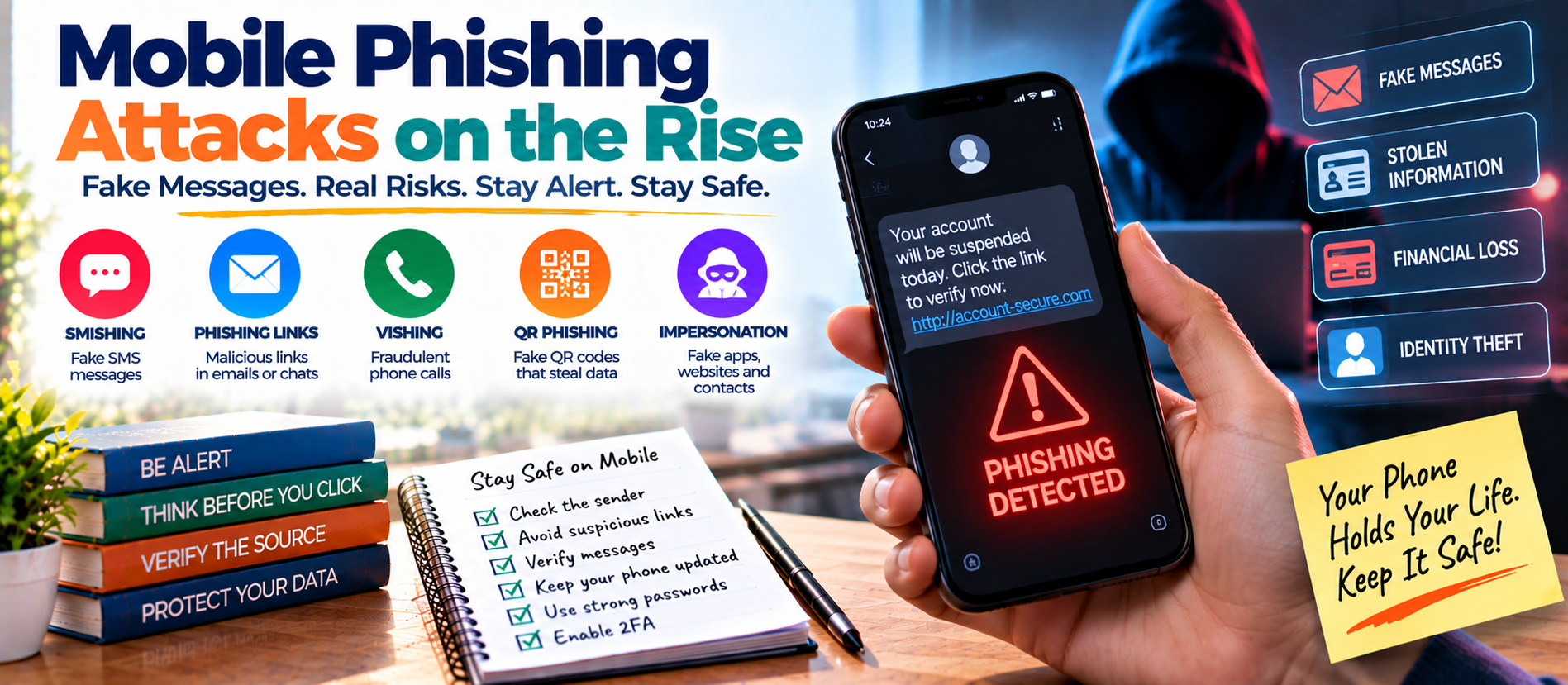
📋 Quick Summary
In this article:
Why Mobile Phishing Is Growing
Common Types of Mobile Phishing Attacks
1. Fake Delivery Messages
2. Fake Bank Alerts
3. Fake Account Security Warnings
4. Fake Job and Investment Offers
5. Wrong-Number Scams
6. QR-Code Phishing
7. Messaging-App Phishing
How Mobile Phishing Attacks Work
Warning Signs of a Phishing Text
Our phones have become the main gateway to the digital world. We use them for banking, shopping, email, work, social media, payments, and private conversations. That convenience also makes mobile devices attractive targets for cybercriminals.
Mobile phishing attacks are becoming more sophisticated. Criminals use text messages, messaging apps, fake websites, QR codes, phone calls, social media, and malicious apps to trick people into giving away information or approving fraudulent actions.
The Anti-Phishing Working Group reported that phishing attacks rose 10.1% in the second quarter of 2026. It also reported that smishing, or phishing through SMS and text messages, increased 40% from the first quarter to the second quarter.
The Federal Trade Commission also reported that consumers lost $470 million to scams that started with text messages in 2024. That was more than five times the amount reported in 2020.
These numbers show why mobile security deserves more attention. The good news is that most people can reduce their risk with a few simple habits.
What Is Mobile Phishing?
Mobile phishing is an attempt to trick a person through a phone or mobile device. The attacker may want a password, payment detail, verification code, personal information, or access to an account.
When phishing uses SMS or text messages, it is commonly called smishing. Voice-based phishing is called vishing. Similar attacks can also appear inside messaging apps, social networks, email apps, and mobile browsers.
The basic goal is usually the same: create trust or urgency, make the victim take an action, and capture something valuable.
Why Mobile Phishing Is Growing
Mobile phishing has several advantages for criminals. People check their phones frequently. Messages can appear as notifications and may be opened within seconds. A small screen can also make it harder to inspect a web address carefully.
Mobile devices combine many valuable services in one place. A single phone may provide access to email, banking, cloud storage, social media, payment apps, and authentication tools.
Modern attackers can also personalize messages using information gathered from data breaches, social media, public profiles, and previous scams. Artificial intelligence can make fraudulent messages faster to produce and easier to customize.
GSMA's 2026 mobile security landscape identifies scam attacks on mobile consumers, weak cyber hygiene, software weaknesses, and the growing use of generative and agentic AI as important areas of concern.
Common Types of Mobile Phishing Attacks
1. Fake Delivery Messages
A message may claim that a package cannot be delivered because of an address problem, unpaid fee, or missing information. It includes a link that leads to a fake delivery website.
The goal is often to steal card details, passwords, or other personal information.
2. Fake Bank Alerts
You may receive a message saying that a suspicious transaction has been detected. The message asks you to click a link or call a number.
The attacker may pretend to be a bank employee and ask for login details, card information, or a verification code.
3. Fake Account Security Warnings
Messages may claim that your email, social media, cloud storage, or shopping account will be locked unless you verify it immediately.
Urgency is the main weapon. The attacker wants you to act before you have time to check whether the message is genuine.
4. Fake Job and Investment Offers
Scammers may send attractive job offers, remote-work opportunities, investment tips, or quick-income schemes through text or messaging apps. Some begin with a harmless conversation and become fraudulent later.
Be especially careful if someone asks you to deposit money, buy cryptocurrency, pay a fee, or provide sensitive documents before you can receive an alleged opportunity.
5. Wrong-Number Scams
A scam can start with a simple message such as “Hi, is this Rahul?” The sender may pretend it was a mistake and then continue the conversation.
Over time, the conversation may become a romance scam, investment scam, or other form of social engineering.
6. QR-Code Phishing
QR codes can hide the destination of a link until the code is scanned. Criminals may place malicious QR codes in messages, posters, advertisements, emails, or even physical locations.
Always check the destination before entering credentials or payment information.
7. Messaging-App Phishing
Phishing does not have to arrive through SMS. WhatsApp, Telegram, social media messages, email, and other communication platforms can also be used.
A message from a known contact is not automatically safe. Their account may have been compromised.
How Mobile Phishing Attacks Work
Most attacks follow a simple pattern: get attention, create urgency, request an action, collect information, and continue the attack. The action may be clicking, calling, replying, scanning a QR code, downloading an app, or approving a login.
Warning Signs of a Phishing Text
- The message creates unusual urgency.
- It asks you to click an unexpected link.
- It requests passwords, card details, PINs, or verification codes.
- The sender claims there is an immediate account problem.
- The message contains unusual spelling or wording.
- The web address looks unfamiliar or slightly misspelled.
- You are asked to move money to a “safe” account.
- You are offered an unexpected prize, job, refund, or investment.
- A person you know suddenly asks for money or sensitive information.
The FTC advises consumers not to click links or respond to unexpected texts. If a message may be legitimate, contact the company through a website or phone number you already know is genuine.
Why Mobile Phishing Can Be Difficult to Detect
Mobile interfaces are designed for convenience, not detailed investigation. Long URLs may be hidden. Small screens can make suspicious domains harder to notice. Notifications can encourage quick reactions.
Security researchers have also reported that AI is making mobile phishing more scalable and convincing. Zimperium reported in July 2026 that phishing events detected on employee mobile devices had grown 380% since January 2025, while the number of devices where employees clicked malicious links grew 110% in 2025 compared with the previous year.
Users should slow down whenever a message asks for a sensitive action.
How AI Is Changing Mobile Phishing
Artificial intelligence can help attackers write more natural messages, translate content, personalize scams, and create variations quickly. It can also help criminals research targets and automate parts of an attack.
That makes old warning signs less reliable. A phishing message may have perfect grammar and look professionally written.
The safest approach is to focus on the request itself. Ask: Was I expecting this message? Why is it asking me to act now? Can I verify it through an independent channel?
How to Protect Against Mobile Phishing Attacks
1. Do Not Click Unexpected Links
If a text says your bank, delivery, employer, or account provider needs action, do not automatically use the link. Open the official app or type the known website address yourself.
2. Never Share Verification Codes
A login code is meant to prove your identity. Do not give it to someone who calls or messages you unexpectedly.
3. Use Multi-Factor Authentication
MFA adds another security layer. For stronger protection, consider phishing-resistant methods such as security keys or passkeys where supported. CISA describes phishing-resistant MFA as the strongest form of MFA and recommends planning migration toward it for high-value accounts.
4. Keep Your Phone Updated
Install operating-system and app updates promptly. Security updates can fix vulnerabilities that attackers may exploit.
5. Install Apps Carefully
Use official app stores and avoid unknown APK files or unofficial downloads. Review permissions before installing an app.
6. Use Screen Lock and Device Protection
Use a strong device passcode or biometric lock. Turn on built-in device-finding features where available. Encryption can also help protect stored information if a device is lost or stolen.
7. Enable Spam and Scam Filters
Use the spam-reporting and message-filtering features provided by your phone, messaging app, or mobile carrier.
8. Verify Through a Separate Channel
If a message claims to be from a bank, business, family member, or colleague, verify it independently. Use a trusted phone number, official website, or another known contact method.
What to Do If You Clicked a Phishing Link
Do not panic. Fast action can reduce damage.
- Close the suspicious website.
- Do not enter additional information.
- If you entered a password, change it immediately from a trusted device.
- Change the same password anywhere else it was reused.
- Enable MFA.
- Check account sessions and recent activity.
- Contact your bank quickly if payment information was exposed.
- Report the scam to the relevant platform or authority.
- Watch for follow-up messages and suspicious login alerts.
How Businesses Can Reduce Mobile Phishing Risk
Mobile phishing is also a business problem. Employees may access corporate email, cloud services, customer records, and internal applications from smartphones.
Businesses should provide phishing awareness training, strong identity controls, MFA, appropriate mobile-device management, secure application policies, and clear reporting procedures.
Employees should know exactly where to report a suspicious text, call, login request, or mobile application. Fast reporting can help security teams contain an incident before it spreads.
Mobile Phishing Prevention Checklist
- Pause before clicking an unexpected message.
- Check the sender and destination carefully.
- Never share passwords, PINs, or verification codes.
- Use unique passwords and MFA.
- Prefer phishing-resistant authentication for high-value accounts when available.
- Keep your phone and apps updated.
- Install software only from trusted sources.
- Limit unnecessary app permissions.
- Verify urgent requests through an independent channel.
- Monitor banking and account activity.
- Report suspicious texts instead of engaging with them.
Frequently Asked Questions
What is mobile phishing?
Mobile phishing is a scam designed to steal information or access by targeting a person through a smartphone or other mobile device. It can use SMS, calls, email, messaging apps, social media, QR codes, or malicious websites.
What is smishing?
Smishing is phishing delivered through SMS or text messages. It often uses fake delivery alerts, bank warnings, account notices, job offers, or payment requests.
Can a text message infect my phone?
A message may contain a link to malicious software or a website that exploits a vulnerability. Even when no malware is installed, the message may still steal passwords, payment information, or other personal data.
Should I reply to a suspicious text?
No. Avoid replying to unexpected messages. Use your phone or carrier's reporting tools where available, and report serious fraud through the appropriate authority.
Are mobile phishing attacks increasing?
Recent threat data indicates a significant increase. APWG reported a 40% quarter-over-quarter increase in smishing during Q2 2026, while Zimperium reported a 380% increase in phishing events detected on employee mobile devices since January 2025.
What is the safest response to an urgent bank text?
Do not use the link or phone number in the message. Open your official banking app or use a trusted contact method to check whether there is a real issue.
Final Thoughts
Mobile phishing attacks are rising because smartphones combine attention, identity, communication, and financial access in one place. Attackers know that a convincing notification can create a fast emotional reaction.
The best defense is to slow down. Do not trust unexpected messages simply because they look professional. Verify requests independently. Use MFA, keep your device updated, protect your accounts, and report suspicious activity quickly.
For more practical cybersecurity, AI, technology, and digital business insights, explore Digiifrog at www.digiifrog.com.
Sources and Further Reading
- Anti-Phishing Working Group — Phishing Activity Trends Report, Q2 2026.
- Federal Trade Commission — Top Text Scams of 2024.
- CISA — Mobile Device Cybersecurity Guidance.
- CISA — Implementing Phishing-Resistant MFA.
- GSMA — Mobile Telecommunications Security Landscape 2026.
- Zimperium — 2026 Global Mobile Threat Report.
Ready to Grow?
Talk to us about a strategy tailored to your brand — we will help you stand out in search, AI discovery and social.
Comments (0)
Log in to leave a comment.