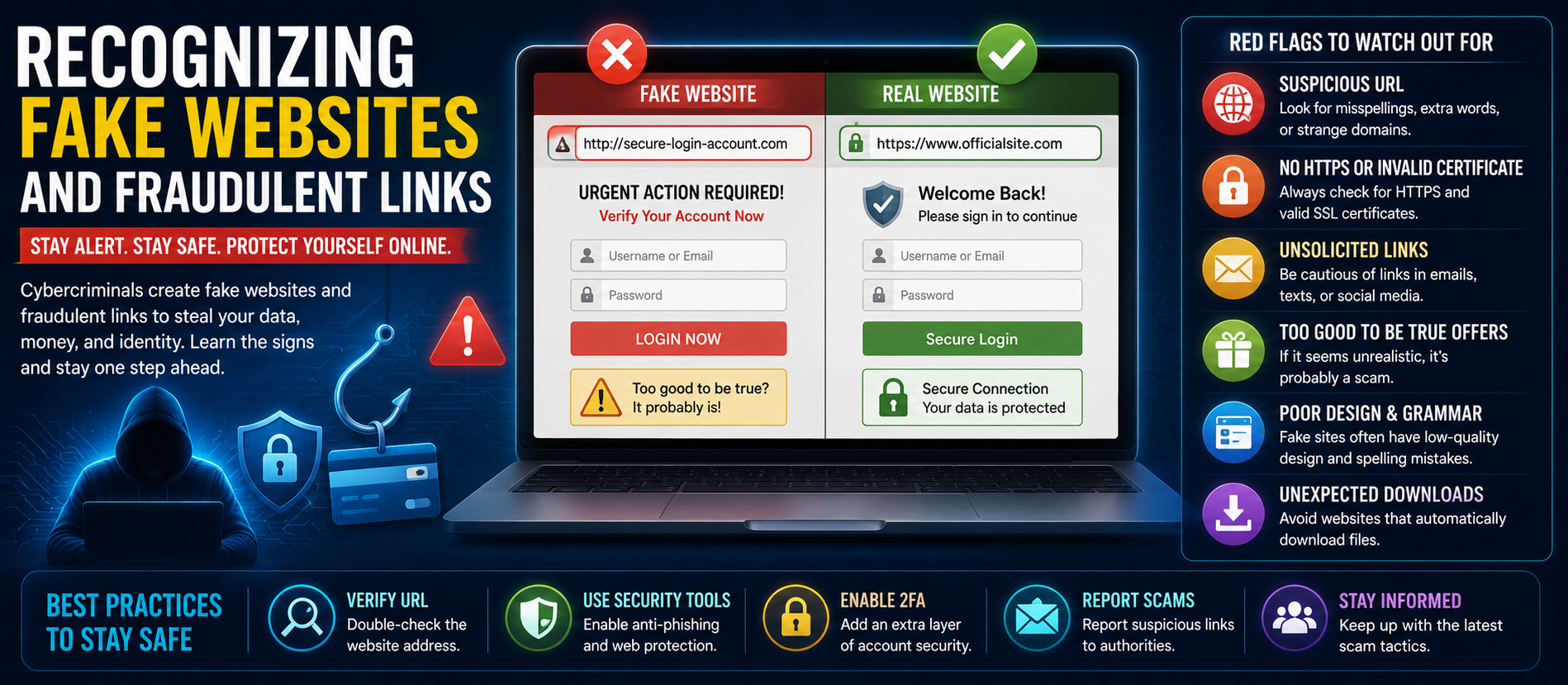
📋 Quick Summary
In this article:
Why Fake Websites Are Increasing
Warning Signs of Fake Websites
1. Suspicious URL
2. Missing HTTPS
3. Poor Design and Grammar
4. Unrealistic Offers
5. Fake Contact Information
How Businesses Can Protect Employees
Cybercriminals are constantly creating fake websites and fraudulent links to steal passwords, banking information, credit card details, and personal data. In 2026, phishing campaigns are more convincing than ever, often using Artificial Intelligence, cloned websites, QR-code phishing, and social engineering to deceive users.
⚠ Watch Out
This WordPress-ready guide explains how to identify fake websites, recognize malicious links, avoid phishing scams, and protect yourself and your business online. The article is optimized for SEO, AEO, GEO, and AI Search optimization.
What Are Fake Websites?
Fake websites imitate legitimate businesses, banks, eCommerce stores, government portals, and social media platforms. Their goal is to trick visitors into entering sensitive information or downloading malware.
Why Fake Websites Are Increasing
- AI-generated phishing campaigns
- Low-cost domain registration
- Easy website cloning tools
- Growth of online shopping
- Increasing digital payments
Warning Signs of Fake Websites
1. Suspicious URL
Look for misspelled domain names, unusual extensions, extra characters, or misleading subdomains.
2. Missing HTTPS
Although HTTPS alone doesn't guarantee safety, the absence of encryption is a significant warning sign.
3. Poor Design and Grammar
Low-quality graphics, broken pages, spelling mistakes, and awkward language often indicate fraudulent sites.
4. Unrealistic Offers
Deals that seem too good to be true are frequently used to lure victims.
5. Fake Contact Information
Legitimate businesses typically provide verifiable addresses, phone numbers, and customer support details.
Recognizing Fraudulent Links
- Hover over links before clicking.
- Be cautious of shortened URLs.
- Avoid unexpected QR codes.
- Verify links received through email or messaging apps.
- Never click urgent payment requests without verification.
Common Phishing Techniques
- Email phishing
- Spear phishing
- SMS phishing (Smishing)
- Voice phishing (Vishing)
- QR phishing (Quishing)
- Social media impersonation
How Businesses Can Protect Employees
- Security awareness training
- Multi-Factor Authentication (MFA)
- Email security gateways
- DNS filtering
- Endpoint Detection & Response (EDR)
- Regular phishing simulations
How AI Helps Detect Fraud
Machine Learning can identify suspicious domains, analyze website behavior, detect phishing emails, and recognize abnormal user activity before significant damage occurs.
Best Practices
- Use a password manager.
- Enable MFA everywhere possible.
- Keep browsers and devices updated.
- Verify website ownership before entering sensitive data.
- Monitor financial accounts regularly.
SEO, AEO & GEO Optimization
Provide structured, trustworthy content with FAQs, clear headings, practical examples, and accurate cyber security guidance to improve visibility across Google, Bing, ChatGPT, Gemini, Copilot, and other AI-powered search platforms.
AEO & GEO Optimized FAQs
How can I identify a fake website?
Check the URL, verify HTTPS, inspect contact information, watch for poor design, and avoid unrealistic offers.
What should I do if I click a phishing link?
Disconnect if malware is suspected, change affected passwords, enable MFA, scan your device, and monitor accounts for suspicious activity.
Can AI detect phishing websites?
Yes. Modern AI security tools can identify suspicious domains, analyze behavior, and detect many phishing attempts before users interact with them.
Conclusion
💡 Key Insight
Recognizing fake websites and fraudulent links is one of the most important cyber security skills in 2026. By staying alert, verifying websites, enabling MFA, using secure browsing practices, and educating employees, individuals and businesses can significantly reduce the risk of phishing and online fraud.
For more expert insights on Cyber Security, SEO, AEO, GEO, AI Search Optimization, Cloud Security, and Digital Transformation, visit Digiifrog at www.digiifrog.com.
Ready to Grow?
Talk to us about a strategy tailored to your brand — we will help you stand out in search, AI discovery and social.
Comments (0)
Log in to leave a comment.