📋 Quick Summary
In this article:
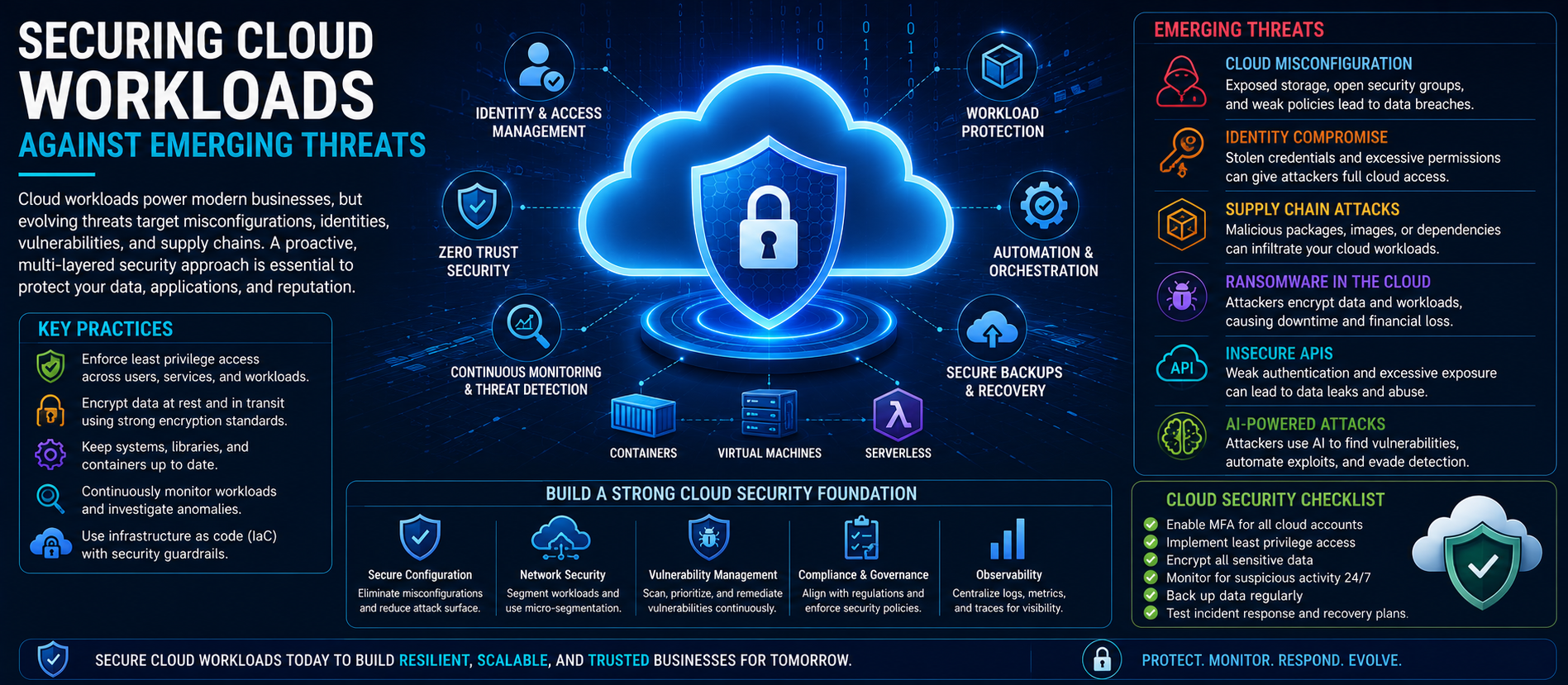
Why Cloud Workload Security Matters
Emerging Cloud Threats in 2026
Best Practices for Securing Cloud Workloads
1. Implement Zero Trust Security
2. Strengthen Identity and Access Management
3. Encrypt Data Everywhere
4. Secure Containers and Kubernetes
5. Monitor Continuously
6. Patch and Update Regularly
7. Protect APIs
8. Secure Backups
Cloud computing has become the backbone of digital transformation. Organizations of every size rely on cloud workloads to host applications, databases, containers, virtual machines, AI services, and business-critical systems. As cloud adoption accelerates in 2026, cyber criminals are also evolving their tactics, targeting cloud infrastructure with ransomware, identity attacks, misconfiguration exploits, API abuse, and AI-assisted threats.
This comprehensive guide explains how to secure cloud workloads against emerging cyber threats using modern security strategies, Zero Trust architecture, workload protection, AI-powered monitoring, and cloud-native security tools. The article is optimized for SEO, AEO, GEO, and AI-powered search platforms.
What Are Cloud Workloads?
Cloud workloads are applications, services, virtual machines, containers, serverless functions, storage resources, and databases that run in public, private, or hybrid cloud environments.
- Virtual machines
- Containers and Kubernetes clusters
- Serverless applications
- Cloud databases
- AI and analytics platforms
- SaaS business applications
Why Cloud Workload Security Matters
Compromised workloads can expose sensitive information, disrupt business operations, increase compliance risks, and lead to costly data breaches.
- Protect customer data
- Maintain business continuity
- Reduce ransomware exposure
- Meet compliance requirements
- Prevent unauthorized access
Emerging Cloud Threats in 2026
- Cloud ransomware attacks
- Identity and credential theft
- API attacks
- Container escape exploits
- Supply-chain compromises
- AI-powered phishing
- Cloud misconfigurations
- Insider threats
Best Practices for Securing Cloud Workloads
1. Implement Zero Trust Security
Continuously verify every user, workload, API, and device before granting access.
2. Strengthen Identity and Access Management
Use least-privilege access, role-based access control (RBAC), privileged access management, and Multi-Factor Authentication (MFA).
3. Encrypt Data Everywhere
Encrypt data at rest, in transit, and during backups using strong encryption and secure key management.
4. Secure Containers and Kubernetes
Scan container images, patch vulnerabilities, secure Kubernetes clusters, and enforce runtime protection.
5. Monitor Continuously
Use cloud-native monitoring, SIEM, XDR, and AI-powered analytics to detect suspicious activity in real time.
6. Patch and Update Regularly
Maintain operating systems, container images, applications, and cloud services with the latest security updates.
7. Protect APIs
Implement API authentication, rate limiting, logging, encryption, and continuous monitoring.
8. Secure Backups
Maintain immutable and offline backups following the 3-2-1 strategy and regularly test recovery procedures.
9. Deploy Cloud Workload Protection Platforms (CWPP)
CWPP solutions secure workloads across virtual machines, containers, and cloud-native applications with centralized visibility.
10. Use Cloud Security Posture Management (CSPM)
CSPM tools identify misconfigurations, compliance gaps, and security risks before attackers exploit them.
The Role of Artificial Intelligence
AI enhances workload security through behavioral analytics, anomaly detection, automated incident response, predictive threat intelligence, and continuous risk assessment.
Common Mistakes to Avoid
- Leaving storage publicly accessible
- Using excessive permissions
- Ignoring cloud logs
- Weak API security
- Unpatched workloads
- Untested backup plans
Future Trends
Cloud security will increasingly rely on AI-driven automation, confidential computing, identity-first security, Zero Trust networking, and unified cloud-native protection platforms.
AEO & GEO Optimized FAQs
What is cloud workload security?
Cloud workload security protects applications, virtual machines, containers, serverless services, and data running in cloud environments.
What are the biggest cloud threats in 2026?
Ransomware, identity theft, API attacks, cloud misconfigurations, supply-chain compromises, and AI-assisted cyber attacks.
How can organizations secure cloud workloads?
Implement Zero Trust, MFA, encryption, CWPP, CSPM, continuous monitoring, vulnerability management, and secure backups.
How does AI improve cloud security?
AI detects anomalies, prioritizes risks, automates incident response, and strengthens threat detection across cloud workloads.
Conclusion
Securing cloud workloads requires a proactive, layered security strategy that combines Zero Trust, identity protection, encryption, workload monitoring, AI-powered analytics, and cloud-native security technologies. Organizations that continuously assess risk and strengthen cloud defenses will be better prepared for emerging cyber threats in 2026.
For more expert insights on Cyber Security, Cloud Security, AI Search Optimization, SEO, AEO, GEO, and Digital Transformation, visit Digiifrog at www.digiifrog.com.
Ready to Grow?
Talk to us about a strategy tailored to your brand — we will help you stand out in search, AI discovery and social.
Comments (0)
Log in to leave a comment.